
OpenCV simplifies Computer Vision and Image Processing for AI Research and Development. Boost efficiency and innovate faster. Ready to upgrade your workflow?
Why OpenCV Is a Game-Changer in Computer Vision and Image Processing
Ever feel like you’re wrestling with your projects?
Like you’re pouring endless hours into something that should be simpler?
Especially in the fast-paced world of AI?
AI usage is blowing up, right?
Everyone’s talking about it, everyone’s building with it.
And if you’re in AI Research and Development, you know the stakes are high.
You need tools that don’t just work, but actually move the needle.
Tools that make a difference, not just add to your tech stack.
That’s where OpenCV comes in.
It’s not just another library; it’s a powerhouse.
Specifically, for Computer Vision and Image Processing.
If you’re serious about getting results, about building impactful AI, you need to hear this.
I’m talking about a tool that can redefine how you approach complex visual tasks.
A tool that can genuinely be a game-changer.
Let’s cut to the chase and see what OpenCV brings to the table.
What is OpenCV?
OpenCV stands for Open Source Computer Vision Library.
Simple name, huge impact.
It’s a massive, open-source library of programming functions.
Mainly aimed at real-time Computer Vision and Image Processing.
Think of it as your Swiss Army knife for anything involving images or video.
Originally developed by Intel, now it’s maintained by a non-profit organization.
This means it’s constantly updated, community-driven, and incredibly robust.
It’s not just for academics.
It’s used by startups, big tech companies, and individual developers.
If you’re working on anything from facial recognition to augmented reality, chances are OpenCV is involved.
Its core function?
To provide a common infrastructure for computer vision applications.
And to accelerate the use of machine perception in commercial products.
The target audience is broad.
Researchers, engineers, students, even hobbyists.
Anyone who needs to extract information from images or videos.
Or process them in some meaningful way.
OpenCV supports multiple programming languages.
C++, Python, Java, MATLAB.
This flexibility is a huge win.
It runs on Windows, Linux, macOS, Android, and iOS.
Talk about cross-platform power.
It’s designed to be efficient.
Optimized for performance.
That’s critical when you’re dealing with high-volume image data or real-time video streams.
So, what does this mean for you?
It means less time building fundamental blocks.
More time innovating.
More time focusing on the unique challenges of your AI projects.
It handles the heavy lifting of image manipulation.
Letting you focus on the intelligence layer.
That’s a serious advantage in any competitive field.
Key Features of OpenCV for Computer Vision and Image Processing
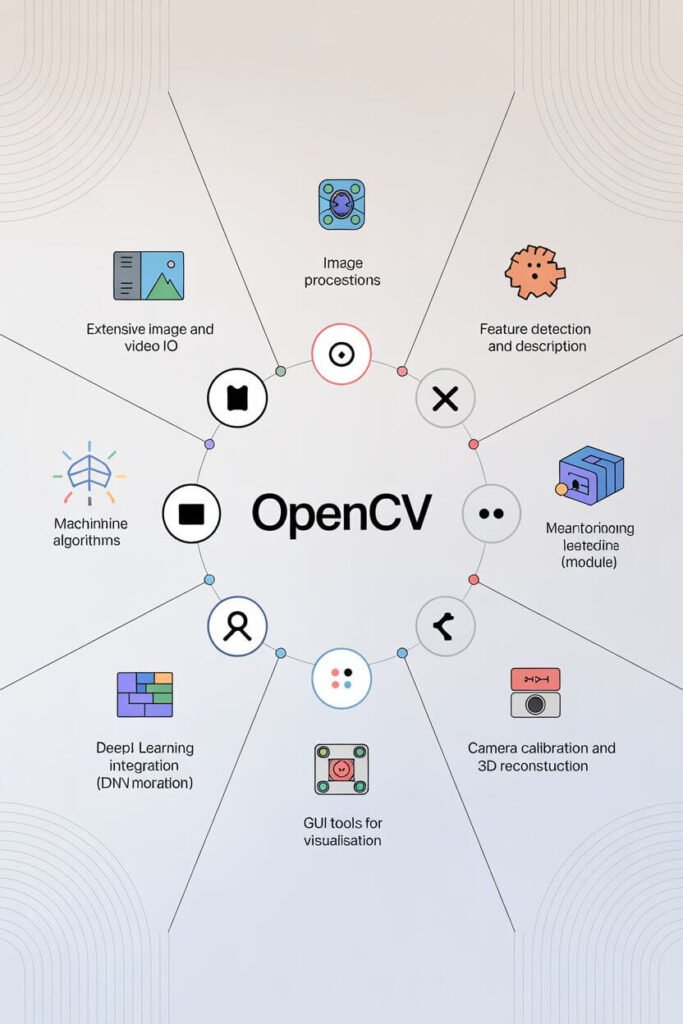
OpenCV isn’t just one thing.
It’s a collection of powerful tools, a full arsenal for your projects.
Let’s break down some of its key features.
- Extensive Image and Video I/O:
This is fundamental.
OpenCV handles almost any image or video format you throw at it.
You can read images from disk, capture video from cameras, or process video files.
It’s seamless.
This means you spend zero time worrying about format compatibility.
You just focus on getting your data in and out.
It supports common formats like JPEG, PNG, TIFF for images.
And AVI, MP4, MOV for videos.
Crucial for any project involving visual data.
It saves massive headaches, trust me.
- Image Processing Operations:
This is where the magic begins.
OpenCV provides hundreds of functions for image processing.
Things like filtering, geometrical transformations, color space conversions.
You can resize images, rotate them, crop them.
Convert RGB to grayscale, or vice-versa.
Apply blur effects for noise reduction.
Perform edge detection with algorithms like Canny or Sobel.
These are the building blocks for more complex vision tasks.
They let you preprocess your data, enhancing relevant features.
This directly improves the accuracy of your AI models.
Better input, better output. Simple.
- Feature Detection and Description:
Want your AI to recognize objects?
Or track points of interest across frames?
OpenCV has algorithms for that.
SIFT, SURF, ORB, FAST, BRIEF.
These detect unique points or regions in an image.
Then describe them in a way that’s invariant to rotation, scale, or illumination changes.
This is essential for object recognition, image stitching, or 3D reconstruction.
It’s like giving your AI eyes that can pick out the most important details.
And remember them, even when the scene changes.
This makes your computer vision applications far more robust.
- Machine Learning Algorithms:
Yes, OpenCV also includes a comprehensive machine learning module.
It supports SVMs, k-Nearest Neighbors, Boosting, Decision Trees, and more.
You can train classifiers directly within OpenCV.
For tasks like object classification or pattern recognition.
It’s incredibly convenient to have these tools integrated.
No need to switch libraries for your ML needs.
This streamlines your development process significantly.
It’s like having an all-in-one shop for your vision and learning tasks.
- Deep Learning Integration (DNN module):
This is huge for modern AI.
OpenCV’s Deep Neural Network (DNN) module allows you to load and run pre-trained deep learning models.
Models from frameworks like TensorFlow, Caffe, PyTorch, and ONNX.
This means you can leverage state-of-the-art AI.
Without rebuilding everything from scratch.
Perform object detection, image classification, segmentation with ease.
You can run these models on CPUs or GPUs.
It’s about deploying powerful AI where you need it.
Fast and efficiently.
- Camera Calibration and 3D Reconstruction:
Working with multiple cameras?
Need to understand the 3D structure of a scene?
OpenCV provides tools for camera calibration.
Correcting lens distortions, finding intrinsic and extrinsic parameters.
Then, use these parameters for stereo vision.
Calculate depth information from multiple 2D images.
This is crucial for robotics, autonomous vehicles, and augmented reality.
It turns flat images into meaningful spatial data.
Giving your AI a true sense of depth and geometry.
- GUI Tools for Visualisation:
Debugging and visualizing your computer vision pipeline is vital.
OpenCV comes with simple GUI functions.
`imshow()` to display images.
`waitKey()` to capture keyboard input.
`createTrackbar()` for interactive parameter tuning.
These aren’t fancy GUIs, but they’re incredibly practical.
They let you see what’s happening at each step.
Adjust parameters on the fly.
This speeds up development and debugging significantly.
You don’t need to write custom display code every time.
It just works.
Benefits of Using OpenCV for AI Research and Development
So, why should you care?
Beyond the features, what’s the real payoff?
For anyone in AI Research and Development, the benefits are clear.
First, **time savings**.
This is massive.
OpenCV provides pre-optimized, battle-tested algorithms.
You don’t have to code every single image processing step from scratch.
Imagine building a facial recognition system.
Without OpenCV, you’d spend weeks implementing filters, feature detectors, and classifiers.
With OpenCV, you call a few functions.
This lets you prototype faster.
Experiment more.
And bring your ideas to life quicker.
Time is money, and OpenCV saves a lot of it.
Next, **quality improvement**.
The algorithms in OpenCV are developed and refined by experts.
They’re highly optimized and reliable.
This means better accuracy in your detections.
More robust tracking.
And generally higher performance in your AI applications.
You’re building on a solid foundation.
Not reinventing the wheel with potentially buggy code.
This translates directly to more successful research outcomes.
And more reliable products.
Then there’s **overcoming creative blocks**.
Sometimes, you get stuck.
A particular image processing challenge seems insurmountable.
OpenCV often has a function or a module that addresses exactly that problem.
It provides a framework that encourages exploration.
You can quickly try different approaches.
Test various algorithms.
Without getting bogged down in implementation details.
It frees up your mental energy for the actual innovation.
For the *hard* problems, not the routine ones.
Another huge benefit: **cost-effectiveness**.
It’s open source.
Meaning, it’s completely free to use.
No licensing fees.
No subscriptions.
This is a massive advantage for startups, small research teams, and individual developers.
You get enterprise-grade tools without the enterprise price tag.
This allows you to allocate your budget to other critical areas.
Like compute resources or specialized hardware.
Finally, the **community support**.
Because it’s open source, it has a huge, active community.
Forums, tutorials, Stack Overflow answers.
If you run into a problem, someone has likely faced it before.
And found a solution.
This access to collective knowledge is invaluable.
It reduces frustration and accelerates problem-solving.
You’re never truly alone when working with OpenCV.
It’s a collaborative powerhouse.
Pricing & Plans
This is simple.
OpenCV is free.
Completely, utterly free.
It’s released under a BSD license.
This means you can use it for commercial projects.
You can modify it.
You can redistribute it.
No strings attached, well, almost.
The BSD license generally requires you to retain the copyright notice.
And the license itself.
But that’s a minor detail for the immense value you get.
There’s no “premium version” in the traditional sense.
No hidden costs.
What you download is what you get.
The entire library, all its modules, all its capabilities.
So, how does this compare to alternatives?
Many specialized computer vision libraries or SDKs come with hefty licensing fees.
Especially for commercial use.
Think about some commercial vision software.
Or specialized toolkits for specific hardware.
Those can run into thousands of pounds annually.
OpenCV eliminates that barrier entirely.
This makes it incredibly accessible.
For individual researchers, small startups, or even large corporations.
It levels the playing field.
You can focus your budget on hardware, talent, or other critical resources.
Instead of sinking it into software licenses.
There are community-driven efforts that offer paid support or consulting.
But these are optional services.
Not part of the core OpenCV offering.
For example, OpenCV.org offers training courses.
Or you might hire a consultant with deep OpenCV expertise.
But to use the library itself?
Totally free.
This makes it a no-brainer for anyone starting out.
Or for established teams looking to optimize costs.
You get a world-class tool.
At zero monetary cost.
That’s a hard deal to beat.
Hands-On Experience / Use Cases
Let’s talk real world.
How does OpenCV actually perform?
I’ve used it for a bunch of projects.
From simple object detection to complex robotic navigation.
Its usability is surprisingly straightforward, especially with Python bindings.
You import `cv2`, and you’re off to the races.
Here’s a common scenario: building a real-time object detection system.
Say, identifying cars in a traffic camera feed.
Without OpenCV, this is a multi-month project.
With it, you can get a prototype running in a day or two.
First, you’d capture frames from the camera using OpenCV’s `VideoCapture`.
Easy.
Then, you load a pre-trained deep learning model.
Like YOLO or SSD, via OpenCV’s DNN module.
This is literally a couple of lines of code.
`net = cv2.dnn.readNetFromDarknet(cfg_path, weights_path)`
The model processes each frame.
OpenCV handles the input and output layers for the neural network.
It gives you bounding boxes and confidence scores for each detected object.
Then, you can draw these boxes on the original frame.
Using `cv2.rectangle()` and `cv2.putText()`.
Finally, display the result in a window using `cv2.imshow()`.
All of this runs in real-time, often exceeding 30 frames per second.
Even on modest hardware.
The results?
Highly accurate object detection.
With minimal effort on my part.
Another use case: document scanning and text extraction.
Imagine you have a skewed image of a document.
OpenCV can find the document’s corners.
Use `findContours()` and geometrical analysis.
Then, apply a perspective transformation.
`cv2.getPerspectiveTransform()` and `cv2.warpPerspective()`.
This straightens the document.
Making the text perfectly legible.
You can then pass this clean image to an OCR engine.
Like Tesseract.
The pre-processing capabilities of OpenCV make OCR far more effective.
It improves recognition accuracy dramatically.
Another quick win is in augmented reality.
Say you want to overlay a 3D model onto a marker in a video feed.
OpenCV can detect the marker using feature matching.
Then estimate its 3D pose in relation to the camera.
Using functions like `solvePnP`.
This gives you the precise position and orientation.
So you can render your 3D model correctly.
All these examples show one thing:
OpenCV isn’t just theory.
It’s practical, powerful, and produces tangible results.
It drastically reduces development cycles.
And allows researchers to focus on novel approaches.
Rather than repetitive coding.
Who Should Use OpenCV?
Alright, so who is this tool really for?
Who gets the most out of OpenCV?
If you’re in the AI Research and Development space, especially focused on Computer Vision and Image Processing, it’s a non-negotiable.
But let’s get more specific.
**Machine Learning Engineers and Data Scientists:**
If you’re building models that ingest visual data, OpenCV is your pre-processing king.
Image augmentation, feature extraction, data loading.
It makes your data pipelines robust and efficient.
It’s crucial for training accurate models.
**Robotics Engineers:**
Robots need to see and understand their environment.
OpenCV provides the foundation for robot vision.
Navigation, object manipulation, obstacle avoidance.
From SLAM to industrial inspection, it’s indispensable.
**Academics and Researchers:**
Developing new algorithms?
Testing new theories in computer vision?
OpenCV offers a flexible platform for experimentation.
You can quickly implement and compare different approaches.
And share your work easily due to its open-source nature.
**Embedded Systems Developers:**
Working on devices with limited computational power?
OpenCV is optimized for performance.
It can run efficiently on single-board computers like Raspberry Pi or NVIDIA Jetson.
Perfect for IoT, smart cameras, or embedded AI applications.
**Startups and Entrepreneurs:**
Got a killer idea involving visual AI?
OpenCV lets you build prototypes quickly and cost-effectively.
No licensing fees means lower upfront costs.
It helps you validate your concept fast.
And scale without prohibitive software expenses.
**Students and Hobbyists:**
Learning computer vision?
Want to build cool projects?
OpenCV is widely documented, with tons of tutorials.
It’s an excellent entry point into the world of AI vision.
And it empowers you to create impressive applications.
Essentially, anyone who deals with images or videos programmatically.
And needs to extract intelligence from them.
That’s your target audience for OpenCV.
If you’re not using it, you’re either missing out on serious efficiency.
Or paying too much for less capable tools.
Simple as that.
How to Make Money Using OpenCV
Okay, free is great, but how do you turn free into cash?
OpenCV is a foundational tool.
It enables you to build valuable solutions.
Here’s how you can leverage it for profit.
- Offer Custom Computer Vision Solutions:
This is the most direct route.
Businesses need custom vision systems.
Think quality control in manufacturing.
Automated inspection of products.
Security surveillance systems that detect specific events.
Retail analytics for foot traffic or shelf monitoring.
You can build these solutions using OpenCV as the core.
Charge clients for development, deployment, and maintenance.
The cost savings from using open-source tools mean higher profit margins for you.
- Develop and Sell Niche AI Products:
Instead of custom services, build a product.
Identify a specific market need.
Maybe an AI-powered image enhancer for photographers.
Or a specialized biometric authentication system.
A tool for automatic video content tagging.
You build the software once, using OpenCV.
Then sell licenses or offer it as a SaaS model.
The initial investment is in your development time.
But the scalability is immense.
- Consulting and Training:
OpenCV is powerful, but it has a learning curve.
Many companies and individuals need help getting started.
Or optimizing their existing OpenCV implementations.
If you’re an expert, offer your knowledge.
Provide workshops, online courses, or one-on-one consulting.
Help teams integrate OpenCV into their workflows.
Or troubleshoot complex vision problems.
Your expertise is valuable, and people will pay for it.
Consider this example: “How Sarah Makes $5K/Month Using OpenCV for Industrial Inspection.”
Sarah noticed a gap in the market.
Small manufacturing plants struggled with manual quality checks.
High error rates, slow processes.
She developed a simple vision system.
Using OpenCV, a few inexpensive cameras, and a Raspberry Pi.
The system detects defects on assembly lines.
Like missing screws or incorrect labels.
She charges a monthly service fee.
For installation, monitoring, and support.
Her clients save money on faulty products and labor.
She makes a steady income with minimal overhead.
All powered by the robustness of OpenCV.
The key is to identify a problem.
And use OpenCV to build an efficient, cost-effective solution.
It allows you to deliver high-value AI solutions without massive software costs.
That’s a recipe for profit.
Limitations and Considerations
No tool is perfect.
OpenCV is powerful, but it’s important to be realistic.
It comes with its own set of considerations.
First, the **learning curve**.
While it’s user-friendly for experts, it’s not point-and-click.
You need programming knowledge, typically Python or C++.
And a foundational understanding of computer vision concepts.
Things like image filters, matrices, and coordinate systems.
For a complete beginner, it can feel a bit overwhelming.
But the extensive documentation and community help mitigate this.
It requires commitment, but the payoff is worth it.
Next, **dependency management and build complexities**.
Especially for C++ users, compiling OpenCV can be a chore.
Dealing with compiler settings, linking libraries.
Ensuring all dependencies like FFmpeg or CUDA are correctly configured.
This can be a source of frustration.
Python users have it easier with `pip install opencv-python`.
But for complex projects or specific optimizations, setup can be tricky.
**Performance vs. ease of use**.
OpenCV is highly optimized.
But real-time performance often depends on careful implementation.
And knowing *which* algorithms to use for *which* task.
Simply using a function doesn’t guarantee optimal speed.
You might need to optimize image sizes, choose faster algorithms.
Or leverage GPU acceleration with CUDA.
This adds another layer of complexity.
**Deep Learning module limitations**.
While OpenCV’s DNN module is excellent for inference.
Meaning, running pre-trained models.
It’s not designed for *training* deep learning models.
For that, you’ll still need frameworks like TensorFlow or PyTorch.
OpenCV acts as a deployment and preprocessing layer.
Not an end-to-end deep learning platform.
Understand its role in your AI pipeline.
Finally, **accuracy and robustness depend on context**.
OpenCV provides the tools.
But the quality of your results depends on your data.
Your parameter tuning.
And your understanding of the algorithms.
Garbage in, garbage out still applies.
It’s not a magic bullet that solves all vision problems automatically.
It’s a powerful hammer, but you still need to know how to swing it.
Be aware of these points, and you’ll get the most out of OpenCV.
Final Thoughts
So, what’s the verdict on OpenCV?
It’s not just a tool; it’s an essential resource.
For anyone serious about Computer Vision and Image Processing.
Especially in AI Research and Development.
It cuts through the noise.
It simplifies complex tasks.
And it empowers you to build incredible AI applications.
The benefits are clear: **massive time savings**, **improved quality**, **overcoming creative blocks**, and **zero cost**.
It’s a robust, community-backed library.
With extensive features for everything from basic image manipulation to advanced deep learning inference.
Yes, there’s a learning curve.
And yes, deployment can sometimes be finicky.
But the value you get in return is immeasurable.
If you’re not using OpenCV, you’re leaving money on the table.
Or spending too much time on problems that have already been solved.
It’s a foundational piece of any modern AI vision stack.
My recommendation?
If you’re dabbling in computer vision, or running a professional operation.
Start using OpenCV today.
It will fundamentally change how you approach these challenges.
And accelerate your path to impactful AI solutions.
Don’t just take my word for it.
Dive in, experiment, and see the power for yourself.
The results will speak volumes.
Visit the official OpenCV website
Frequently Asked Questions
1. What is OpenCV used for?
OpenCV is a comprehensive library primarily used for Computer Vision and Image Processing tasks.
This includes object detection, facial recognition, image manipulation, video analysis, 3D reconstruction, and machine learning applications that involve visual data.
It serves as a core tool for developing AI applications that need to “see” and interpret the world.
2. Is OpenCV free?
Yes, OpenCV is completely free.
It is an open-source library released under a BSD license, meaning you can use it for both personal and commercial projects without any licensing fees or hidden costs.
This makes it highly accessible for developers, researchers, and businesses of all sizes.
3. How does OpenCV compare to other AI tools?
OpenCV focuses specifically on Computer Vision and Image Processing, offering a vast array of specialized functions for these areas.
It often complements other AI tools like deep learning frameworks (TensorFlow, PyTorch) by handling data preprocessing and deployment of trained models.
While other tools might offer broader AI capabilities, OpenCV excels as the go-to library for visual data handling and analysis.
4. Can beginners use OpenCV?
Yes, beginners can use OpenCV, but it does require some programming knowledge (Python or C++) and a willingness to learn computer vision concepts.
The community support, extensive documentation, and numerous online tutorials make it approachable.
It’s a powerful learning tool for anyone interested in AI vision.
5. Does the content created by OpenCV meet quality and optimization standards?
OpenCV provides the fundamental algorithms and tools for processing and analyzing visual content.
The quality and optimization of the “content” (e.g., detected objects, processed images) depend on how you implement and tune the algorithms.
However, the library itself is highly optimized and widely used in industry, providing a strong foundation for high-quality, performant solutions.
6. Can I make money with OpenCV?
Absolutely. You can make money with OpenCV by offering custom Computer Vision solutions to businesses, developing and selling niche AI products (like specialized image editors or inspection systems), or providing consulting and training services to individuals and companies looking to implement OpenCV in their projects.
Its free nature allows for higher profit margins on your services and products.