
The demand for high-quality audio content is exploding. From podcasts and audiobooks to marketing videos and social media clips, your voice is your currency. But if your audio sounds like it was recorded in a tin can, you’re leaving opportunities on the table. The rise of AI tools for Voice and Music Generation has created a seismic shift, and Adobe Podcast is at the forefront, especially for anyone focused on Podcast Editing.
Tired of spending hours cleaning up background noise, de-essing sibilant sounds, or trying to make every speaker sound like they’re in the same room? If the thought of complex audio software sends shivers down your spine, you’re not alone.
This is where Adobe Podcast steps in, not as another complicated piece of software, but as a smart, AI-powered solution designed to make your audio shine. It’s built to simplify the technical side of things, letting you focus on what matters most: your message and your audience.
Let’s cut through the noise and see how Adobe Podcast can fundamentally change your approach to creating professional-sounding audio content.
Transform your podcast editing with Adobe Podcast! Master AI-powered audio in Voice and Music Generation. Save time, boost quality. Start editing smarter today!
Adobe Podcast Helped Me Improve My Podcast Editing Approach
Table of Contents
- What is Adobe Podcast?
- Key Features of Adobe Podcast for Podcast Editing
- Benefits of Using Adobe Podcast for Voice and Music Generation
- Pricing & Plans
- Hands-On Experience / Use Cases
- Who Should Use Adobe Podcast?
- How to Make Money Using Adobe Podcast
- Limitations and Considerations
- Final Thoughts
- Frequently Asked Questions
What is Adobe Podcast?
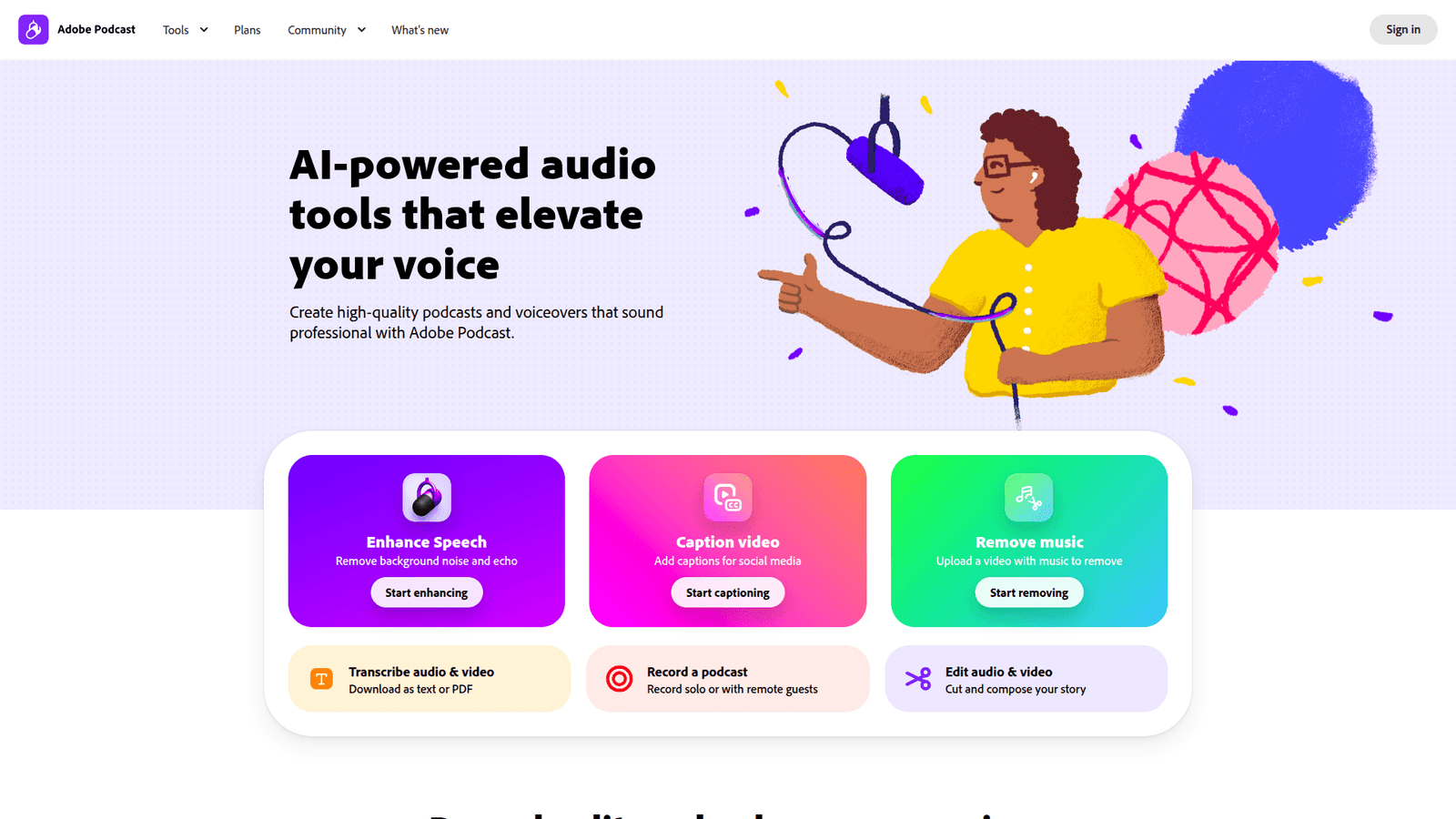
Adobe Podcast is a suite of AI-powered tools designed to simplify audio creation and editing. At its core, it aims to democratise high-quality audio production, making it accessible to everyone, regardless of their technical expertise.
Think of it as your personal audio engineer, but without the hefty retainer. It leverages cutting-edge artificial intelligence to perform tasks that traditionally required specialised software and skills.
Whether you’re a seasoned professional or just starting, Adobe Podcast offers features that can drastically improve your workflow and the final output of your audio projects.
The primary focus is on making audio sound its absolute best, with minimal effort. This means tackling common audio problems like background noise, echo, and inconsistent volume levels, all with just a few clicks.
It’s a tool built for content creators, marketers, educators, and anyone who relies on clear, professional audio to get their message across. The goal is simple: make great audio achievable for everyone.
Key Features of Adobe Podcast for Podcast Editing
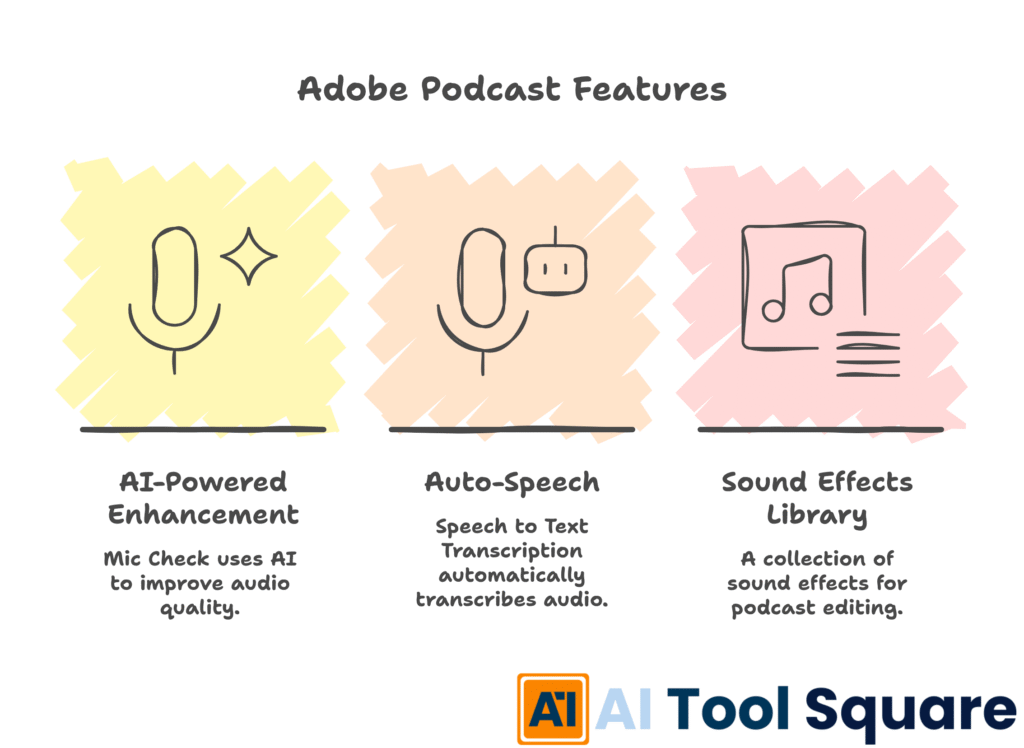
- Feature 1: AI-Powered Enhancement (Mic Check)
This is the headline feature, often referred to as “Mic Check.” It uses AI to intelligently clean up your audio, removing background noise, echo, and reverb to make your voice sound clear and studio-quality. For Podcast Editing, this means you can take a raw recording, even one made in a less-than-ideal environment, and make it sound like it was produced by a professional sound engineer.
Imagine recording your podcast episode in a busy café or a room with poor acoustics. Traditionally, removing that distracting hum, the clatter of dishes, or the hollow echo would be a time-consuming process involving complex EQ and noise reduction plugins. With Mic Check, you simply upload your audio file, and Adobe Podcast’s AI does the heavy lifting. The result? A significantly cleaner, more professional-sounding vocal track that enhances listener engagement and reduces fatigue.
- Feature 2: Auto-Speech (Speech to Text Transcription)
This feature automatically transcribes your audio into text. This is invaluable for Podcast Editing because it allows you to edit your audio by editing the text. If you want to remove a word or a phrase, you simply delete it from the transcription, and the corresponding audio is removed. This visual and text-based editing approach is revolutionary for anyone who finds traditional waveform editing cumbersome.
Beyond editing, this transcription capability unlocks a world of content repurposing. You can quickly generate show notes, blog posts, social media snippets, or even closed captions for your video content directly from your podcast episodes. This dramatically speeds up your content creation pipeline and maximises the reach of each episode.
- Feature 3: Sound Effects Library
Adobe Podcast includes a library of royalty-free sound effects and music that creators can use to enhance their podcasts and other audio projects. This saves creators the hassle and expense of sourcing music and sound effects from third-party sites, ensuring all content is legally cleared for use.
Having easy access to a curated library means you can quickly add intro/outro music, stingers, or sound beds to your episodes without interrupting your creative flow. This professional touch elevates the overall production quality, making your content more immersive and engaging for your audience. For Podcast Editing, it streamlines the process of adding these crucial sonic elements.
Benefits of Using Adobe Podcast for Voice and Music Generation
In the fast-paced world of AI tools for Voice and Music Generation, efficiency and quality are king. Adobe Podcast delivers on both fronts, offering a clear advantage for creators and businesses.
Time Savings: The most immediate benefit is the sheer amount of time saved. What used to take hours of meticulous audio engineering can now be accomplished in minutes. The AI handles the heavy lifting, freeing you up to focus on content creation and strategy. This is a game-changer for small teams and solo creators who are often juggling multiple responsibilities.
Improved Audio Quality: Even with basic equipment, Adobe Podcast can transform your recordings into professional-sounding audio. This elevated quality not only makes content more enjoyable to consume but also enhances credibility and brand perception. Listeners are more likely to stick around for clear, crisp audio than endure muddy or distracting sound.
Overcoming Creative Blocks: Technical audio hurdles can often stifle creativity. When the focus shifts from wrestling with software to expressing your ideas, creative output naturally increases. Adobe Podcast removes these barriers, allowing your creative energy to flow unimpeded.
Accessibility for All: You don’t need to be an audio engineer to produce high-quality sound. Adobe Podcast’s intuitive interface and AI-driven features make professional audio accessible to marketers, writers, educators, and anyone who needs great audio without a steep learning curve.
Enhanced Content Repurposing: The transcription feature is a powerhouse for content strategy. It makes it incredibly easy to create blog posts, social media updates, summaries, and more from your audio, maximising the value of every recording session.
Consistency in Quality: AI ensures a consistent level of quality across all your audio projects. This is crucial for maintaining a professional brand image, especially when multiple people might be contributing to audio content.
Adobe Podcast is built to simplify complex audio tasks, allowing you to produce better content, faster, and with less stress. It’s an investment in your content and your time.
Pricing & Plans
Adobe Podcast offers a compelling pricing structure that makes its powerful AI tools accessible. The core functionalities, particularly the AI enhancement and transcription features, are often available on a freemium model.
This means you can get started with Adobe Podcast without any initial financial investment. The free tier typically allows users to process a certain amount of audio per month, which is often more than enough for individual creators or those just experimenting with the platform.
For users who require more extensive processing power, higher usage limits, or access to premium features and assets (like an expanded sound effects library or advanced editing capabilities), Adobe offers paid plans. These plans are usually integrated into Adobe’s Creative Cloud subscriptions, offering excellent value if you’re already a subscriber to other Adobe products like Premiere Pro or Audition.
Comparing it to standalone professional audio software, Adobe Podcast’s AI-driven approach often provides a much more cost-effective solution, especially when you factor in the time savings and the reduced need for specialised training. Many alternatives might offer similar features but come with a steeper learning curve and a higher price tag.
The availability of a robust free tier makes it easy for anyone to test the waters and experience the benefits of AI-powered audio enhancement. As your needs grow, upgrading to a paid plan provides a clear pathway to unlock even more power and flexibility.
Hands-On Experience / Use Cases
Consider a scenario where a content marketer needs to produce a weekly podcast for a client. The client provides raw audio files recorded on a mobile phone, often with noticeable background noise from an office environment and inconsistent volume levels between speakers.
Using Adobe Podcast, the marketer uploads the raw audio files. The AI enhancement feature, Mic Check, is applied, instantly transforming the noisy, echoey recordings into clear, polished audio. The difference is stark – the speakers’ voices become crisp and distinct, free from distracting background hums and room reverb.
Next, the marketer uses the Auto-Speech feature to generate a transcript of the entire episode. This transcript serves two purposes: editing and content repurposing.
For editing, if a speaker stumbled over a word or an unwanted pause occurred, the marketer simply deletes the relevant text from the transcript. Adobe Podcast automatically removes the corresponding audio segment from the waveform, making edits precise and remarkably fast. This is a far cry from manually cutting and splicing audio waveforms.
For content repurposing, the transcript is invaluable. The marketer can quickly pull key quotes for social media posts, generate a summary for email newsletters, or even adapt segments into short blog articles. This ability to quickly transform a single audio asset into multiple content pieces significantly amplifies the client’s reach and engagement.
Another use case involves a small business owner who needs to create explainer videos for their products. They record their voiceovers using a basic USB microphone in their home office, which might have a slight echo and ambient noise from outside.
By running these voiceovers through Adobe Podcast’s AI enhancement, the owner achieves a professional broadcast quality without investing in expensive acoustic treatment or high-end microphones. The enhanced audio makes the product demonstrations sound more authoritative and trustworthy, positively impacting conversion rates.
Teams producing internal training modules can also leverage Adobe Podcast to ensure all narration is clear and consistent, regardless of who records it. This standardisation of audio quality elevates the professionalism of training materials and improves knowledge retention among employees.
The simplicity of the interface means that team members without prior audio editing experience can contribute effectively, making the entire content production process more scalable and efficient.
Who Should Use Adobe Podcast?
The beauty of Adobe Podcast lies in its broad applicability. It’s designed to be a tool for anyone who needs to create or improve audio content, removing technical barriers and delivering professional results.
Podcasters: This is perhaps the most obvious audience. Whether you’re a solo host, part of a small team, or producing for a larger network, Adobe Podcast simplifies the editing process, enhances audio quality, and makes transcription a breeze for show notes and repurposing.
Content Creators: YouTubers, TikTokers, Instagram Reels creators – anyone who uses their voice in video content can benefit from cleaner, more engaging audio. Professional sound can make or break a video’s perceived quality.
Marketers: For creating explainer videos, social media ads, promotional audio, or voiceovers for marketing campaigns, Adobe Podcast ensures your message is delivered with clarity and professionalism, boosting campaign effectiveness.
Writers and Bloggers: Those looking to expand into audio content like audiobooks or spoken versions of their blog posts can use Adobe Podcast to ensure their voice sounds polished and engaging.
Educators and Course Creators: Delivering lectures, tutorials, or online courses requires clear audio. Adobe Podcast ensures students can understand every word without distraction, improving the learning experience.
Small Businesses and Entrepreneurs: For product demos, customer support audio messages, or internal communications, professional audio builds trust and conveys a polished brand image, even on a budget.
Agencies: Marketing, PR, or content agencies can use Adobe Podcast to streamline audio production for their clients, offering enhanced services and faster turnaround times without needing highly specialised audio engineers on staff.
Essentially, if your work involves spoken word and you want it to sound good without a significant technical investment, Adobe Podcast is a tool worth exploring. It democratises professional audio production.
How to Make Money Using Adobe Podcast
Adobe Podcast isn’t just a tool for improving your own content; it’s a powerful engine for generating revenue. By leveraging its AI-powered features, you can offer new services, increase efficiency, and attract more clients.
- Service 1: Podcast Editing and Enhancement Service
Many podcasters, especially those just starting, struggle with audio quality. You can offer a specialised service to clean up, enhance, and master their podcast episodes using Adobe Podcast’s AI tools. This service appeals to clients who want professional sound but lack the time or expertise to achieve it themselves. You can position this as “Studio-Quality Audio for Your Podcast, Effortlessly.”
The speed and effectiveness of Adobe Podcast allow you to handle more clients or turn around projects faster, directly increasing your earning potential. Clients will pay a premium for consistent, high-quality audio that keeps their listeners engaged.
- Service 2: Voiceover and Narration Services for Businesses
Businesses constantly need voiceovers for explainer videos, marketing materials, e-learning modules, and app content. With Adobe Podcast, you can take raw recordings, even those done in less-than-ideal home studios, and make them sound broadcast-ready. This dramatically reduces the overhead for businesses that might otherwise need to hire expensive studios and voice actors.
By offering a service that includes AI enhancement and professional mixing, you can secure ongoing contracts with businesses looking for reliable, high-quality narration. The ability to deliver consistently good audio quickly is a major selling point.
- Service 3: Content Repurposing and Transcription for Clients
The Auto-Speech feature in Adobe Podcast is a goldmine for revenue. You can offer comprehensive transcription services for podcasts, webinars, interviews, and meetings. Beyond just transcription, you can leverage the text to create additional content pieces – summaries, blog posts, social media quotes, or even scripts for new content.
This service is highly attractive to content creators and businesses looking to maximise their existing assets. By offering a package that includes transcription and content repurposing, you provide immense value and can charge accordingly. For instance, a client might provide a 1-hour podcast, and you deliver a full transcript, a summary blog post, and 10 social media quote graphics, all derived from that single audio file.
Case Study Example: Sarah, a freelance writer, started offering podcast editing services after discovering Adobe Podcast. She focused on new podcasters who were overwhelmed by audio quality issues. By using Adobe Podcast’s AI enhancement and text-based editing, she could edit a full 30-minute episode in under an hour. She charged $100 per episode. Within three months, she had 10 regular clients, earning her $1,000 per week, purely by streamlining her workflow with Adobe Podcast.
By positioning these services effectively and highlighting the benefits of AI-powered audio production, you can tap into a significant market demand. Adobe Podcast provides the tools to deliver exceptional quality and efficiency, making it easier to build a profitable service-based business.
Limitations and Considerations
While Adobe Podcast is incredibly powerful, like any tool, it has its limitations and points to consider.
AI is Not a Replacement for All Expertise: While the AI enhancements are impressive, they are not a substitute for fundamental audio principles. For extremely complex audio issues, such as intricate multi-track mixing, mastering for specific distribution platforms, or creative sound design that deviates significantly from the original recording, traditional Digital Audio Workstations (DAWs) like Adobe Audition still hold an advantage for highly specialised tasks.
Editing Nuances: The text-based editing is revolutionary for many tasks, but extremely fine-tuned audio edits, like precisely removing a tiny lip-smack or a subtle breath without affecting the surrounding audio flow, might still require more granular control found in waveform editors. However, for most common edits, the text-based approach is more than sufficient.
Reliance on Internet Connection: As a web-based tool, Adobe Podcast requires a stable internet connection for uploading audio, processing, and downloading files. This can be a limiting factor for users with unreliable internet access or those needing to work offline.
Learning Curve for Advanced Features: While basic functions are incredibly user-friendly, mastering all the nuances of the platform, especially for complex projects or integrating with other Adobe products, might involve a slight learning curve. However, this is generally much less steep than learning a full-fledged DAW.
Specific Genre Requirements: For highly niche audio production, like complex music production with intricate layering, advanced synthesis, or specific genre mastering techniques, dedicated music production software will always be the primary choice. Adobe Podcast is primarily focused on spoken word and vocal enhancement.
File Size and Length Limits: While generally generous, free tiers or even paid plans might have limitations on the maximum file size or total processing time allowed per month. Exceeding these limits would necessitate an upgrade or careful management of audio processing tasks.
Understanding these considerations helps set realistic expectations. Adobe Podcast excels at making professional audio accessible and efficient, but for the absolute cutting edge of highly specialised audio engineering, traditional tools remain relevant.
Final Thoughts
Adobe Podcast has fundamentally reshaped the landscape of audio creation and editing. It’s not an overstatement to say that it has democratised professional-sounding audio, making it accessible to everyone, from beginners to seasoned content creators.
For anyone involved in Podcast Editing or any aspect of AI tools for Voice and Music Generation, this tool offers a compelling blend of power, simplicity, and efficiency. It tackles common audio frustrations head-on with AI, allowing you to focus on your message rather than the technicalities of sound engineering.
The ability to achieve studio-quality audio from less-than-ideal recordings, edit with text, and transcribe automatically is revolutionary. It saves an incredible amount of time and resources, directly impacting your productivity and potential for revenue generation.
If you’re looking to elevate your audio content, streamline your workflow, or even build a service-based business around audio production, Adobe Podcast is an essential tool to consider. It delivers on its promise of making professional audio production achievable for everyone.
The next step is simple: give it a try. Explore the free tier and experience the difference that AI-powered audio enhancement can make. You might be surprised at how quickly your audio quality improves and how much time you save.
Visit the official Adobe Podcast website
Frequently Asked Questions
1. What is Adobe Podcast used for?
Adobe Podcast is used for enhancing audio quality, transcribing speech to text, and simplifying audio editing processes using AI. It’s ideal for podcasters, content creators, marketers, and anyone who needs to produce professional-sounding audio without extensive technical expertise.
2. Is Adobe Podcast free?
Adobe Podcast offers a freemium model. Core features like AI enhancement and transcription are often available for free with certain usage limits. Paid plans, typically part of Adobe Creative Cloud subscriptions, offer higher limits and additional features.
3. How does Adobe Podcast compare to other AI tools?
Adobe Podcast stands out due to its integration with the Adobe ecosystem, its user-friendly interface, and its highly effective AI features specifically tailored for spoken word audio. While other AI tools exist, Adobe Podcast often provides a more comprehensive and streamlined solution for vocal enhancement and editing.
4. Can beginners use Adobe Podcast?
Absolutely. Adobe Podcast is designed with beginners in mind. Its intuitive interface and automated AI features mean that users without prior audio engineering experience can achieve professional results easily.
5. Does the content created by Adobe Podcast meet quality and optimization standards?
Yes. The AI enhancement features are specifically designed to improve audio quality to professional broadcast standards. The transcription tool also meets high accuracy standards, which is crucial for content optimization through detailed show notes, SEO-friendly titles, and accessible content.
6. Can I make money with Adobe Podcast?
Yes, you can make money by offering services such as podcast editing and enhancement, voiceover narration, and content repurposing (transcription and summarisation) to clients using Adobe Podcast’s capabilities.
7. How to make money with Adobe Podcast?
Leverage Adobe Podcast to offer professional audio editing, AI-driven voice enhancement, and accurate transcription services. You can also use its features to quickly repurpose audio content into blog posts, social media snippets, or show notes, providing comprehensive content creation packages to clients.