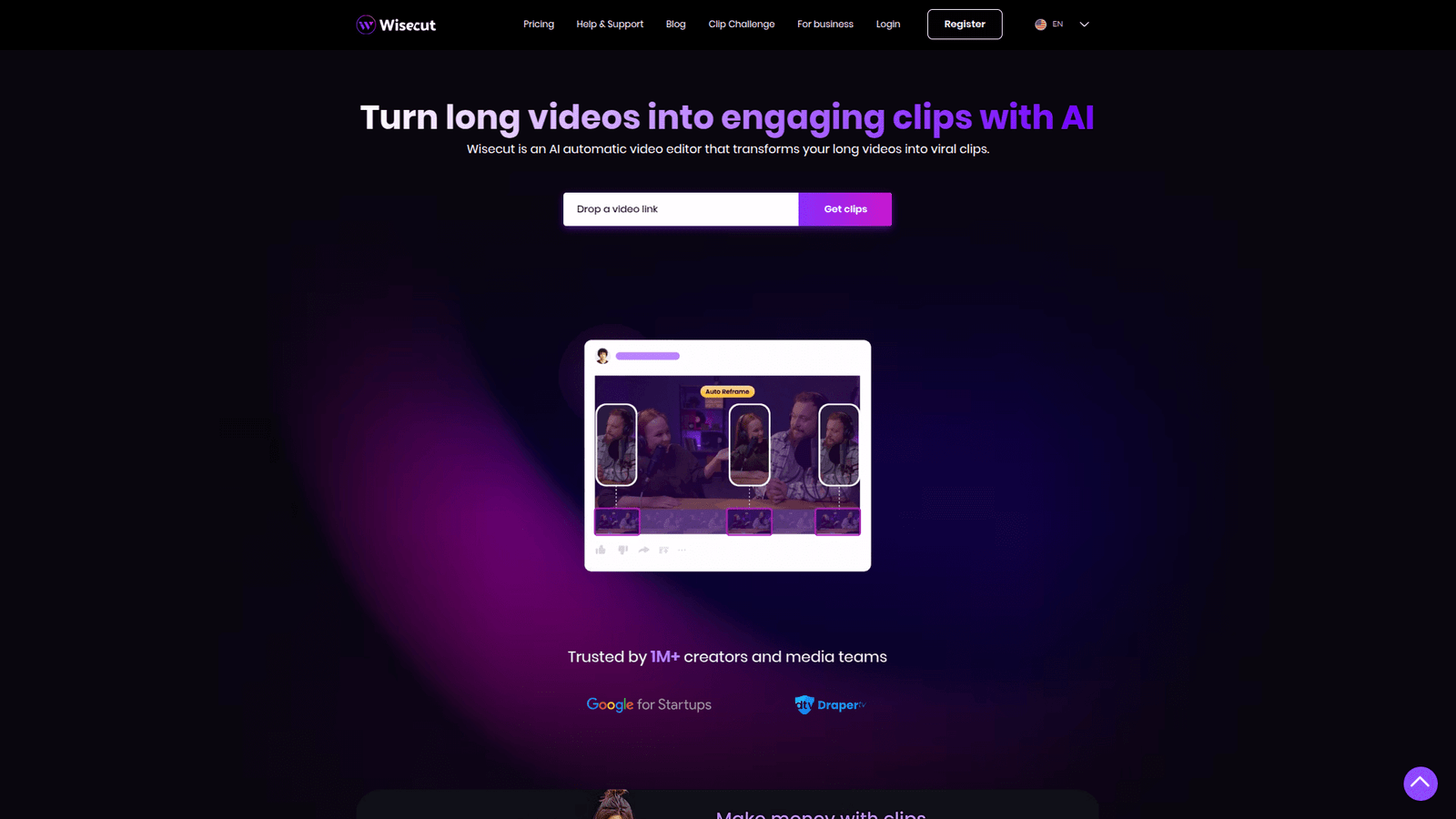

Wisecut revolutionises AI Powered Video Editing, automatically cutting, adding music, and subtitling. Save hours, boost output, and create stunning videos faster. Start optimising your video workflow now!
Wisecut Is Built for Video and Animation – Here’s Why
Ever feel like you’re chained to your editing suite?
Hours upon hours, just trimming, chopping, adding music. It’s draining.
You know the drill. You’ve got great ideas, but the grind of video production eats away at your time and energy.
Especially in the Video and Animation space, where demand for content is exploding.
But what if there was a way to reclaim those hours?
What if you could produce more, faster, without sacrificing quality?
That’s where AI steps in.
Specifically, Wisecut. This isn’t just another tool. It’s a game-changer.
It’s designed to help you crush your video goals, not get crushed by them.
Let’s unpack how Wisecut is making waves and why it might be the missing piece in your content creation puzzle.
Table of Contents
- What is Wisecut?
- Key Features of Wisecut for AI Powered Video Editing
- Benefits of Using Wisecut for Video and Animation
- Pricing & Plans
- Hands-On Experience / Use Cases
- Who Should Use Wisecut?
- How to Make Money Using Wisecut
- Limitations and Considerations
- Final Thoughts
- Frequently Asked Questions
What is Wisecut?
So, what exactly is Wisecut?
Think of it as your intelligent assistant for AI Powered Video Editing.
It’s an AI-powered online video editor that automates the tedious parts of video creation.
It cuts silences, adds smart background music, and even generates subtitles automatically.
Who’s it for? Anyone creating video content.
That means marketers, content creators, educators, small businesses, and agencies.
If you’re making explainer videos, vlogs, social media clips, or online courses, Wisecut has your back.
It takes your raw footage and, in minutes, transforms it into polished, ready-to-publish content.
The goal? To drastically reduce your editing time.
It lets you focus on the creative aspects, not the repetitive clicks.
This tool is built on the premise that your time is valuable.
Don’t spend it on busywork. Spend it on impact.
That’s the Wisecut promise.
Key Features of Wisecut for AI Powered Video Editing
- Smart Cut: Silence Removal & Jump Cuts
This is probably the biggest time-saver Wisecut offers.
It automatically detects and removes silent pauses in your videos.
Think about how much dead air you typically have in recordings.
Wisecut gets rid of it, making your videos tighter and more engaging.
It creates jump cuts, which are essential for fast-paced content.
This feature alone can shave hours off your editing process.
It means viewers stay hooked because there’s no wasted time.
You get a professional, snappy edit without lifting a finger.
- Auto Background Music
Getting the right background music can be a nightmare.
Finding royalty-free tracks, matching the vibe, adjusting volumes…
Wisecut handles it automatically.
It selects appropriate background music from its library.
Then it adjusts the volume based on speech, so your voice is always clear.
No more fumbling with audio levels.
This feature ensures your videos sound professional and polished.
It adds an emotional layer to your content without manual effort.
A massive win for quality and speed.
- Auto Subtitles & Translation
Accessibility is huge.
Most viewers watch videos without sound, especially on social media.
Wisecut automatically generates accurate subtitles for your videos.
But it doesn’t stop there.
It can also translate those subtitles into multiple languages.
This instantly broadens your audience reach.
Imagine reaching global markets with minimal effort.
It’s a powerful tool for expanding your content’s footprint.
This feature makes your content more accessible and discoverable.
Benefits of Using Wisecut for Video and Animation
Let’s talk brass tacks. Why should you care about Wisecut?
Time Savings: This is the big one. Traditional video editing is a time sink.
Wisecut automates the most tedious parts. This means you get hours back in your day.
Hours you can spend creating more content, engaging with your audience, or even just living your life.
Imagine the output increase. More videos, faster.
Quality Improvement: It’s not just about speed; it’s about better results.
The AI-powered cuts and music balancing create a smoother, more professional video than most people could achieve manually in the same timeframe.
Your videos will look and sound more polished, more engaging.
This elevates your brand perception.
Overcoming Creative Blocks: Sometimes, the sheer volume of editing work can kill your creative spirit.
When you know the mundane tasks are handled, you’re free to focus on the story, the message, the visuals.
It removes a significant mental barrier.
You can experiment more, take more risks, because the groundwork is already laid.
Scalability: For agencies or businesses needing consistent video content, Wisecut is a game-changer.
You can process multiple videos simultaneously.
It standardises your output quality, even with different creators.
This makes scaling your video production highly efficient.
It means more content, more engagement, more reach, with fewer resources.
Pricing & Plans
Alright, let’s talk money. Is Wisecut going to break the bank?
No, it’s pretty competitive, especially considering the time it saves.
Wisecut offers a free plan to get you started.
This free tier typically gives you a limited amount of processing time each month.
It’s perfect for testing the waters, or for casual creators who only need a few minutes of edited video per month.
For serious creators and businesses, they offer premium plans.
These plans usually come with significantly more video processing time, access to advanced features, and higher resolution exports.
Some plans might include more music options, faster processing queues, or priority support.
Compared to hiring a dedicated video editor or spending countless hours yourself, the premium plans are a no-brainer.
They are an investment that pays for itself in time saved and increased output.
Always check their official website for the most up-to-date pricing, as plans can change.
But generally, you’ll find options for monthly or annual subscriptions, with annual often offering a discount.
Think of it as trading a small recurring fee for massive productivity gains.
It’s a smart exchange.
Hands-On Experience / Use Cases
Alright, let’s get real. How does this thing actually work in practice?
I’ve used Wisecut for several projects, from short social media clips to longer tutorial videos.
The usability is surprisingly straightforward.
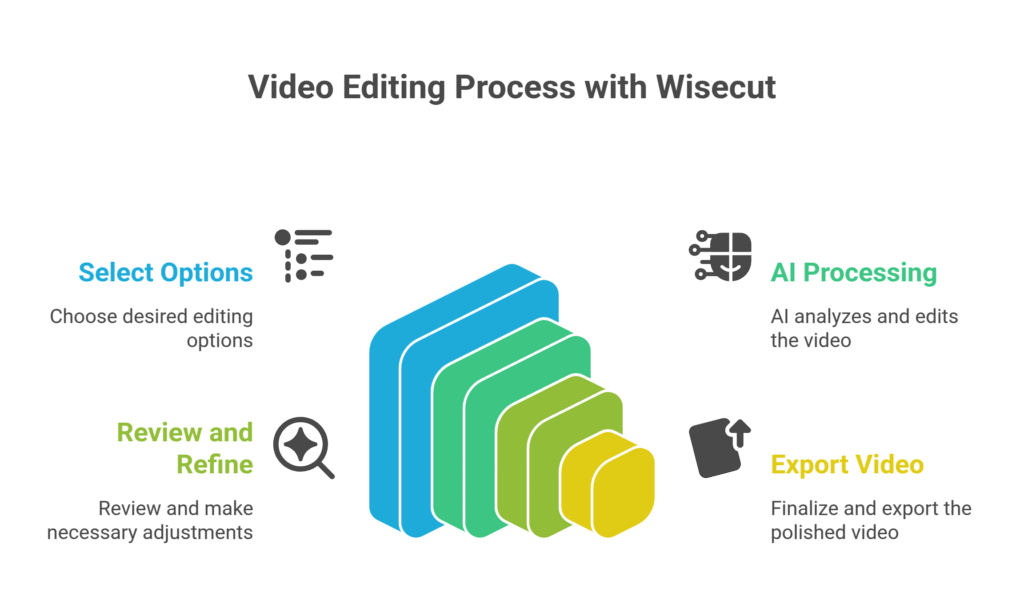
You upload your raw footage. It could be a talking head video, a product demo, or a lecture.
Then, you select a few basic options: do you want jump cuts? Background music? Subtitles?
Hit “process.” That’s it.
The AI takes over. It analyses your audio for silences, figures out where to make cuts, and syncs music.
Within minutes (depending on video length), you get a polished version.
The first time you see it, it’s almost magic.
The silences are gone, the pace is tighter, and the music fades in and out perfectly.
You can then review the video, make minor tweaks if needed, and export.
For example, I had a 30-minute interview that needed to be condensed into a 5-minute highlight reel.
Manually, that’s hours of work, scrubbing through footage, making precise cuts.
With Wisecut, I uploaded it, let it do its thing, and then spent about 15 minutes refining the AI’s suggestions.
Total time spent? Under an hour.
Results? A professional, engaging video that would have taken me half a day previously.
That’s the real impact.
Who Should Use Wisecut?
Who stands to gain the most from Wisecut?
If you’re creating videos, you should at least consider it.
Content Creators & YouTubers: If you’re constantly churning out vlogs, tutorials, or review videos, Wisecut is a lifesaver.
It frees you from the editing grind, allowing more time for content creation and audience engagement.
Marketers & Businesses: Need explainer videos, product demos, or testimonials?
Wisecut helps you produce high-quality marketing assets quickly, without needing a full-time video editor.
It speeds up campaign launches.
Educators & Trainers: If you create online courses, lectures, or training modules, Wisecut makes your spoken content crisp and professional.
It ensures your audience stays focused on the learning material, not on dead air.
Podcasters (who convert to video): Many podcasters are now putting their audio on YouTube.
Wisecut can take that raw video, clean up the audio, add music, and generate subtitles, making it YouTube-ready in no time.
Agencies: If you manage video content for multiple clients, it can significantly boost your output capacity.
It standardises quality and reduces per-project costs.
Essentially, anyone who spends too much time on basic video editing tasks.
If you’re looking for efficiency and scalability in your video production, Wisecut is for you.
How to Make Money Using Wisecut
Alright, let’s get down to business. How can you actually make money with Wisecut?
This isn’t just about saving time; it’s about creating new revenue streams or amplifying existing ones.
The core principle here is efficiency. It helps you do more, faster, and often better, which translates directly to profit.
- Offer Niche Video Editing Services:
Think about clients who need specific, repetitive video editing tasks.
Podcasters needing their long-form interviews condensed and subtitled for social media.
Coaches who record webinars and need them chopped into digestible clips.
You can offer “AI-Powered Video Condensing” or “Automated Subtitling Services.”
Because Wisecut handles the heavy lifting, you can charge a premium for the fast turnaround.
Your cost of production is super low, meaning higher margins for you.
This allows you to take on more clients than a traditional editor ever could.
- Scale Your Own Content Production & Monetization:
If you’re a content creator, more content equals more views, more ad revenue, and more affiliate sales.
By drastically cutting down your editing time, you can release videos more frequently.
This keeps your audience engaged and grows your channel faster.
Imagine doubling your video output without doubling your effort.
That’s a direct path to increased income from YouTube, sponsored content, or product sales.
The AI handles the grunt work, leaving you to focus on high-value creative tasks.
- Create & Sell Short-Form Video Content Packages:
Businesses constantly need short, engaging videos for TikTok, Instagram Reels, and YouTube Shorts.
These are often snippets from longer talks, interviews, or presentations.
Wisecut is perfect for this.
You can offer packages to local businesses: “Get 10 short-form videos from your existing footage for $X.”
You simply upload their raw video, let Wisecut do the initial cuts, then add their branding and a call to action.
This is high-demand, high-volume work that it makes incredibly profitable.
It’s a low-effort way to add significant value to clients.
Let’s look at Sarah, a freelance social media manager. Before Wisecut, creating short video clips for clients was a massive bottleneck.
She’d spend hours on a single 3-minute clip, struggling with silences and music.
After integrating it, she started offering a “Video Snippet Package.”
She now processes a client’s 60-minute interview into 10-15 short, engaging clips in less than an hour of her own time.
She charges $500 for this package and easily handles 5-7 clients per month, pulling in an extra $2,500 – $3,500, purely from leveraging Wisecut’s automation.
This is the kind of leverage this tool provides.
Limitations and Considerations
No tool is perfect. Wisecut is incredibly powerful, but it has its considerations.
Accuracy: While highly accurate, AI isn’t human. Occasionally, the silence detection might be slightly off.
It might cut a brief, intentional pause, or miss a very short one.
You’ll still need to review the output and make minor manual adjustments.
It’s an 80/20 rule: It handles 80% of the tedious work, leaving you 20% for refinement.
Creative Control: If you need very specific, artistic cuts, complex overlays, or highly nuanced visual storytelling, Wisecut won’t replace a professional editor or full-fledged video editing software.
It’s best for content where clear, concise communication and a brisk pace are paramount.
Think utility over high art.
Learning Curve: While generally intuitive, there’s always a slight learning curve with any new software.
Understanding its features and how to best leverage them for your specific content takes a bit of time.
However, it’s far less steep than learning a traditional NLE like Adobe Premiere Pro.
Internet Dependency: As a cloud-based tool, you need a stable internet connection for uploads, processing, and downloads.
If your internet is spotty, this could be a point of frustration.
These aren’t deal-breakers, just things to keep in mind.
It’s about managing expectations and understanding where Wisecut shines brightest.
Final Thoughts
Here’s the deal: if you’re making videos, you’re either spending too much time editing, or paying someone too much money to do it.
Wisecut changes that equation.
It’s not just a fancy AI tool; it’s a productivity multiplier.
For creators, marketers, educators, and businesses, the ability to automate the grunt work of video editing is massive.
It means more content, better content, delivered faster.
It means you can focus on the big ideas, the compelling stories, and the strategic growth of your brand.
Not on trimming silences or fumbling with audio levels.
My recommendation? Give it a shot.
Start with the free plan. Upload some raw footage. See for yourself.
You might just reclaim hours you didn’t even know you were losing.
And those reclaimed hours? They’re pure profit, pure opportunity.
Stop overcomplicating things. Wisecut simplifies a complex process.
It’s a smart investment for anyone serious about video.
Visit the official Wisecut website
Frequently Asked Questions
1. What is Wisecut used for?
Wisecut is an AI-powered online video editor designed to automate tedious editing tasks. It automatically removes silences, adds background music, and generates subtitles, making videos tighter and more engaging. It’s used for creating vlogs, tutorials, marketing videos, online courses, and social media content quickly and efficiently.
2. Is Wisecut free?
Yes, Wisecut offers a free plan. This free tier provides limited processing minutes each month, allowing users to test its core features. For higher usage and advanced functionalities, premium paid plans are available, offering more video time, higher resolution exports, and additional benefits.
3. How does Wisecut compare to other AI tools?
Wisecut distinguishes itself by focusing heavily on automating the core, time-consuming aspects of video editing, particularly silence removal, music synchronisation, and subtitling. While other AI tools might offer broader video effects or template-based creation, it excels at streamlining the editing workflow for spoken content, aiming for efficiency and speed without requiring extensive manual input.
4. Can beginners use Wisecut?
Absolutely. Wisecut is designed with user-friendliness in mind. Its interface is intuitive, and the AI handles most of the complex editing decisions automatically. This makes it an excellent tool for beginners who want to produce professional-looking videos without needing extensive prior editing experience or technical skills.
5. Does the content created by Wisecut meet quality and optimization standards?
Yes, videos produced with Wisecut generally meet high quality standards for clarity and engagement. The automated jump cuts improve pacing, smart music ensures proper audio levels, and auto-generated subtitles boost accessibility and SEO for platforms like YouTube. This results in content that is both polished and optimised for viewer retention and reach.
6. Can I make money with Wisecut?
Definitely. Wisecut significantly boosts your efficiency, allowing you to produce more video content in less time. This opens up opportunities to offer video editing services to clients, scale your own content creation for increased ad revenue or sales, or create niche video content packages (e.g., short-form social media clips) for businesses, directly translating saved time into profit.