
Calendly revolutionises calendar and meeting automation for productivity. Streamline scheduling & book more meetings. Try it now!
Say Goodbye to Manual Calendar and Meeting Automation – Hello Calendly
The productivity game is on. Every day, more professionals in Productivity and Assisting are spotting AI tools that actually work. Not the fluff, but the stuff that cuts through the noise and gets results.
You know the drill. Endless email chains just to find a time. Back-and-forth scheduling that eats up hours. Missed opportunities because booking a simple meeting felt like climbing Everest.
That’s where the real magic happens. That’s where tools like Calendly step in. It’s not just another app; it’s your secret weapon for owning your calendar.
What is Calendly?
Calendly is a smart scheduling automation tool. Its main job? To kill the hassle of coordinating meetings and appointments.
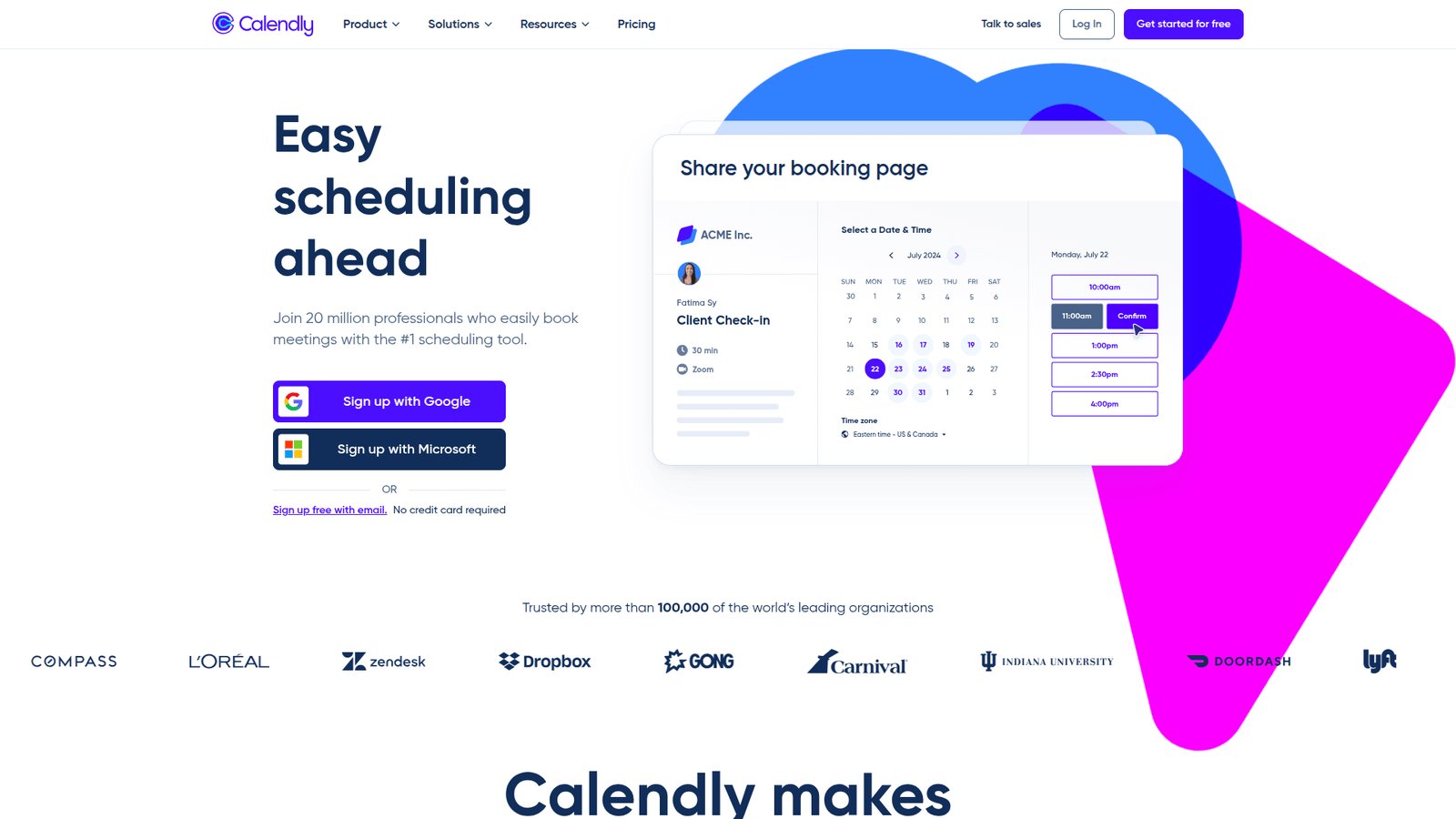
Think of it as your personal scheduling assistant. You set your availability, what kind of meetings you offer, and how long they last. Then, you share a link.
Anyone who needs to meet with you clicks that link, sees your open slots, and picks a time that works for them. Boom. Meeting booked. No more emails. No more phone tag.
It’s built for anyone who schedules meetings, which, let’s be honest, is pretty much everyone in the business world. Salespeople, consultants, coaches, recruiters, customer support teams – you name it. If your day involves talking to people, Calendly can save you time.
It’s designed to be straightforward. You don’t need to be a tech wizard to set it up. You connect your calendar, define your preferences, and you’re good to go. It’s about making your professional life smoother and more efficient.
Key Features of Calendly for Calendar and Meeting Automation
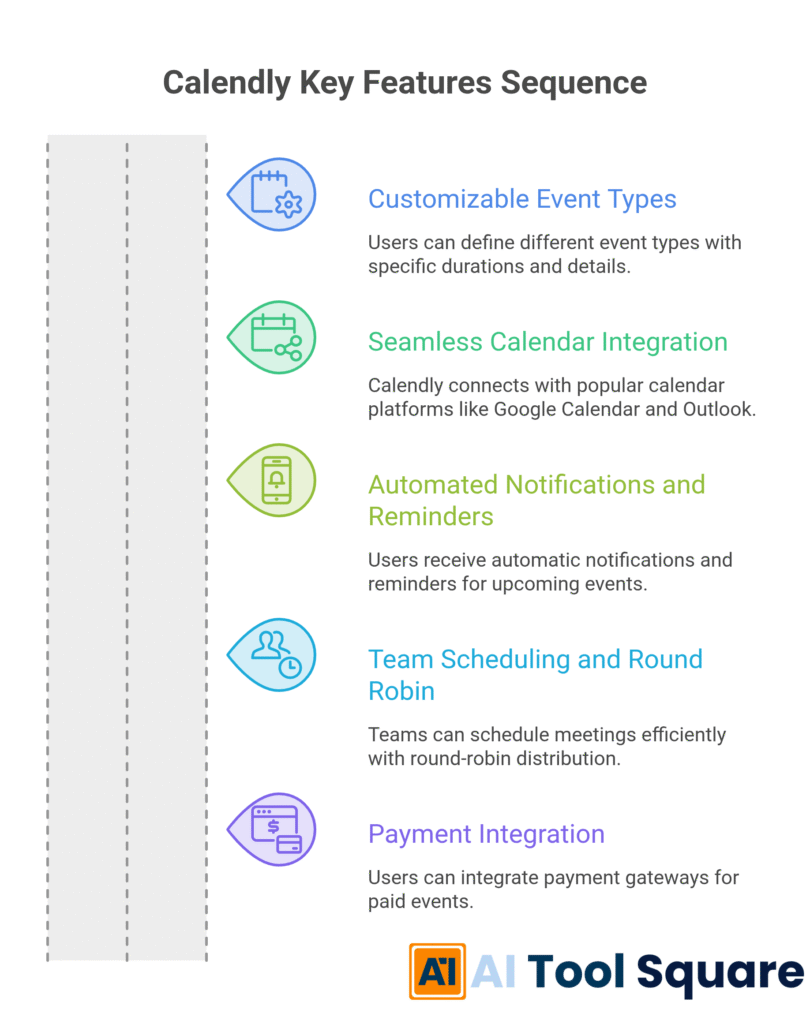
Calendly packs a punch with features that directly address the pain points of Calendar and Meeting Automation. These aren’t just bells and whistles; they’re crucial for reclaiming your time.
- Feature 1: Customizable Event Types
This is huge. Calendly lets you create different event types. Need a quick 15-minute discovery call? A deep-dive 60-minute consultation? Or maybe a 30-minute product demo? You define each one. You set the duration, buffer times before and after, and even ask specific questions on the booking form.
This means when someone books, you get exactly the kind of meeting you need, with the right amount of time allocated, and they’ve already provided key information. It’s calendar and meeting automation at its most granular, ensuring every interaction is purposeful and efficient. - Feature 2: Seamless Calendar Integration
This is the engine that makes it all work. It integrates with your existing calendars – Google Calendar, Outlook Calendar, iCloud Calendar, and Office 365. When a meeting is booked through Calendly, it automatically appears in your primary calendar and blocks off that time.
Crucially, it also checks your calendar for existing conflicts. If you’ve already got something booked, that slot won’t appear as available for booking. This prevents double-bookings and ensures your schedule remains intact. It’s robust calendar automation that protects your valuable time. - Feature 3: Automated Notifications and Reminders
This is where the ‘automation’ in Calendar and Meeting Automation truly shines. Calendly sends out automatic confirmation emails to both you and the invitee when a meeting is booked. It also sends out reminders before the meeting.
These reminders are lifesavers. They drastically reduce no-shows, which cost businesses a fortune. You can customise the timing and content of these reminders, ensuring your attendees are nudged at the right moment. This feature alone is a massive win for productivity and ensures your scheduled meetings actually happen. - Feature 4: Team Scheduling and Round Robin
For teams, this is a game-changer. Calendly can manage multiple team members’ availability. The “Round Robin” feature assigns incoming meeting requests to team members on a rotating basis, ensuring no one gets overloaded and all leads or inquiries are handled promptly.
This is brilliant for sales teams where timely follow-up is critical. It also works for support teams or anyone where workload needs to be distributed evenly. It’s a powerful tool for managing group calendars and ensuring consistent coverage without manual oversight, a true leap forward in calendar automation for groups. - Feature 5: Payment Integration
For businesses that charge for consultations or services, Calendly offers built-in payment integration. You can connect Stripe or PayPal to your event types. Potential clients can book and pay for your services directly through the scheduling link.
This streamlines the entire process, from initial contact to payment. It removes another layer of manual follow-up and ensures you get paid for your time without the administrative headache. It’s a smart move for service-based professionals looking to optimize their workflow and revenue capture through advanced calendar and meeting automation.
Benefits of Using Calendly for Productivity and Assisting
The impact of Calendly on productivity and assisting professionals is profound. It’s not just about saving a few minutes; it’s about fundamentally shifting how you manage your time and interactions.
The most obvious benefit is the **time savings**. Think about the hours you currently spend on email tag to find a meeting slot. Calendly eliminates this entirely. Your calendar becomes a dynamic, self-managing entity, freeing you up for higher-value tasks.
This also leads to **increased efficiency**. When scheduling is effortless, you can book more meetings. More meetings mean more opportunities to close deals, onboard clients, or build relationships. Your business can grow simply because you’ve removed a significant bottleneck.
Another critical advantage is **reduced stress and mental clutter**. No more juggling multiple calendars, remembering who’s available when, or worrying about double-bookings. Calendly handles the logistics, giving you peace of mind and the mental bandwidth to focus on your core work.
Furthermore, it **enhances your professional image**. A sleek, easy-to-use scheduling link makes you look organised and professional. It shows potential clients or partners that you value their time and have a streamlined process. This can be a significant competitive advantage.
For those in Productivity and Assisting, the ability to **delegate scheduling** is invaluable. You can empower team members, virtual assistants, or even automated systems to manage booking inquiries without constant supervision.
Ultimately, Calendly helps you **convert interest into action**. When someone is ready to talk, they can book a meeting instantly. This immediate access significantly increases the likelihood of that lead or inquiry turning into a tangible outcome, whether it’s a sale, a project kick-off, or a valuable collaboration.
Pricing & Plans

Calendly offers a tiered pricing structure, making it accessible for individuals and teams of all sizes.
The **Free plan** is a fantastic starting point. It allows you to connect one calendar and create one event type. This is perfect for individuals who are just starting out or have simple scheduling needs. You get the core functionality of automated scheduling without any cost.
The **Standard plan** is priced at $10 per user per month (billed annually) or $12 per user per month (billed monthly). This plan unlocks more power. You can connect multiple calendars, create unlimited event types, and gain access to team features like round-robin scheduling. This is ideal for small businesses or solopreneurs who need more flexibility and team collaboration.
For larger teams or businesses requiring advanced features, the **Teams plan** is available at $16 per user per month (billed annually) or $20 per user per month (billed monthly). This plan includes everything in Standard, plus features like group events, custom branding, and priority support.
The **Enterprise plan** is custom-quoted and designed for larger organisations with specific security, compliance, and integration needs. It offers advanced security features, dedicated account management, and premium integrations.
Compared to alternatives, Calendly’s pricing is competitive, especially considering the robust feature set and the significant time savings it provides. The free tier is genuinely usable, allowing many to experience the benefits before committing to a paid plan.
Hands-On Experience / Use Cases
Imagine a freelance content marketer who needs to schedule discovery calls with potential clients. Instead of emailing back and forth about availability, they set up a “30-Minute Discovery Call” event type in Calendly. They define their working hours, add a 10-minute buffer after each call, and link their Google Calendar.
They then embed this Calendly link on their website and include it in their email signature. A potential client visits their website, clicks the link, sees the marketer’s available slots, and books a call. It automatically adds the call to the marketer’s calendar, sends a confirmation email to both parties, and schedules a reminder for the client 24 hours before the meeting. The marketer saves hours each week, allowing them to focus on writing and client acquisition.
Consider a small digital marketing agency that needs to schedule client onboarding sessions. The agency sets up a “Client Onboarding Session” event type, making it 60 minutes long. They link it to multiple team members’ calendars and enable the “Round Robin” assignment. When a new client signs up, they are sent the agency’s Calendly link. It automatically assigns the booking to the next available team member, ensuring clients are onboarded efficiently without the agency owner having to manually allocate resources. This prevents delays and ensures a consistent client experience.
A sales development representative (SDR) can use it to book product demos. They create a “Product Demo” event type that is 45 minutes long and includes a brief questionnaire asking about the prospect’s pain points. When they identify a hot lead, they send them a direct Calendly link. The prospect books the demo, providing valuable pre-call information that the SDR can use to tailor the demonstration. This makes the SDR more effective and increases the conversion rate of demos to sales.
A career coach who offers various coaching packages can set up different event types for each. A “15-Minute Intro Call,” a “60-Minute Coaching Session,” and a “90-Minute Strategy Session.” Each can have a different price associated with it if payment integration is used. Clients can choose the service they need, see the coach’s availability, and book directly. This removes friction in the sales process and allows the coach to focus on delivering high-quality coaching rather than administrative tasks. The ability to have multiple, clearly defined offerings simplifies the client’s decision-making process.
Who Should Use Calendly?

Calendly is a Swiss Army knife for scheduling. Its benefits extend across a vast spectrum of professionals, but certain groups stand to gain exponentially more.
Freelancers and Solopreneurs are prime candidates. Whether you’re a graphic designer, writer, consultant, or virtual assistant, your time is your most valuable asset. Calendly automates the tedious task of booking clients, freeing you to do more billable work.
Sales Professionals, from SDRs to account executives, can massively boost their productivity. The ability to quickly schedule discovery calls, demos, and follow-ups without email back-and-forth means more conversations, more pipeline, and more closed deals.
Marketers, especially those in demand generation or partner marketing, can use Calendly to schedule calls with potential partners, influencers, or leads from campaigns. Streamlined scheduling means quicker follow-up and higher conversion rates.
Small Business Owners and their teams can leverage Calendly to manage client appointments, service bookings, and internal meetings. It brings a level of professionalism and efficiency that can rival much larger organisations.
Educators and Tutors can use it to schedule one-on-one sessions, office hours, or consultations with parents, ensuring their availability is clearly communicated and appointments are easily made.
Recruiters and HR Professionals can dramatically speed up the hiring process by using Calendly to schedule initial screenings, interviews, and follow-up calls with candidates. It minimises delays and keeps the candidate experience positive.
Coaches and Consultants of all kinds – business coaches, life coaches, wellness coaches – will find Calendly indispensable for booking sessions and managing their client rosters efficiently.
Basically, if you have ever found yourself thinking, “There has to be a better way to schedule this,” Calendly is likely for you. It’s for anyone who values their time and wants to simplify the process of connecting with others.
How to Make Money Using Calendly
Calendly isn’t just a tool for saving time; it’s a vehicle for increasing revenue and creating new income streams, particularly within the Productivity and Assisting space.
- Service 1: Offer Scheduling Management Services
Many businesses and busy professionals struggle with managing their schedules. You can offer your services as a virtual assistant specialising in Calendly management. This involves setting up and optimising Calendly accounts for clients, managing their event types, integrating their calendars, and ensuring their booking process runs smoothly.
Clients pay you a retainer or hourly fee for this specialised service. Your expertise in Calendly becomes your marketable skill. You handle the technical setup and ongoing management, allowing your clients to focus on their core business, while you earn money by making their scheduling effortless. - Service 2: Consult on Calendar and Meeting Automation Efficiency
Businesses that are still relying on manual scheduling methods are losing significant productivity. You can position yourself as a consultant who helps them implement Calendly and other automation tools. Your service would involve assessing their current workflow, recommending Calendly solutions, and training their team on how to use it effectively for Calendar and Meeting Automation.
Your consultancy fee is based on the value you provide in increased efficiency and reduced administrative costs for the client. This is a high-value service as you are directly impacting their bottom line through smart automation. - Service 3: Monetise Consultations and Services Directly
If you offer services like coaching, consulting, or specialised training, you can directly integrate Calendly with payment gateways like Stripe or PayPal. When clients book a paid session or service through your Calendly link, the payment is processed automatically.
This eliminates the need for manual invoicing and chasing payments. For example, a business coach could offer tiered coaching packages with different session lengths and pricing, all bookable and payable via Calendly. A photographer could offer mini-session bookings that are paid for upon booking. This direct integration turns your scheduling tool into a revenue-generating point of sale.
Real Case Study Example: Sarah, a freelance marketing consultant, noticed many of her peers complaining about the time spent on administrative tasks. She decided to specialise in helping them streamline their operations using Calendly. She created a website outlining her services, which included “Calendly Setup & Optimisation” and “Virtual Scheduling Assistant.” Within six months, she was managing Calendly for five clients, earning an average of $1,500 per month from these services alone. She also uses Calendly to book her own client calls, ensuring she’s always perceived as organised and efficient.
Limitations and Considerations
While Calendly is a powerhouse for Calendar and Meeting Automation, it’s not without its limitations. Understanding these helps you use it more effectively.
One key consideration is the **reliance on calendar accuracy**. Calendly is only as good as the calendar it’s synced with. If your primary calendar isn’t up-to-date, or if you forget to block off personal time, Calendly might incorrectly show availability. This can lead to scheduling conflicts that need manual resolution, undermining some of the automation benefits.
While the basic setup is simple, **advanced customisation can have a learning curve**. Creating complex workflows, setting up round-robin assignments for large teams, or integrating with multiple other tools might require more time and effort to master. It’s not always plug-and-play for every intricate scenario.
Calendly is primarily focused on **scheduling, not necessarily full CRM functionality**. While it collects some information through booking questions, it doesn’t replace a dedicated Customer Relationship Management system. You’ll still need other tools to manage client data, track sales pipelines comprehensively, or send mass marketing communications.
The **free plan is quite limited**. With only one calendar connection and one event type, it’s sufficient for basic use but quickly becomes restrictive for professionals with diverse scheduling needs or those working in teams. Upgrading is almost always necessary for significant productivity gains.
For some specific industries with very complex booking requirements (e.g., highly specialised medical appointments with unique prerequisites), Calendly might require significant customisation or may not be the perfect fit without additional integrations. Always assess your specific needs against the tool’s capabilities.
Final Thoughts
Calendly has become an indispensable tool for anyone looking to conquer their calendar and streamline meeting scheduling. For professionals in Productivity and Assisting, it’s not an exaggeration to say it’s a game-changer.
It takes the friction out of scheduling, allowing you to focus on what truly matters: doing the work, serving your clients, and growing your business. The automation it provides for Calendar and Meeting Automation is sophisticated yet remarkably easy to implement.
From saving countless hours on email tag to reducing no-shows and even enabling new revenue streams, Calendly delivers tangible results. It’s a smart investment, especially with its accessible free plan and scalable paid tiers.
If you’re tired of the scheduling circus, it’s time to stop.
Give Calendly a try. Your future, less-stressed self will thank you.
Visit the official Calendly website
Frequently Asked Questions
1. What is Calendly used for?
Calendly is primarily used for automating the process of scheduling meetings and appointments. It allows users to set their availability, share a link, and let others book time slots directly into their calendar without back-and-forth emails.
2. Is Calendly free?
Yes, Calendly offers a robust free plan that includes essential scheduling features, connecting one calendar and creating one event type. Paid plans are available for more advanced features and team collaboration.
3. How does Calendly compare to other AI tools?
Calendly is a specialised AI tool focused purely on scheduling automation. While other AI tools might handle content creation, data analysis, or broad automation, Calendly excels in its specific niche of intelligent calendar and meeting automation, making it a leader in its category.
4. Can beginners use Calendly?
Absolutely. Calendly is designed to be user-friendly and intuitive. Beginners can set up their account and start scheduling in minutes, with most advanced features also being accessible through clear interfaces.
5. Does the content created by Calendly meet quality and optimization standards?
Calendly doesn’t create content in the way generative AI tools do. It automates the scheduling process. The quality of your meetings and the information you gather depends on how you set up your event types and questions, not on AI-generated output from Calendly itself.
6. Can I make money with Calendly?
Yes, you can make money with Calendly. This can be done by offering scheduling management services to clients, monetising your own consulting or coaching services directly through Calendly’s payment integrations, or increasing sales and client acquisition by making it easier for people to book time with you.
7. How to make money with Calendly?
You can make money with Calendly by offering specialised virtual assistant services focused on Calendly setup and management for other businesses. Additionally, you can directly integrate payment gateways with your Calendly account to receive payments for services like consultations, coaching sessions, or product demos booked through the platform.