


Microsoft Power Automate supercharges your Trigger-based Automation. Automate repetitive tasks, boost efficiency, and reclaim your time. Ready to simplify your workflow?
This Is How Trigger-based Automation Should Be Done
Ever feel like you’re drowning in busywork?
Like your team’s stuck in an endless loop of manual, repetitive tasks?
You’re not alone.
The world of work is speeding up, and if you’re not keeping pace, you’re getting left behind.
Especially in Automation and Integration, where efficiency isn’t just a nice-to-have, it’s the whole game.
Enter Microsoft Power Automate.
This isn’t just another tech tool.
It’s a complete shift in how you approach work.
Specifically, how you handle Trigger-based Automation.
Imagine tasks just… happening.
Automatically.
No manual intervention, no errors, no wasted hours.
It’s not magic; it’s smart automation.
I’ve seen it change businesses, and it can change yours too.
Stick around. I’ll show you how.
Table of Contents
- What is Microsoft Power Automate?
- Key Features of Microsoft Power Automate for Trigger-based Automation
- Benefits of Using Microsoft Power Automate for Automation and Integration
- Pricing & Plans
- Hands-On Experience / Use Cases
- Who Should Use Microsoft Power Automate?
- How to Make Money Using Microsoft Power Automate
- Limitations and Considerations
- Final Thoughts
- Frequently Asked Questions
What is Microsoft Power Automate?
So, what is Microsoft Power Automate?
Think of it as your digital assistant, but on steroids.
It’s a cloud-based service that lets you create automated workflows between your favourite apps and services.
No code? No problem.
It’s designed for everyone, from the tech wizard to the complete beginner.
Its core function?
To automate repetitive tasks.
Picture this: An email arrives, and a file automatically saves to SharePoint.
Or a new tweet triggers an update in your CRM.
That’s the power of it.
It’s all about creating “flows” – a series of steps that automatically run when a specific event (a “trigger”) occurs.
Who’s it for?
Anyone drowning in digital paperwork.
Marketers needing to automate social media posts or lead nurturing.
HR teams streamlining onboarding.
Sales professionals updating CRM records from emails.
Even content creators wanting to automate their publishing schedule.
It connects with hundreds of services, both Microsoft and third-party.
Outlook, SharePoint, Twitter, Dropbox, Salesforce, Asana – you name it.
This means less time spent on the mundane.
More time for what actually moves the needle.
It turns reactive processes into proactive, automated systems.
That’s the game.
Key Features of Microsoft Power Automate for Trigger-based Automation
When it comes to Trigger-based Automation, Microsoft Power Automate isn’t playing around.
It’s got a few core features that make it stand out.
These aren’t just bullet points; they’re game-changers.
- Extensive Connector Library: This is huge. Power Automate connects to literally hundreds of services and applications. Think Microsoft 365, Dynamics 365, SharePoint, Outlook, but also Salesforce, Twitter, Dropbox, Google Drive, Trello, and more. This means your triggers and actions aren’t confined to a single ecosystem. An email in Gmail can trigger an action in SharePoint, or a new entry in a Google Sheet can update a record in your CRM. This broad reach is what makes it so versatile for complex automation scenarios. You’re not limited in what you can connect.
- Conditional Logic and Loops: This takes your automation beyond simple “if this, then that.” You can build complex flows with conditional logic (IF/THEN/ELSE statements) and loops. For example, if an email subject contains “Urgent,” then send a notification to a specific team; otherwise, just save it to a folder. Or, you can loop through a list of items, performing an action on each one – like processing a list of invoices or updating multiple database records based on a single trigger. This allows for truly intelligent and adaptive automation, handling various scenarios without manual oversight. It’s about building smarter workflows, not just faster ones.
- Scheduled Flows and Instant Flows: Power Automate offers different types of triggers. Instant flows can be initiated manually with a button click, perfect for ad-hoc tasks. Scheduled flows run at specific intervals – daily, weekly, or monthly – great for regular reports or data clean-ups. But the real meat for Trigger-based Automation is the automated cloud flows. These trigger automatically when an event occurs – a new file uploaded, an email received, an item created in a list. This means your automation is always on, always watching, and always ready to act the moment something happens. No more waiting around. No more missed opportunities.
These features combine to create a powerhouse for automating processes.
It means fewer errors, faster response times, and a significant reduction in manual effort.
You’re not just automating tasks; you’re building a more efficient operation.
It’s about working smarter, not harder.
Benefits of Using Microsoft Power Automate for Automation and Integration
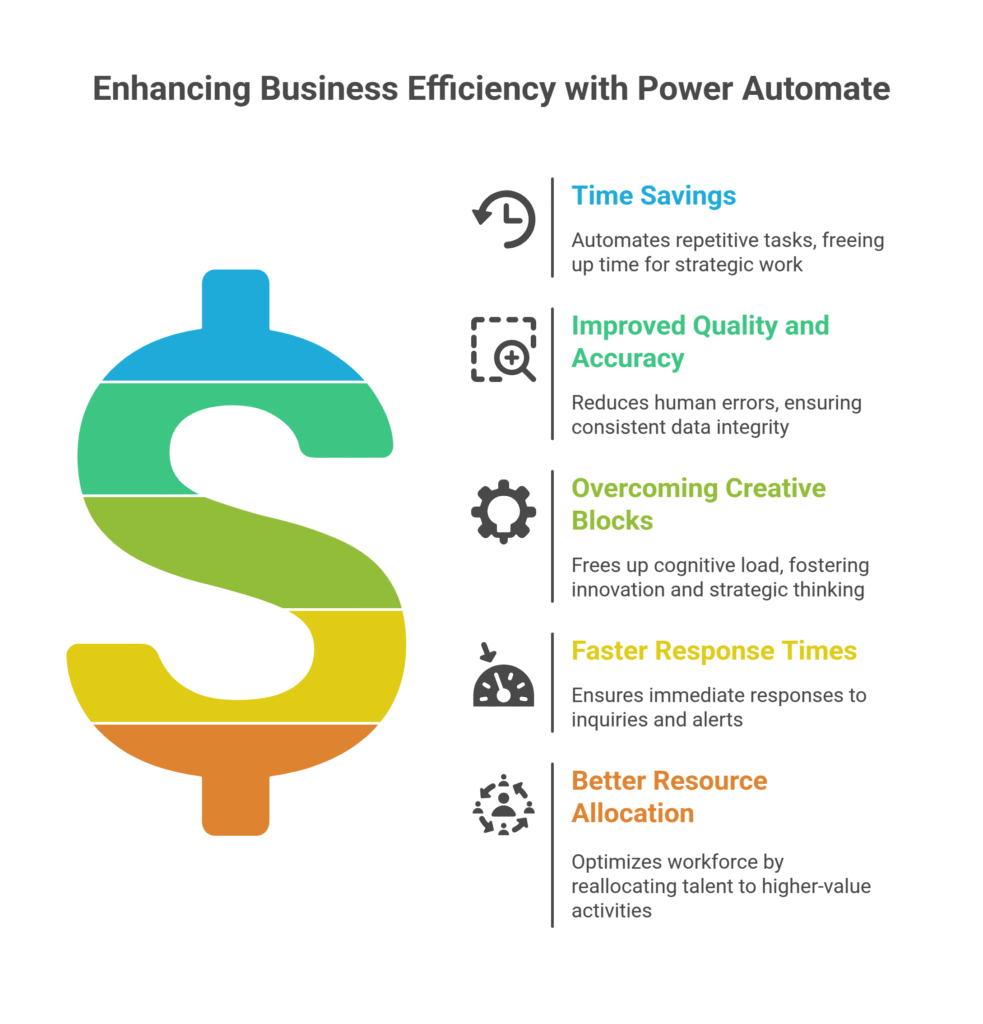
Alright, so you know what it does. But what’s in it for you?
The benefits of using Microsoft Power Automate for Automation and Integration are huge.
We’re talking tangible gains here, not just theoretical ones.
First up: Time savings. Massive time savings.
Think about all those tasks you do every day or week that are repetitive.
Moving files, sending standard emails, updating spreadsheets, logging data.
Each one takes minutes. Those minutes add up to hours. Hours add up to days.
Power Automate eliminates that.
It automates these tasks, freeing up your team to focus on strategic work.
Work that actually drives growth and innovation.
Next, improved quality and accuracy.
Humans make mistakes. It’s a fact of life.
Typos, forgotten steps, incorrect data entries.
Automated flows don’t.
Once you set up a flow, it executes the same steps, perfectly, every single time.
This reduces errors, improves data integrity, and ensures consistency across your operations.
Which means fewer headaches down the line.
Then there’s overcoming creative blocks.
When you’re bogged down in manual work, your brain gets tired.
You don’t have the mental bandwidth for innovative thinking.
By automating the grunt work, you free up cognitive load.
Your team can think bigger, strategize better, and come up with new ideas.
It cultivates a more creative, problem-solving environment.
Also, faster response times.
Customer inquiries, internal requests, data alerts – they all need quick action.
Automated triggers ensure immediate responses.
A customer fills out a form? An email goes out instantly.
A critical alert hits your inbox? A Teams notification fires off to the right person.
This improves customer satisfaction and internal efficiency.
Finally, better resource allocation.
You’re no longer paying highly skilled employees to do mindless data entry.
You can reallocate their talents to higher-value activities.
This doesn’t just save money; it optimizes your entire workforce.
The ROI on this kind of automation is crystal clear.
It’s not just about saving time; it’s about making your business more profitable and agile.
Pricing & Plans
Alright, let’s talk brass tacks: what’s this going to cost you?
Microsoft Power Automate isn’t a one-size-fits-all product when it comes to pricing.
It’s designed to scale, which is smart.
First off, there’s no forever-free plan for extensive use.
However, if you’re already knee-deep in Microsoft 365, you might have some basic Power Automate capabilities bundled in.
These are often enough for simple, personal automations.
Think “save email attachments to OneDrive.”
For anything serious, you’ll be looking at paid plans.
They generally operate on a per-user or per-flow basis.
The per-user plan is pretty straightforward.
You pay a monthly fee for each user who needs to create, run, or administer flows.
This plan includes a certain number of “runs” or actions allowed per month.
It’s good for teams where multiple people are building and managing their own automations.
Then there’s the per-flow plan.
This is for when you have processes that need to be accessed and used by a large number of users, but maybe not everyone needs to build their own flows.
For example, a company-wide approval process.
You license the flow itself, and then anyone in the organisation can use it without needing an individual license.
This is typically for more mission-critical, high-volume automations.
Pricing can vary based on regions and specific offerings.
You’ll want to check Microsoft’s official site for the latest figures.
How does it compare to alternatives?
Tools like Zapier or Integromat (now Make) are often compared.
Zapier is generally easier for simple, cross-platform integrations, but can get pricey fast with high-volume tasks.
Make offers more powerful logic and better value for complex workflows, but has a steeper learning curve.
Power Automate shines if you’re heavily invested in the Microsoft ecosystem.
Its native integration with Microsoft 365, Dynamics 365, and Azure services is seamless.
You get deeper capabilities, better security, and unified administration within the Microsoft cloud.
For many businesses, especially those already using Microsoft products, it’s a no-brainer.
It’s not the cheapest option out there for every single use case, but the value for robust, scalable, and secure automation within an enterprise environment is very compelling.
Hands-On Experience / Use Cases

Let’s get real. How does Microsoft Power Automate actually work in the trenches?
I’ve used it for a bunch of stuff, and the usability is surprisingly good.
It’s got a drag-and-drop interface, so you’re not staring at lines of code.
It’s more like building with digital Lego bricks.
Here’s a common scenario: Lead management.
Imagine a marketing team getting leads from multiple sources – website forms, LinkedIn, a specific email inbox.
Manually collating these is a nightmare. Data gets missed, follow-ups are delayed.
Here’s how Power Automate tackles it:
Use Case: Automated Lead Nurturing and CRM Update
The Trigger: A new entry in a Microsoft Forms submission for a webinar registration.
The Flow:
1. When a new response is submitted to the “Webinar Registration Form.”
2. Get response details.
3. Create a new lead record in Dynamics 365 (or Salesforce, HubSpot, whatever CRM you use – it connects).
4. Send a personalised “Thank You for Registering” email to the registrant from Outlook, attaching a calendar invite.
5. Post a notification to a specific Microsoft Teams channel alerting the sales team about the new lead.
6. Add the lead’s email to a Mailchimp (or similar) list for a nurture sequence.
7. (Optional) If the lead’s company size is “Enterprise,” create a follow-up task for a senior sales rep in Planner or Asana.
The Result:
Instant lead capture. Zero manual data entry.
Every lead gets immediate acknowledgement.
Sales team is notified without having to check multiple systems.
Nurture campaigns kick off automatically.
High-value leads are flagged immediately.
This eliminates human error, speeds up the sales cycle, and ensures no lead falls through the cracks.
Before Power Automate, this process would involve someone copying data, sending emails, manually updating CRM, and sending Teams messages.
It would take precious minutes, every single time.
With Power Automate, it happens in seconds, automatically.
Another example: Document Approval Workflow.
Trigger: A new document is uploaded to a specific SharePoint library.
Flow:
1. Get document properties.
2. Start an approval process in Microsoft Teams or Outlook, routing to the department manager.
3. If approved, move the document to the “Approved Documents” folder and notify the original uploader.
4. If rejected, move it to “Rejected Documents,” notify the uploader with comments, and maybe even create a task to revise it.
This simplifies complex internal processes, ensuring compliance and speeding up decision-making.
These aren’t just theoretical scenarios. These are real problems that Power Automate solves, day in and day out.
The usability is intuitive enough for anyone to grasp the basics quickly, but powerful enough to handle serious business automation.
Who Should Use Microsoft Power Automate?
Who exactly benefits from Microsoft Power Automate?
It’s not just for the IT department, despite what you might think.
This tool is built for a broad spectrum of users.
First, Small Businesses:
If you’re a small business, resources are tight. Every minute counts.
You don’t have a massive team to handle endless admin tasks.
Power Automate can automate your lead follow-ups, customer service replies, invoice generation, and social media posting.
It lets you operate like a much larger company without the overhead.
It’s about doing more with less.
Next, Marketers:
You’re constantly juggling campaigns, social media, email lists, and analytics.
Imagine automating your social media content distribution from a spreadsheet.
Or automatically adding new webinar registrants to your email nurturing sequence.
Or generating reports when campaign data hits certain thresholds.
Power Automate frees up marketers to focus on strategy and creativity, not repetitive data entry.
Then, Sales Teams:
Sales is all about speed and follow-up.
Automate lead qualification, CRM updates from emails, sending introductory materials, or even setting reminders for key follow-ups.
This means sales reps spend more time selling and less time on administrative tasks.
More calls, more meetings, more closes.
Also, HR and Operations Professionals:
Think onboarding new employees. So many forms, so many systems to update.
Power Automate can automate the entire onboarding checklist: sending welcome emails, creating accounts, setting up training schedules, and notifying relevant departments.
For operations, it can streamline supply chain notifications, inventory updates, or compliance checks.
Any department with repeatable, rule-based processes is a prime candidate.
Finally, Agencies and Consultants:
You manage multiple clients, each with their own processes.
Standardise client onboarding, automate reporting, or create custom integrations between disparate client systems.
This allows agencies to deliver faster, more consistent services, and take on more clients without increasing headcount proportionally.
In essence, if you spend a significant portion of your day on tasks that feel like Groundhog Day, Microsoft Power Automate is for you.
It’s about empowering everyone to be an automator, not just the IT folks.
How to Make Money Using Microsoft Power Automate

Alright, this is where it gets interesting.
It’s not just about saving money; it’s about making it.
Microsoft Power Automate isn’t just a cost-saving tool; it’s a revenue generator.
Here’s how you can turn your expertise into cash:
- Offer Automation Consulting Services: This is the big one. Many businesses, especially small to medium-sized ones, are drowning in manual tasks but have no idea where to start with automation. You step in as the expert.
Service 1: Process Analysis and Automation Implementation. You identify bottlenecks, map out existing manual processes, and then design and implement Power Automate flows to fix them. This can range from automating data entry between systems (e.g., pulling data from online forms into Excel and then into a CRM) to setting up complex approval workflows for documents or expenses. Charge per project, or on a retainer basis for ongoing support and new automation builds.
Case Study Idea: “How Sarah, a freelance consultant, made $5,000 in one month by automating client onboarding for three small marketing agencies using Power Automate, saving each client over 20 hours per month.”
- Develop and Sell Custom Flow Templates: Got a genius flow you built for a common business problem? Package it up and sell it.
Service 2: Niche Flow Templates. Think specific industries. A flow for real estate agents to automate follow-ups after open houses. A flow for e-commerce businesses to track returns and notify inventory. A flow for event organisers to manage registrations and send reminders. You can sell these through your own website, or even explore marketplaces if Microsoft has an ecosystem for it. The beauty here is that you build it once and sell it many times.
- Provide Training and Workshops: The tool is user-friendly, but many still need a guided hand to get started.
Service 3: Power Automate Training. Offer workshops (online or in-person) for businesses looking to empower their own teams to build flows. You can train employees on the basics, advanced concepts, best practices, and troubleshooting. Charge per participant or per company for a dedicated session. This positions you as an authority and can lead to further consulting gigs.
Another angle: Efficiency Gains for Your Own Business.
By using Power Automate internally, you slash your operational costs.
If you run an agency, automate your client reporting, project management updates, or billing reminders.
The time saved is money earned – or rather, money not spent on inefficient labour.
This allows you to take on more clients, deliver faster, and increase your profit margins without hiring more staff.
It’s about scaling your operations without scaling your overhead.
The market for automation services is exploding.
Businesses are desperate to streamline, and tools like Power Automate are the answer.
If you become proficient, you’re sitting on a goldmine.
Limitations and Considerations
Okay, no tool is perfect. And Microsoft Power Automate has its quirks, just like anything else.
It’s vital to go in with eyes wide open.
First, the learning curve.
While it’s touted as “low-code/no-code,” that doesn’t mean it’s zero-learning.
For simple flows, sure, you can pick it up fast.
But for complex, multi-step automations with conditional logic, error handling, and nested loops?
It requires some analytical thinking.
You need to understand how data flows, how triggers work, and the specific syntax for certain expressions.
It’s not rocket science, but it’s not always plug-and-play either.
Expect to invest some time upfront.
Second, connector limitations.
While it has hundreds of connectors, sometimes a specific function you need for a niche app just isn’t there.
Or the available actions for a given connector might be limited.
This can force you to use workarounds, manual steps, or even consider custom connectors if you have the technical prowess (and a premium license).
Always check if your critical apps have the necessary actions available before committing.
Third, debugging can be a pain.
When a flow fails, figuring out why can be frustrating.
The error messages aren’t always crystal clear, especially for complex flows with many steps.
You might spend a good chunk of time trying to pinpoint the exact issue.
This is where patience and systematic troubleshooting come in.
Fourth, licensing complexity.
We touched on pricing, but the different license types (per-user, per-flow, attended RPA, unattended RPA) and add-ons can get confusing.
Understanding which license you need for your specific usage pattern and volume of runs is crucial to avoid unexpected costs or limitations.
It’s not as straightforward as a simple subscription model.
Fifth, performance and throttling.
For very high-volume flows, you can hit API limits or throttling from connected services.
This means your flow might slow down or even pause if it’s making too many requests too quickly.
You need to design your flows efficiently and be aware of the limitations of the services you’re integrating with.
Finally, governance and security.
While Microsoft provides robust security, when you start automating things, you need a plan for how you manage these flows.
Who can create them? Who can access sensitive data? How are connections managed?
It needs a proper governance strategy, especially in larger organisations, to prevent security risks or accidental data exposure.
It’s a powerful tool, but like any powerful tool, it demands respect and a thoughtful approach.
Final Thoughts
So, what’s the verdict on Microsoft Power Automate?
Look, the world is moving fast. If you’re not automating, you’re falling behind.
It’s that simple.
Microsoft Power Automate isn’t just hype. It’s the real deal.
It’s a robust, scalable, and increasingly intelligent platform that empowers you to strip away the busywork.
It brings serious value to the table, especially for Trigger-based Automation.
It frees up your time, cuts down on errors, and lets your team focus on high-value tasks.
The cost savings and efficiency gains are very real.
If you’re already in the Microsoft ecosystem, it’s a no-brainer.
It integrates seamlessly, and you leverage your existing investment.
But even if you’re not, the sheer breadth of its connectors makes it a compelling choice.
Yes, there’s a learning curve. Yes, you might hit a few snags with complex flows or specific connectors.
But the payoff? It’s huge.
You’re not just buying a tool; you’re investing in a more efficient, less stressful, and ultimately more profitable way of working.
It streamlines your operations, accelerates your response times, and lets you do more with the same resources.
My recommendation?
Don’t just read about it. Dive in.
Start with a simple, repetitive task that eats up your time every week.
Try to automate it with Power Automate.
Once you see that first flow run successfully, you’ll get it.
You’ll see the potential.
The future of work is automated. Make sure you’re part of it.
Visit the official Microsoft Power Automate website
Frequently Asked Questions
1. What is Microsoft Power Automate used for?
Microsoft Power Automate is used for creating automated workflows between various applications and services. It helps automate repetitive tasks like data entry, file management, notifications, and approvals, saving time and reducing errors.
2. Is Microsoft Power Automate free?
No, Microsoft Power Automate is not entirely free. While basic capabilities might be included with some Microsoft 365 subscriptions, full access to its features and higher usage limits requires paid per-user or per-flow plans.
3. How does Microsoft Power Automate compare to other AI tools?
Microsoft Power Automate excels in its deep integration with the Microsoft ecosystem (Microsoft 365, Dynamics 365, Azure). Compared to tools like Zapier or Make, it offers robust enterprise-level features, greater control, and scalability, especially for organisations already invested in Microsoft’s cloud services.
4. Can beginners use Microsoft Power Automate?
Yes, beginners can use Microsoft Power Automate. It features a user-friendly, low-code/no-code interface with drag-and-drop functionality and pre-built templates, making it accessible for those without programming experience. However, more complex flows may require some logical thinking and a deeper understanding of triggers and actions.
5. Does the content created by Microsoft Power Automate meet quality and optimization standards?
Microsoft Power Automate itself doesn’t “create content” in the typical sense of generating text or images. It automates processes around content, like saving documents, sending emails, or updating databases. The quality of any content managed by Power Automate depends on the inputs and the systems it integrates with. Its value is in process optimisation and reliability, not content generation.
6. Can I make money with Microsoft Power Automate?
Absolutely. You can make money by offering Power Automate consulting services to businesses needing automation, developing and selling custom flow templates for niche markets, or by providing training and workshops on how to use the tool. It’s a high-demand skill in the current market.




