


Zapier automates no-code workflows, saving you time and boosting productivity instantly. Stop wasting time on manual tasks. Start automating with Zapier today!
Why Zapier Is a Smart Choice for No-Code Workflow Automation
Manual tasks sucking the life out of you?
Feeling like you’re just moving data around instead of building something?
You’re not alone.
The world of work is changing fast.
Automation and integration are no longer “nice-to-haves.”
They’re the price of admission.
Especially if you’re trying to scale without hiring an army.
Enter AI, making things even crazier, in a good way.
AI tools are popping up everywhere, promising to make things easier.
But which ones actually deliver?
Which ones can you trust to handle the grunt work?
That’s where Zapier comes in.
It’s not just another tool.
It’s the glue that holds your digital world together.
Especially when it comes to No-Code Workflow Automation.
Let’s break down why it matters and how it can change everything for you.
Table of Contents
- What is Zapier?
- Key Features of Zapier for No-Code Workflow Automation
- Benefits of Using Zapier for Automation and Integration
- Pricing & Plans
- Hands-On Experience / Use Cases
- Who Should Use Zapier?
- How to Make Money Using Zapier
- Limitations and Considerations
- Final Thoughts
- Frequently Asked Questions
What is Zapier?
Okay, let’s get straight to it. What IS Zapier?
Think of it as the ultimate connector for your apps.
You’ve got email, CRM, spreadsheets, project management tools, social media… the list goes on.
They all do different things, right?
And getting them to talk to each other usually requires code, APIs, and a headache.
Zapier nukes that problem.
It lets you create automated workflows between your apps without writing a single line of code.
These workflows are called “Zaps.”
A Zap is basically an automated task you want done repeatedly.
It works on a simple “Trigger-Action” principle.
Something happens in one app (the Trigger).
And that makes something else happen automatically in another app (the Action).
For example, a new email arrives in Gmail (Trigger).
Zapier can then automatically save the attachment to Dropbox (Action).
Or a new lead fills out a form on your website (Trigger).
Zapier can add them to your CRM (Action) AND send you a Slack notification (another Action).
It connects thousands of apps.
Seriously, thousands.
This means you can automate almost anything.
For anyone tired of manual data entry, copy-pasting, or switching between a dozen tabs all day.
Marketers, sales teams, small business owners, agencies, freelancers, literally anyone who uses multiple online tools.
It’s built for speed and efficiency.
It’s about making your apps work for you, instead of the other way around.
It’s a cornerstone of modern Automation and Integration.
It helps you get more done with less effort.
Which is the name of the game, right?
Key Features of Zapier for No-Code Workflow Automation
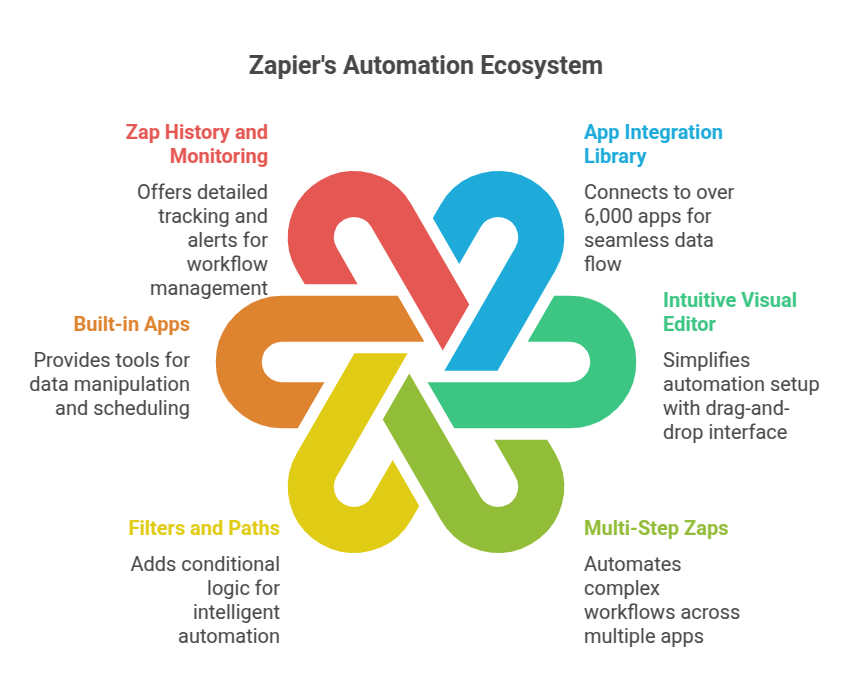
So, what makes Zapier the go-to for no-code workflow automation?
It’s the features that strip away the complexity and just make things work.
- Huge App Integration Library:
This is the big one. Zapier connects to over 6,000 apps.
This isn’t some limited list.
We’re talking Google Workspace, Slack, Mailchimp, HubSpot, Salesforce, Stripe, Trello, Asana, social media platforms… you name it, it’s probably there.
This vast library means you’re not limited by the tools you already use.
You can connect almost any part of your business process.
This is crucial for true workflow automation.
It prevents data silos and makes your tools talk to each other seamlessly.
No need for custom code or expensive developers just to get two apps communicating.
- Intuitive Visual Editor:
Building a Zap is drag-and-drop simple.
You don’t need to understand code or APIs.
The interface guides you through setting up your trigger and actions.
You select the apps, define the trigger event, and then specify the actions you want to happen.
Mapping data between apps is visual and straightforward.
This empowers anyone to build automations.
Not just tech wizards.
It democratises automation.
You can see your workflow taking shape step-by-step.
Easy to build, easy to understand, easy to modify.
- Multi-Step Zaps:
Most workflows aren’t just one step.
Something happens here, then that data goes there, then another thing happens based on that.
Zapier handles this with multi-step Zaps.
A single trigger can kick off a chain of actions across multiple apps.
For instance, a new order in your e-commerce store (Trigger).
Action 1: Add the customer to your CRM.
Action 2: Send a notification to your shipping team in Slack.
Action 3: Add the order details to a Google Sheet for tracking.
Action 4: Send a confirmation email to the customer via Mailchimp.
All automated. From one trigger.
This lets you automate complex business processes end-to-end.
Saves massive amounts of time and reduces errors.
- Filters and Paths:
Not every trigger should lead to every action.
Sometimes you only want a Zap to run if certain conditions are met.
Zapier’s Filters allow you to set criteria.
For example, only run this Zap if the lead source is “Facebook Ad.”
Or only process this email if the subject line contains “URGENT.”
Paths take this further, allowing different outcomes based on conditional logic.
If Condition A is met, take Path 1.
If Condition B is met, take Path 2.
This adds intelligence and flexibility to your automations.
It means your Zaps can handle real-world complexity, not just simple linear tasks.
- Built-in Apps (Formatters, Filters, Delays, etc.):
Beyond connecting apps, Zapier has its own tools to manipulate data.
Formatters can clean up text, dates, or numbers.
Filters, as mentioned, control when Zaps run.
Delays can pause a Zap for a set time, useful for drip campaigns or follow-ups.
Scheduled Triggers let you run Zaps at specific intervals.
These built-in tools make your Zaps smarter and more powerful.
They allow you to prepare data correctly before sending it to the next app.
Essential for reliable automation.
- Zap History and Monitoring:
Once your Zaps are running, you need to know they’re working.
Zapier provides detailed history of every time a Zap runs.
You can see if it succeeded or failed.
If there’s an error, it shows you exactly what went wrong.
This makes troubleshooting easy.
You get alerts for failed Zaps.
Allows you to fix issues quickly and keep your workflows running smoothly.
Peace of mind that your automations are doing their job.
Benefits of Using Zapier for Automation and Integration
Why bother with automation anyway?
What’s the real payoff for putting in the effort with a tool like Zapier?
It boils down to a few key things.
Saving Time (Massive Time Savings):
This is the most obvious one.
Think about all the repetitive tasks you do daily or weekly.
Copying data, sending standard emails, posting updates, scheduling content.
These minutes add up. Hours. Days. Weeks.
Automating them frees up that time.
Time you can spend on higher-value work.
Thinking, strategizing, creating, selling.
The stuff that actually grows your business.
Stop being a digital data mover.
Be a strategist. A creator.
Zapier gives you that time back.
Reducing Errors (Increased Accuracy):
Humans make mistakes.
Especially when doing repetitive, boring tasks.
Fatigue sets in. Typos happen. Wrong data gets copied.
Automated systems don’t get tired.
Once a Zap is set up correctly, it performs the task the exact same way, every time.
This drastically reduces human error.
Data is transferred accurately. Processes run correctly.
This is critical for things like sales leads, customer data, order processing, and financial tracking.
Accuracy builds trust and prevents costly screw-ups.
Improving Productivity (Doing More with Less):
When tasks are automated, your team (or you) can handle more.
You’re not bottlenecked by manual processes.
Leads get followed up faster.
Customers get responses quicker.
Projects move forward without waiting for someone to manually update a spreadsheet.
This means you can handle a higher volume of work.
Scale your operations without proportionally increasing headcount just to handle admin.
That’s serious leverage.
Connecting Disparate Systems:
Modern businesses use a bunch of different software.
They often don’t talk to each other natively.
This creates silos.
Data is stuck in one place.
You lose visibility. Processes break down.
Zapier acts as the universal translator.
It lets your CRM talk to your email marketing, your project management talk to your calendar, your forms talk to your spreadsheets.
It unifies your operations.
This connectivity is essential for a smooth, efficient workflow.
It gives you a single view of your data (or makes it easy to compile one).
Enabling No-Code Innovation:
Before tools like Zapier, automating complex tasks often required developers.
That meant high costs, long wait times, and needing technical expertise.
No-code automation changes this.
Business users, marketers, operations managers – anyone can build powerful automations.
You don’t need to learn to code.
This means you can experiment, iterate, and deploy automations much faster.
It empowers non-technical people to solve technical problems.
This speeds up innovation within your company.
You can react faster to changing needs.
Build custom workflows that fit your exact process.
Without waiting for the dev team.
This is a massive competitive advantage.
These benefits aren’t theoretical. They’re real, tangible results you see almost immediately.
Less busywork, more impact.
Pricing & Plans
Okay, so how much does this magic box cost?
Zapier isn’t the cheapest tool on the block, but it’s far from the most expensive, especially compared to the value it provides (or the cost of hiring someone to do the manual work).
They have a tiered pricing model based on the number of tasks you run and the complexity of your Zaps.
Yes, they have a Free Plan.
This is great for trying it out or for very light automation needs.
The free plan is limited.
You get 5 Zaps (meaning 5 different automated workflows).
These can only be single-step Zaps (one trigger, one action).
You get 100 tasks per month. A task is counted every time a step in your Zap successfully completes an action.
So, if you have a Zap that sends an email when you get a new form submission, and you get 10 new submissions, that’s 10 tasks used.
For serious automation, the free plan won’t cut it for long.
Their paid plans unlock the real power.
Plans typically start with the “Starter” plan, then “Professional,” “Team,” and “Company.”
As you move up, you get:
More tasks per month (from 750 up to millions).
The ability to create Multi-Step Zaps (essential for complex workflows).
Access to premium apps (some apps require a paid Zapier plan to connect).
Filters and Paths (conditional logic).
Auto-replay for failed tasks (Zapier automatically tries failed tasks again).
Faster Zap run times (Zaps check for new data more frequently).
Team accounts and admin features for collaboration.
The cost increases with the number of tasks and features.
It’s a scalable model.
You pay for what you use, essentially.
How does it compare to alternatives?
Other automation platforms exist, like Make (formerly Integromat), Microsoft Power Automate, and specific app-native automations.
Make is often cited as a direct competitor, sometimes seen as more powerful for complex logic, but arguably with a steeper learning curve than Zapier’s core interface.
Microsoft Power Automate is strong if you’re already heavily invested in the Microsoft ecosystem.
Native app automations are limited to just that specific app or a few direct connections.
Zapier’s strength lies in its vast app library, ease of use for beginners, and scalability from simple Zaps to complex multi-step workflows.
Is it worth the money?
If you’re spending even a few hours a month on repetitive tasks that Zapier could automate, the answer is almost certainly yes.
Calculate your hourly rate.
Multiply it by the hours you spend on manual work.
Compare that number to Zapier’s monthly cost.
The ROI is often immediate and significant.
Hands-On Experience / Use Cases
Enough theory. How does this actually play out in the real world?
I’ve used Zapier for years across different businesses and projects.
It’s a game-changer.
Let’s look at a few common scenarios where Zapier shines for no-code workflow automation.
Lead Management and Sales Follow-up:
Imagine you run ads or have forms on your website.
New leads come in.
Manual process: Get email notification, copy details, paste into CRM, maybe add a reminder to follow up. Time-consuming. Easy to miss leads.
Zapier workflow:
Trigger: New form submission (e.g., Typeform, Google Forms, HubSpot).
Action 1: Create a new contact in your CRM (e.g., HubSpot, Salesforce, Pipedrive).
Action 2: Add the lead to a specific email sequence in your email marketing tool (e.g., Mailchimp, ActiveCampaign).
Action 3: Send a notification to your sales team in Slack with the lead details.
Action 4: Create a task in your project management tool (e.g., Asana, Trello) to follow up.
Result: Leads are captured instantly, added to your sales pipeline, nurtured automatically, and your team is notified without anyone lifting a finger. Faster follow-up means higher conversion rates. Zero leads fall through the cracks.
Social Media Posting and Content Distribution:
Creating content is hard enough. Distributing it shouldn’t be a manual chore.
Manual process: Write blog post, copy text, download images, upload to Facebook, Instagram, LinkedIn, Twitter, format everything… takes ages.
Zapier workflow:
Trigger: New item in your RSS feed (when a new blog post is published).
Action 1: Create a new social media post on Twitter with a link to the article.
Action 2: Create a draft post on Facebook (or publish directly).
Action 3: Add the article link and title to a spreadsheet for tracking.
Bonus: Use a Delay step.
Action 4 (after Delay): Post a reminder about the article on LinkedIn a few days later.
Result: Your new content is automatically shared across your social channels. Saves significant time. Ensures consistent distribution. You can focus on creating the next piece.
E-commerce Order Processing:
Every order means data entry, communication, and logistics.
Manual process: Get order email, copy customer details, add to shipping software, update inventory spreadsheet, send confirmation email… prone to errors.
Zapier workflow:
Trigger: New order in Shopify (or WooCommerce, Stripe, etc.).
Action 1: Add customer details to your email list (e.g., for future marketing).
Action 2: Create a shipping label in your shipping software (e.g., ShipStation).
Action 3: Update your inventory management system.
Action 4: Send a custom order confirmation email to the customer.
Result: Order processing is automated from sale to shipping. Reduces manual data entry, improves accuracy, speeds up fulfillment, and keeps customers informed automatically.
Streamlining Internal Operations:
Internal tasks can be the biggest time sinks.
Manual process: Someone requests time off via email, manager approves, someone manually updates a shared calendar, notifies payroll…
Zapier workflow:
Trigger: New entry in a “Time Off Request” Google Form.
Action 1: Send an approval request to the manager via email or Slack.
Action 2 (Conditional – runs only if approved): Add the time off dates to a shared Google Calendar.
Action 3 (Conditional – runs only if approved): Notify the payroll department via email or a task in their system.
Result: Time off requests are submitted, approved, and recorded automatically based on simple form submission and manager approval. Standardizes the process and saves HR/admin time.
These are just a few examples. The possibilities are almost endless because of the sheer number of apps Zapier connects.
It’s about identifying repetitive tasks and seeing if Zapier has integrations for the apps involved.
Chances are, it does.
Who Should Use Zapier?
Alright, who exactly benefits most from this?
Is it only for massive corporations with dedicated tech teams?
Absolutely not.
Zapier is built for anyone who uses multiple online tools and wants them to work together seamlessly.
Small Business Owners:
If you’re running a small business, you’re probably wearing many hats.
Sales, marketing, customer service, operations, maybe even HR.
Manual, repetitive tasks eat up your limited time.
Zapier is like hiring an invisible, tireless assistant for cheap.
It automates lead capture, customer follow-up, social media posting, order notifications, and much more.
Frees you up to focus on growing the business, not managing spreadsheets.
Marketers:
Marketers deal with mountains of data and a constant need for timely communication.
Lead generation forms, email list management, social media scheduling, data tracking in spreadsheets, connecting ad platforms to CRMs.
Zapier automates these flows.
Get new leads from Facebook Ads into your email list automatically.
Post blog updates to social media.
Sync webinar registrations to your CRM.
Track campaign performance data in a central location.
Saves hours every week and ensures marketing processes run like clockwork.
Sales Teams:
Sales needs speed and accurate data.
Getting leads into the CRM quickly is critical.
Automating follow-up tasks.
Notifying the right salesperson based on lead criteria.
Updating deal stages across different tools.
Zapier connects your lead sources (website forms, landing pages, social media) directly to your CRM and communication tools.
Reduces manual data entry for sales reps, giving them more time to sell.
Ensures leads are actioned faster.
Freelancers & Consultants:
Managing clients, projects, invoices, and marketing your own services is a lot for one person.
Automate client onboarding emails.
Send proposals from a proposal tool to your project management board.
Track hours in one app and create invoice drafts in another.
Post service updates to social media automatically.
Zapier makes you look more professional and efficient, even when you’re a one-person show.
Saves time on administrative tasks, freeing you up for billable hours.
Agencies:
Agencies manage multiple clients, each with potentially different tool stacks.
Getting data from client systems into your own tools is a headache.
Reporting requires pulling data from various sources.
Zapier allows agencies to connect their tools (project management, reporting, CRM) to their clients’ tools (analytics, ad platforms, e-commerce).
Automate reporting data collection.
Streamline client onboarding and communication workflows.
Manage tasks and approvals across different client accounts.
Improves efficiency, reduces manual reporting work, and allows agencies to take on more clients without proportionally increasing overhead.
Anyone doing repetitive digital tasks:
Seriously. If you find yourself doing the same copy-pasting, file saving, notification sending, or data moving more than a couple of times, there’s probably a Zap for it.
Students, educators, non-profits, internal teams in large companies (HR, Finance, IT) – automation benefits everyone.
If you’re tired of busywork, Zapier is your answer.
How to Make Money Using Zapier
Okay, let’s talk cash.
Beyond saving time (which is saving money), can you actually make money directly with Zapier?
Absolutely.
Here’s how people are doing it.
- Offering Zapier Automation Services:
Not everyone has the time or desire to set up their own automations, even with a no-code tool.
Businesses know they need automation but don’t know where to start.
This is where you come in.
Position yourself as a “Workflow Automation Specialist” or “Zapier Consultant.”
You offer services to analyse a business’s current manual processes.
Identify opportunities for automation using Zapier.
Design and build the Zaps for them.
Train their staff on how to maintain or use the automated workflows.
You can charge an hourly rate or a project-based fee.
Demand for this is growing rapidly as businesses realize the value of efficiency.
Focus on specific niches (e.g., e-commerce automation, marketing automation for small businesses, real estate agent workflows).
Showcase case studies of how you saved clients X hours or $Y by implementing Zapier.
- Building and Selling Pre-Built Zaps or Templates:
If you identify common automation needs across many businesses in a specific industry, you can build pre-configured Zap templates.
While Zapier has a template library, you can create more specific or complex ones.
Package these up and sell them.
Or create guides and tutorials on setting up specific workflows (e.g., “Automate Your Lead Follow-up with HubSpot and Slack”).
Charge for the template file or access to premium documentation.
This is more of a productized service model.
Scalable if you can build templates that many people need.
- Integrating Zapier into Your Existing Services:
If you’re already a marketing agency, web developer, or virtual assistant, add Zapier automation as an upsell or core part of your offering.
Building a website for a client? Offer to set up automations for their contact form or e-commerce store using Zapier.
Managing social media? Use Zapier to automate posting and content curation.
Offering administrative support? Automate data entry or reporting tasks for clients.
This adds significant value to your existing services and allows you to charge more.
It makes you a more valuable partner to your clients.
- Creating Content and Education Around Zapier:
Become an expert and teach others.
Start a blog, YouTube channel, or online course focused on Zapier and no-code automation.
Share tips, tutorials, use cases, and best practices.
Monetize through ads, affiliate marketing (Zapier has an affiliate program), selling your own courses or premium content.
Build an audience interested in automation and integration.
Your expertise becomes the product.
Case Study Example (Simulated):
“Meet Sarah. She used to spend 10 hours a week manually transferring leads from LinkedIn Sales Navigator into her client’s Pipedrive CRM, then sending introduction emails. It was mind-numbing work. She discovered Zapier. She built a Zap that triggers when a new connection is accepted on LinkedIn, pulls their data, creates a contact in Pipedrive, and sends a personalized email using data from Pipedrive.
This Zap takes 5 minutes to set up and runs automatically. It saves her client (and her) 9.5 hours a week on this single task. Sarah now charges a premium for this ‘Automated Lead Workflow’ service, bundling Zapier setup into her overall consulting fee. She’s replicated this for 5 clients, adding significant recurring revenue just by implementing efficient workflows they couldn’t build themselves. That’s the power of becoming a Zapier expert.”
Making money with Zapier isn’t about selling the tool itself, but selling the outcome: efficiency, time savings, and streamlined processes. Businesses pay good money for that.
Limitations and Considerations
Nothing is perfect, right?
While Zapier is incredibly powerful, there are a few things to keep in mind.
Complexity of Workflows:
While the visual editor is easy for basic Zaps, building truly complex multi-step workflows with lots of conditional logic (Paths and Filters) can still be challenging.
It requires careful planning and testing.
You need to think through every possible scenario and data point.
Debugging can sometimes be tricky, although Zapier’s history and error reporting help.
For incredibly intricate, enterprise-level integrations, you might still need a more powerful (and complex) integration platform or custom code.
But for 90% of business needs, Zapier is more than capable.
Cost Scalability:
The pricing scales with tasks.
If your automations become wildly successful and trigger millions of tasks, the cost can add up.
It’s still likely cheaper than paying humans to do the work, but it’s an operational cost you need to monitor.
It’s important to build efficient Zaps and use Filters to avoid unnecessary task usage.
Understand how tasks are counted for your specific workflows.
App API Limitations:
Zapier relies on the APIs provided by the apps it connects to.
The specific triggers and actions available for an app are determined by its developer and their Zapier integration.
Sometimes, the exact trigger or action you need for a specific workflow might not be available for a particular app.
Or the data Zapier can pull from or send to an app might be limited by that app’s API.
You might need to find workarounds or use intermediate apps.
Always check the available triggers and actions for the apps you plan to connect *before* committing to a workflow.
Learning Curve (for advanced features):
Basic Zaps are easy.
But mastering multi-step Zaps, Filters, Paths, and using Zapier’s built-in utilities effectively requires a bit of a learning curve.
It’s not “hard” in the sense of needing a degree, but it requires logical thinking and practice.
You need to understand how data flows between apps.
Zapier provides great documentation and support, but expect to spend some time learning if you want to build sophisticated automations.
Dependency on External Services:
Your automations rely on Zapier’s service and the services of the apps you connect.
If Zapier goes down, or one of the apps you’re using has an outage, your Zaps won’t run.
Zapier is generally very reliable, but external dependencies are always a consideration.
Have manual backup processes for critical workflows, just in case.
Despite these considerations, for most businesses and individuals, the benefits of Zapier far outweigh the limitations. It solves a core problem – getting apps to work together – in a way that’s accessible and powerful.
Final Thoughts
Look, time is the most valuable thing you have.
Spending it on mind-numbing, repetitive digital tasks is a waste.
It’s literally costing you money and energy that could be used to grow, create, or just live your life.
Zapier is more than just an automation tool.
It’s a productivity multiplier.
It’s a way to leverage technology without becoming a programmer.
It’s the backbone of effective Automation and Integration in the no-code world.
If you’re still manually moving data between apps…
If you’re sending the same emails over and over…
If your team is bogged down in administrative tasks…
You need to look at Zapier.
Start with the free plan. Identify one simple, repetitive task you do every week. Find the apps involved. See if Zapier connects them. Build that first Zap.
See the time it saves you.
Then find the next task. And the next.
Slowly, you’ll build a web of automations that handle the grunt work.
This isn’t just about efficiency; it’s about building a better business.
A business that runs smoothly.
A business where people focus on what they’re best at.
A business that scales without breaking.
That’s the promise of Zapier for No-Code Workflow Automation.
And it delivers.
Stop wasting time. Start automating.
Visit the official Zapier website
Frequently Asked Questions
1. What is Zapier used for?
Zapier is used to automate tasks between different online apps. It connects thousands of web applications, allowing them to share data and trigger actions automatically without requiring code.
2. Is Zapier free?
Zapier offers a free plan with limited features (5 single-step Zaps, 100 tasks/month). For more complex workflows and higher usage, paid plans are available.
3. How does Zapier compare to other AI tools?
Zapier isn’t primarily an AI content generation tool. It’s an automation and integration platform. While it can connect *to* AI tools (like ChatGPT for automation workflows), its core function is connecting different apps and automating tasks, rather than generating content or analysis itself. Tools like Make (Integromat) are direct competitors in the automation space.
4. Can beginners use Zapier?
Yes, absolutely. Zapier’s visual editor is designed to be intuitive for beginners. Building simple, single-step Zaps is straightforward and requires no technical background. More advanced features have a learning curve, but are still accessible to non-developers.
5. Does the content created by Zapier meet quality and optimization standards?
Zapier itself doesn’t “create content” in the writing sense. It automates actions. For example, it can automate posting existing blog content to social media or saving form submissions. If you connect it to a content generation AI tool, the quality of the output depends on that AI tool, not Zapier. Zapier ensures the automated process runs correctly.
6. Can I make money with Zapier?
Yes, you can make money by offering Zapier setup and consulting services to businesses, building and selling automation templates, integrating Zapier automation into your existing professional services, or creating educational content about using Zapier.




