
Boomi streamlines API Integration, empowering businesses to connect systems effortlessly. Discover how Boomi transforms automation workflows and boosts efficiency. Get started now!
Why Boomi Is a Game-Changer in API Integration
Ever feel like your tech stack is more of a tangled mess than a well-oiled machine?
You’re not alone.
In the world of Automation and Integration, things are moving faster than ever. AI isn’t just a buzzword; it’s becoming the backbone of how businesses operate.
But here’s the kicker: for AI to truly shine, your systems need to talk to each other. Seamlessly.
That’s where API Integration comes into play. It’s the circulatory system of your digital enterprise. If it’s clogged, everything slows down.
And that’s why we need to talk about Boomi.
This isn’t just another tool; it’s a strategic asset that’s changing the game for countless businesses. If you’re serious about scaling, about cutting wasted effort, and about getting your systems to sing in harmony, you need to pay attention.
Let’s dive in and see how Boomi can transform your operations.
Here’s a quick roadmap of what we’re covering:
What is Boomi?
So, what exactly is Boomi? Think of it as the ultimate translator and connector for your software applications.
It’s a cloud-native, low-code platform designed to connect virtually any combination of applications, data, and devices. This isn’t just about moving data from A to B; it’s about making sure A and B can understand each other perfectly, without needing a custom dictionary every time.
Boomi operates on what’s called an Integration Platform as a Service (iPaaS) model. What does that mean for you? It means all the heavy lifting of managing servers, software, and updates is handled for you in the cloud. You just focus on connecting your stuff.
Their core offering, Boomi AtomSphere, is where the magic happens. It’s a unified platform that offers a suite of capabilities, from application and data integration to API management, workflow automation, and data synchronisation.
Who is it for? Anyone struggling with disconnected systems. Large enterprises with complex IT structures, growing businesses trying to scale without hiring an army of developers, or even small teams looking to make their existing tools work harder.
If your sales CRM doesn’t talk to your ERP system, or your marketing automation platform is an island, Boomi is built to bridge those gaps. It empowers business users and IT professionals alike to build integrations faster, with less code, and less headache.
It effectively turns integration from a developer-intensive bottleneck into a manageable, even agile, process. This frees up your expensive dev resources to work on innovation, not just keeping the lights on.
It’s about making your entire digital presence more cohesive and responsive. It’s about getting your systems to collaborate, which means your business can, too.
Key Features of Boomi for API Integration
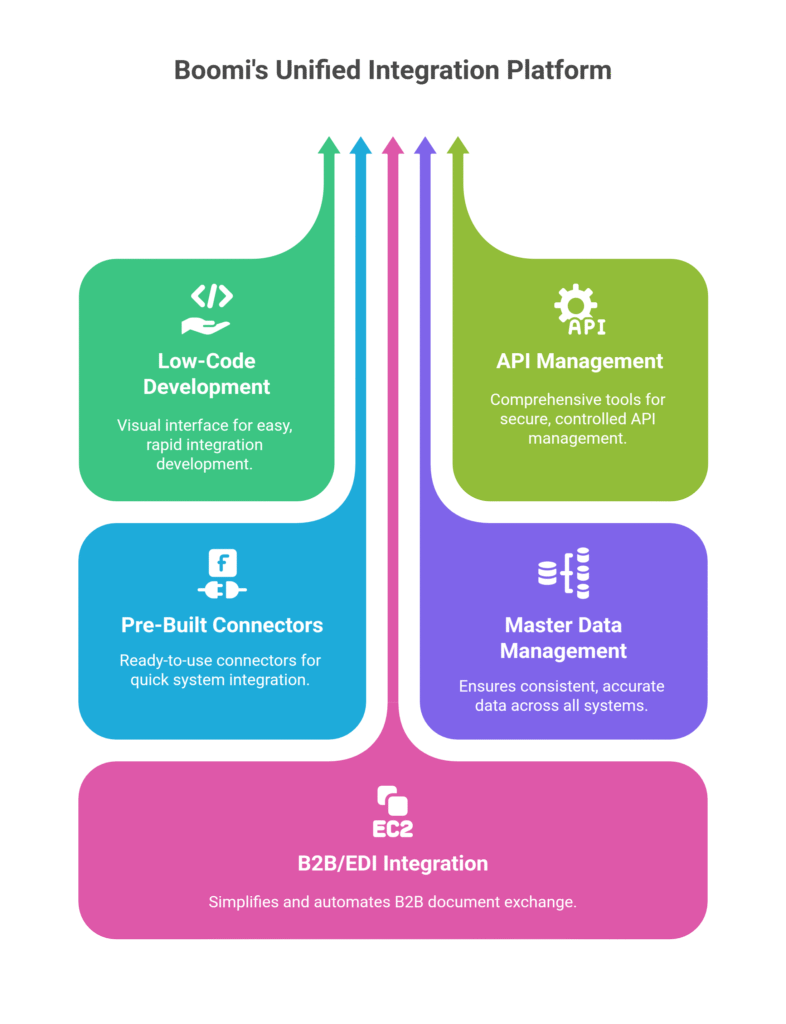
- Low-Code Development Environment:
This is a game-changer. Boomi provides a visual, drag-and-drop interface. You don’t need to be a coding wizard to build complex integrations. This means your business analysts, your power users, even someone with a solid understanding of your business processes, can contribute to building and managing integrations. It democratises API Integration. This speeds up projects massively. You’re not waiting for a developer to have a free slot; you’re building it yourself, or at least having a much more efficient conversation with IT. Imagine getting a new SaaS tool and connecting it to your existing systems in days, not months. That’s the power here. This feature drastically reduces the time and cost associated with developing and deploying new integrations.
- API Management:
Boomi doesn’t just connect APIs; it helps you manage them. This covers everything from designing, publishing, and securing your APIs to monitoring their performance. If you’re exposing your business data or services through APIs, you need robust management. Boomi provides the tools to create a single point of control for all your APIs, whether internal, external, or partner-facing. This is critical for security and governance. You can set policies, manage access, and ensure that only authorised applications or users are interacting with your valuable data. Without proper API management, you’re essentially building a house with no doors or locks. Boomi provides the framework to build securely.
- Pre-Built Connectors and Accelerators:
Time is money, right? Boomi offers a huge library of pre-built connectors for popular applications like Salesforce, SAP, NetSuite, Workday, and many more. This isn’t just a convenience; it’s a massive head start. Instead of writing custom code to talk to each system, you pick a connector, configure it, and you’re good to go. These connectors are maintained and updated by Boomi, so you don’t have to worry about an API changing and breaking your integration. This accelerates your time to value. It also means you can onboard new applications much faster, reacting quickly to market changes or internal business needs. It’s like having a universal adapter for all your digital plugs.
- Master Data Management (MDM):
Data quality is paramount. If your customer records are inconsistent across different systems – a different address in your CRM versus your invoicing system – you’ve got problems. Boomi MDM helps you create a single, authoritative view of your critical business data. It’s about ensuring data accuracy, consistency, and completeness across your entire enterprise. This isn’t just a technical fix; it’s a business imperative. Accurate data leads to better decisions, improved customer experiences, and reduced operational errors. Imagine knowing for sure that every department is working with the same, correct customer information. That’s what MDM delivers, providing a foundation for reliable integration.
- B2B/EDI Integration:
For businesses that exchange documents with partners, suppliers, or customers via Electronic Data Interchange (EDI), Boomi has a dedicated solution. It simplifies the complexities of traditional EDI, moving it to the cloud. You can exchange purchase orders, invoices, shipping notices, and other critical business documents without the headaches of legacy systems. This is huge for supply chain management and partner collaboration. It standardises communication, reduces manual entry errors, and accelerates business processes that involve external parties. It allows you to automate interactions that were previously manual and prone to errors, saving immense time and money.
Benefits of Using Boomi for Automation and Integration
Okay, so we’ve covered what Boomi is and its features. But what does that actually mean for your business? How does it stack up when it comes to the real benefits of using Boomi for Automation and Integration? Let’s break it down.
First off, Speed to Market. This is massive. If you’re launching a new product, acquiring another company, or rolling out a new service, you need your systems to adapt quickly. Traditional integration methods are slow, often taking months. With Boomi’s low-code approach and pre-built connectors, you can get integrations up and running in a fraction of the time. This means you can react faster to market demands, seize opportunities, and beat your competition. Every day saved is revenue earned or an advantage gained.
Next, Reduced Costs. This isn’t just about saving on development hours, though that’s a big part of it. It’s also about cutting down on maintenance, infrastructure, and troubleshooting. Because Boomi is cloud-native, you don’t need to invest in expensive hardware or dedicated IT teams to manage complex integration servers. The visual interface means fewer highly-paid developers are needed for routine tasks. Plus, better integration reduces errors, which means less time spent fixing mistakes, less data reconciliation, and fewer operational hiccups. This directly impacts your bottom line.
Then there’s Improved Data Quality and Reliability. Disjointed systems lead to messy data. Different versions of customer records, inconsistent product information, or sales data that doesn’t match financial records – it’s a nightmare. Boomi’s Master Data Management capabilities help you establish a single source of truth for your critical data. This means better reporting, more accurate analytics, and more reliable decision-making. If your data is clean and consistent, every part of your business runs smoother. It’s the foundation for any serious data-driven strategy.
Another key benefit is Enhanced Scalability and Flexibility. As your business grows, so do your integration needs. Boomi is built to scale. You can add new applications, connect more partners, or handle increased data volumes without having to re-architect your entire integration landscape. Its cloud architecture means it can handle spikes in demand effortlessly. This flexibility also means you can easily swap out old systems for new ones without disrupting your entire operation, keeping your tech stack agile and future-proof.
Finally, Better Business Insights and Decision Making. When all your systems are connected and your data is flowing freely and accurately, you gain a holistic view of your business. Sales, marketing, finance, operations – all departments can access the information they need, when they need it. This enables better analysis, identifies trends, and supports more informed strategic decisions. You move from reacting to problems to proactively identifying opportunities, because your data is finally telling a complete story. It’s about empowering your teams with the information they need to win.
Pricing & Plans
Alright, let’s talk money. Because at the end of the day, any tool, no matter how powerful, needs to make financial sense. Boomi’s pricing model isn’t a one-size-fits-all, off-the-shelf deal you can just add to cart. It’s built for enterprise, meaning it’s typically customised based on your specific needs, the number of integrations you require, the complexity, and the volume of data processed.
There isn’t a simple “free plan” for Boomi in the way you might find for a consumer-facing app. However, they do offer a free trial. This is usually a time-limited access to their platform, allowing you to build and test some integrations to see if it fits your requirements before committing. This is crucial for evaluating its capabilities with your actual data and systems.
The premium versions, or rather, the standard licensing agreements, typically involve a subscription model. This generally includes access to the full suite of Boomi capabilities: AtomSphere for integration, API Management, Master Data Management, B2B/EDI integration, and Flow for workflow automation. The cost will depend on factors like:
- The number of connections or “endpoints” you need.
- The volume of data processed through the platform.
- The specific modules you activate (e.g., just integration, or the full suite including MDM and Flow).
- The level of support and services you require.
Compared to alternatives, Boomi often positions itself against other iPaaS providers like MuleSoft (now part of Salesforce), Dell Cloud Integration, and SnapLogic. While these tools also offer robust integration capabilities, Boomi often highlights its ease of use, low-code approach, and unified platform as differentiators. Some alternatives might be cheaper upfront for simpler, point-to-point integrations, but Boomi’s value often shines in its ability to handle complex, enterprise-wide integration strategies without custom coding.
For a small business with very basic integration needs (e.g., connecting two SaaS apps with pre-built connectors), Boomi might seem like overkill or too expensive. However, for any business dealing with multiple systems, growing data volumes, or a need for centralised API management, the investment in Boomi often pays dividends by significantly reducing development time, maintenance costs, and operational inefficiencies.
My advice? Don’t assume anything without talking to their sales team. Provide them with your specific use cases and integration challenges. They can then build a custom quote that truly reflects the value you’ll get. The initial investment might seem significant, but consider the long-term savings from faster projects, fewer errors, and a more agile IT infrastructure. It’s about total cost of ownership, not just the sticker price.
Hands-On Experience / Use Cases
Alright, let’s get real. What does using Boomi actually feel like? I’ve seen this platform transform situations that previously felt like hitting your head against a brick wall.
Imagine this scenario: a growing e-commerce business. They’re using Shopify for their store, NetSuite for ERP and accounting, and Salesforce for CRM. Sales data from Shopify needs to sync with NetSuite for order processing and inventory updates. Customer data from both Shopify and NetSuite needs to update Salesforce to give sales and marketing teams a complete customer view. Manually, this is a nightmare. Errors, delays, angry customers because inventory is wrong or an order didn’t process.
Enter Boomi.
The first thing you notice is the visual canvas. It’s clean. You drag and drop connectors for Shopify, NetSuite, and Salesforce. Then, you visually map the data fields between them. For instance, customer name in Shopify maps to customer name in Salesforce. Order ID in Shopify maps to order ID in NetSuite. No code. Just pointing and clicking.
When an order comes in on Shopify, Boomi can trigger a process. It pulls the order details, transforms them into the format NetSuite expects, and pushes the data. It then updates inventory in NetSuite. Simultaneously, it can check if the customer already exists in Salesforce or create a new record, adding the order history.
What’s the result?
- Near real-time data synchronisation: Orders flow almost instantly, inventory is always accurate.
- Reduced errors: Automated mapping means fewer typos and inconsistencies than manual data entry.
- Improved customer experience: Orders are processed faster, customer service has all the information at their fingertips.
- Massive time savings: No more manual data export/import, no more reconciliation spreadsheets. Teams can focus on selling and serving customers, not on data entry.
Another classic use case: a large organisation with a legacy on-premise ERP system and a new cloud HR system. Getting them to talk? Traditionally, that’s a custom code nightmare, weeks of development, and brittle integrations.
With Boomi, you deploy a “Boomi Atom” (a lightweight runtime engine) on-premise, which securely connects to your legacy system. Then, from the cloud-based AtomSphere platform, you build the integration to the cloud HR system. Employee data, payroll details, leave requests – they all flow securely and reliably. The low-code interface means the integration team can build and test this much faster. The result is better data for HR, accurate payroll, and a much smoother employee experience.
Usability is high. If you understand your data and business processes, you can get a lot done without deep technical knowledge. For more complex transformations or logic, there are still options for scripting, but a significant portion of the work is visual. It truly simplifies what used to be a highly technical and time-consuming process. The results speak for themselves: faster project delivery, happier teams, and a more connected, efficient business.
Who Should Use Boomi?
Okay, so Boomi’s powerful. But who is it really for? Who gets the most bang for their buck from this platform?
First up: Mid-sized to Large Enterprises. If you’ve got multiple departments, dozens of software applications (CRM, ERP, HRIS, marketing automation, data warehouses), and a growing need for those systems to exchange data seamlessly, Boomi is built for you. You’re past the point where simple point-to-point integrations suffice, and you need a robust, scalable platform.
Next, Businesses Undergoing Digital Transformation. If your company is moving from on-premise legacy systems to cloud-based applications, or integrating newly acquired companies with disparate IT infrastructures, Boomi acts as the critical bridge. It simplifies the complex migration and integration challenges that come with such transformations, reducing risk and accelerating project timelines.
Then there are Organisations with Complex Supply Chains or Partner Ecosystems. If you frequently exchange data with suppliers, distributors, or other business partners (think EDI, B2B data exchange), Boomi’s B2B/EDI capabilities can be a lifesaver. It automates these exchanges, reduces manual errors, and improves efficiency in your external collaborations.
Also, IT Departments Looking for Efficiency and Self-Service. If your IT team is constantly bogged down with integration requests, Boomi’s low-code interface can empower business users to build and manage simpler integrations themselves, freeing up your skilled developers for more strategic work. It shifts the paradigm from IT being a bottleneck to being an enabler.
And finally, Businesses Focused on Data Quality and Governance. If consistent, accurate data across your enterprise is a priority (and it should be!), Boomi’s Master Data Management (MDM) module is invaluable. It ensures a single source of truth for critical business entities like customers, products, and employees, leading to better decision-making and compliance.
Who might NOT be the ideal fit? Very small businesses with only two or three simple SaaS applications that offer direct integrations (e.g., a simple Zapier connection might be enough). For them, Boomi might be overkill. But for anyone looking to build a truly connected, agile, and scalable digital business, Boomi offers a comprehensive and powerful solution. It’s an investment in future-proofing your operations.
How to Make Money Using Boomi
Alright, let’s talk brass tacks: how do you actually turn Boomi into a revenue generator? This isn’t just about saving money on integration costs, though that’s a big win. It’s about creating new income streams and boosting existing ones.
- Offering Integration as a Service (IaaS):
Many businesses, especially small to medium-sized ones, struggle with integrating their various software systems. They might not have the in-house expertise or the budget for full-time integration specialists. This is where you step in. You can establish a consulting or service business focused purely on helping clients connect their systems using Boomi. This could involve integrating their CRM with their ERP, automating data flow between marketing platforms, or setting up B2B integrations with their partners. You charge for your time, expertise, and the value of a seamlessly connected business. It’s a huge market.
- Developing and Selling Pre-Built Connectors/Templates:
While Boomi has a vast library of connectors, there are always niche applications or specific industry integration patterns that aren’t covered out of the box. If you identify a common integration need within a particular industry (e.g., connecting a specific niche e-commerce platform to a common accounting system), you could develop a pre-built Boomi integration package or template. You then sell this template to multiple businesses in that niche, offering it as a faster, more affordable alternative to custom development. This creates a scalable product.
- Improving Operational Efficiency for Existing Clients (and charging more for it):
If you’re already a consultant or service provider (e.g., an agency offering marketing, sales, or operational consulting), Boomi can significantly enhance your value proposition. By using Boomi to automate and integrate your clients’ systems, you dramatically improve their internal efficiency, reduce errors, and free up their staff. You can then charge a premium for these efficiency gains. For example, if you save a client 20 hours a week in manual data entry across departments by implementing a Boomi integration, you’ve delivered tangible financial value they’ll pay for. This isn’t just about adding a new service; it’s about making your existing services more impactful.
Let’s look at a quick example: Think about a systems integrator or a freelance consultant, Sarah. Sarah realised many of her small business clients were losing hours each week manually moving sales orders from their e-commerce platform into their accounting software. They couldn’t afford a large enterprise integration solution. Sarah learned Boomi, built a generic integration process for e-commerce to Xero/QuickBooks, and then started offering it as a managed service.
She charges a setup fee and a monthly recurring fee for maintenance and monitoring. By standardising her approach with Boomi, she can onboard new clients quickly. Her clients get automated processes, error reduction, and faster cash flow, while Sarah generates a solid recurring income. This is how you make real money: by solving painful problems for businesses with a powerful, scalable tool like Boomi. It’s about leveraging technology to create valuable outcomes for others, and getting paid for that value.
Limitations and Considerations
No tool is a silver bullet, and Boomi, while powerful, has its nuances. It’s important to understand these before you dive in.
First, the Learning Curve. While Boomi is touted as low-code and visually driven, it’s not a point-and-click solution for someone with zero technical aptitude. You still need to understand data structures, API concepts, integration patterns (like ETL vs. real-time), and your own business processes intimately. For someone completely new to integration concepts, there will be a significant learning phase. It’s easier than coding from scratch, but it’s not trivial. Expect to invest time in training and familiarisation, particularly for complex scenarios.
Next, Cost for Smaller Use Cases. As I mentioned in the pricing section, Boomi is an enterprise-grade platform. For very simple, two-app integrations or small businesses with limited budgets, the initial investment might seem steep. There are cheaper, simpler alternatives like Zapier or Integromat for basic automation tasks. If your needs are minimal and you’re not projecting significant growth in integration complexity or volume, Boomi might be overkill. You need to weigh the long-term scalability and power against the initial outlay.
Then there’s Debugging and Error Handling. While Boomi provides robust monitoring and error logging, diagnosing complex integration failures can still be challenging. If data is corrupt, or if an external API unexpectedly changes, pinpointing the exact cause and implementing a fix requires a systematic approach and a good understanding of the integration flow. It’s easier than sifting through lines of custom code, but it’s not always instantaneous. You need good processes for testing and validation.
Another consideration is Vendor Lock-in. Once you build a significant number of your core integrations on any iPaaS platform, including Boomi, you become somewhat dependent on that platform. Migrating these integrations to a different system later can be a massive undertaking. This is true for any comprehensive platform, but it’s something to consider when committing to a foundational technology like Boomi. Ensure the platform aligns with your long-term IT strategy.
Finally, Custom Connector Development. While Boomi has thousands of pre-built connectors, if you have a highly niche or proprietary system that isn’t covered, you’ll still need to build a custom connector. This will require developer resources and more traditional coding knowledge. Boomi offers tools to do this, but it removes the “low-code” advantage for that specific part of your integration landscape.
These aren’t deal-breakers, but they are points to consider as you evaluate whether Boomi is the right fit for your specific integration challenges and business strategy. It’s about being informed and realistic about implementation.
Final Thoughts
So, what’s the verdict on Boomi?
If you’ve stuck with me this far, you know this isn’t just another tool. It’s a strategic platform built to tackle one of the biggest headaches in modern business: getting your systems to talk to each other.
Boomi delivers on its promise. It genuinely simplifies complex API Integration, allowing businesses to connect applications, automate workflows, and manage data with a level of agility that was previously impossible without a massive army of developers. Its low-code approach, comprehensive API management, and robust MDM capabilities make it a true game-changer for digital transformation initiatives.
I recommend Boomi for any mid-sized to large enterprise that’s serious about optimising operations, improving data quality, and accelerating their digital strategy. If you’re drowning in manual data transfers, struggling with disconnected systems, or constantly waiting on IT for integration projects, Boomi is a powerful solution that will pay dividends.
It’s not for every tiny operation, but if your integration needs are growing in complexity and volume, the investment is justified by the significant time, cost, and error reductions it brings. It transforms a bottleneck into a competitive advantage.
My suggestion? Don’t just take my word for it. If you recognise your business in the use cases I outlined, take the next step.
Visit the official Boomi website and explore their solutions. Speak to their team, outline your specific challenges, and see how their platform can deliver tangible results for your business. It might just be the pivot you need to unlock your next level of growth and efficiency.
Frequently Asked Questions
1. What is Boomi used for?
Boomi is primarily used for integrating disparate software applications, automating workflows, managing APIs, and ensuring master data consistency across an enterprise. It helps businesses connect their various systems, whether they are on-premise or in the cloud.
2. Is Boomi free?
No, Boomi is not free. It is an enterprise-grade platform with a subscription-based pricing model. However, they do offer a free trial period, allowing users to test its capabilities before committing to a paid plan.
3. How does Boomi compare to other AI tools?
Boomi is an iPaaS (Integration Platform as a Service) that focuses on comprehensive integration and automation. While it leverages AI in some of its underlying processes for efficiency, it’s not an “AI tool” in the generative sense like ChatGPT or an AI content generator. It competes with other iPaaS providers like MuleSoft and SnapLogic, distinguishing itself with its low-code approach and unified platform for various integration needs.
4. Can beginners use Boomi?
While Boomi features a low-code, visual interface that simplifies integration, a basic understanding of data structures, APIs, and business processes is beneficial. Beginners in the context of integration will have a learning curve, but it’s significantly less steep than traditional hand-coding methods. Boomi provides training and resources to help users get started.
5. Does the content created by Boomi meet quality and optimisation standards?
Boomi does not “create content” in the same way a generative AI tool would. Instead, it moves, transforms, and manages data between systems. The “quality” it ensures relates to data accuracy, consistency, and reliability across integrated applications, which directly supports high-quality business operations and data-driven optimisation. It ensures that the data driving your business processes is accurate and timely.
6. Can I make money with Boomi?
Absolutely. You can make money with Boomi by offering integration as a service to clients, developing and selling niche integration templates, or by drastically improving operational efficiency within your own business or for existing clients, allowing you to take on more work or charge higher rates for the value delivered. It’s a tool that enables profitable service offerings and significant cost savings.