
Zapier for API Integration turns manual work into a profit-generating machine. Master these Automation and Integration workflows to scale faster. Get started today.
Zapier Is Built for Automation and Integration – Here’s Why
You have a business to run. You have goals to hit. Yet, you are stuck copying data from one spreadsheet to another. You are manually updating CRM entries. You are wasting hours on tasks that generate zero dollars. That is not how you win.
Speed is the only currency that matters in business. If your systems do not talk to each other, you are leaking money. You need a bridge between your apps. That bridge is Zapier.
This is not just about moving data. This is about building a system that runs while you sleep. When you master API Integration, you stop being a cog in your own machine. You become the architect.
What is Zapier?
Zapier is the engine room for your digital operations. It acts as a connector between thousands of web applications. If two apps have an API, Zapier can make them shake hands.
You define a trigger—an action that happens in one app. You define an action—the result that happens in another app. Zapier connects the two without you writing a single line of code. It is the shortcut for people who want results.
You do not need to be a developer. You do not need a massive IT budget. You just need to know what result you want. Zapier handles the logistics of the connection.
Think of it as a universal translator. One app speaks French, another speaks Japanese. Zapier makes sure the message gets through accurately every single time. It is the backbone of efficient operations.
Key Features of Zapier for API Integration
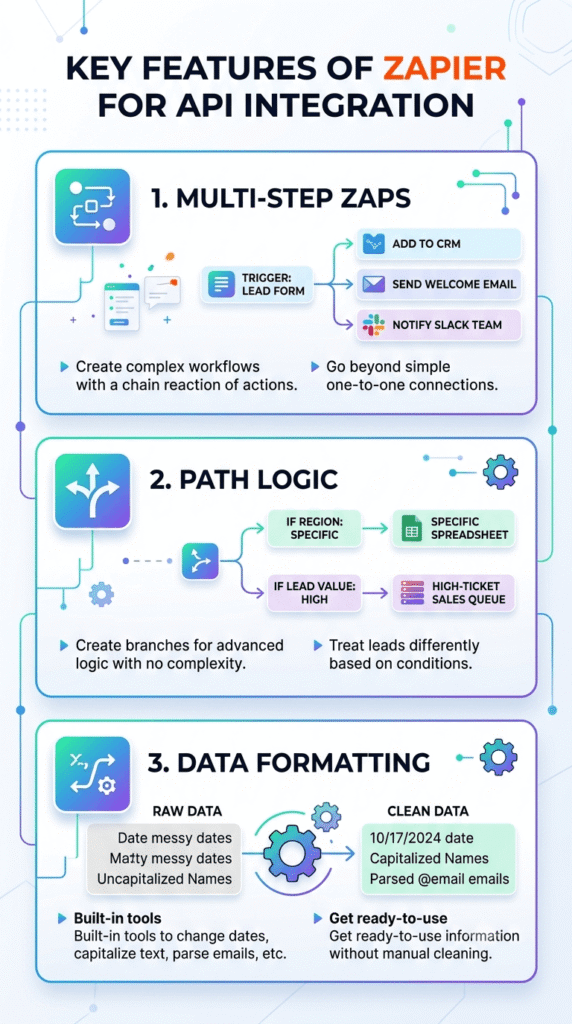
- Multi-Step Zaps: Most people stop at one-to-one connections. Do not do that. With multi-step workflows, you can trigger a chain reaction. A lead fills out a form, and Zapier adds them to your CRM, sends a welcome email, and notifies your team on Slack simultaneously.
- Path Logic: You do not want every lead treated the same way. Path logic lets you create branches. If the lead is from a specific region, route them to a specific spreadsheet. If the lead value is high, send them directly to your high-ticket sales queue. This is advanced logic without the complexity.
- Data Formatting: Raw data is often messy. Zapier includes built-in tools to change dates, capitalize text, or parse emails. You get clean, ready-to-use information delivered to your destination. No manual cleaning required.
Benefits of Using Zapier for Automation and Integration
The primary benefit is time recovery. Every minute you spend moving data manually is a minute you could spend closing deals or improving your product. You buy back your time.
Accuracy is the second win. Humans make mistakes when they type. Zapier does not. It performs the same task the same way every time. Your data stays clean, organized, and reliable for your decision-making.
Scalability is the final piece of the puzzle. When your business grows, your manual processes will snap. You cannot double your team just to move data around. With automated pipelines, your workload stays flat while your revenue grows.
You stop focusing on the “how” of moving data and start focusing on the “what” of growing your business. It is a shift from maintenance to growth. That is where the winners play.
Pricing & Plans

Zapier uses a tiered pricing model. There is a free plan, which is perfect for testing simple connections. It gives you a feel for how the platform operates without any risk.
As you scale, you move to paid plans. These plans increase the number of tasks you can run per month. They also unlock premium features like multi-step workflows and conditional logic.
Compare the cost of the subscription to the cost of your time. If a plan costs fifty dollars but saves you ten hours of manual work, the return on investment is massive. You are buying back your life for pennies on the dollar.
Avoid the trap of thinking about the absolute cost. Think about the opportunity cost of not having these systems in place. If you are not growing, you are dying. Spend money on the tools that make growth possible.
Hands-On Experience / Use Cases
A marketing agency managing client ads uses Zapier to sync lead data. When a lead arrives via Facebook, it is automatically pushed to a Google Sheet. Simultaneously, the agency adds that lead to an email drip sequence.
The system runs automatically. The team receives an alert if a high-intent lead submits their phone number. They call within minutes, significantly increasing their conversion rates compared to waiting for a manual export.
E-commerce stores use these tools to manage inventory. When an order is placed on Shopify, the stock levels in the warehouse management system update instantly. This prevents overselling and keeps customers happy.
Teams use Zapier to bridge gaps between internal communication and project management. A task created in a project board triggers an automated update in a team chat channel. Everyone stays aligned without status meetings. The system provides transparency and keeps projects moving forward.
Who Should Use Zapier?

Anyone running a business needs this. If you are a solopreneur, you are the entire department. You need to automate your admin work to stay focused on high-leverage activities like selling or product development.
Marketing teams are prime candidates. They handle endless flows of data from ad platforms, landing pages, and email lists. Automation keeps their data accurate and their campaigns responsive to real-time changes.
Operations managers find these tools essential for standardizing processes across a team. When everyone uses the same automated workflow, the risk of process drift disappears. Everything stays consistent.
Small to medium-sized businesses benefit because they can act like giants. They get enterprise-level efficiency without the enterprise-level overhead. If your business depends on software, you need a way to make that software talk to itself.
How to Make Money Using Zapier
You can profit from these tools by becoming an automation consultant. Businesses are desperate for efficiency. If you can show a client how to save twenty hours a week, they will pay you for that result.
- Build Custom Workflows: Offer packages to set up connections for small businesses. Help them link their CRM to their billing system. Charge a flat fee for the implementation and a monthly retainer for maintenance.
- Develop Niche Templates: Create specific automation workflows for industries like real estate or fitness coaching. Sell access to these pre-built systems. People want shortcuts. They will pay to bypass the setup phase.
- Optimizing Sales Funnels: Help businesses fix their leaking funnels. By integrating lead tracking and automated follow-up, you increase their conversion rate. Charge a percentage of the revenue growth you generate.
A consultant recently helped a local service business automate their client onboarding process. By connecting their booking software to their contract system and email service, the client saved fifteen hours weekly. The consultant secured a five-hundred-dollar monthly retainer for managing these systems.
Limitations and Considerations
Nothing is perfect. Zapier relies on the APIs of the platforms you connect. If an app changes its API, your connection might break. You need to keep an eye on your Zaps to ensure they remain functional.
Complexity can become an issue. If you build a massive, tangled web of dozens of interconnected tasks, it can become hard to debug when something goes wrong. Keep your automations simple and modular.
There is also a learning curve. While you do not need to code, you do need to understand logic. You need to know how to map fields from one app to another. It requires a clear, logical mind to design efficient systems.
Data privacy is a consideration. Ensure the data passing through your automation is handled according to the regulations relevant to your industry. Never pass sensitive information unless you are certain the connection is secure.
Final Thoughts
You have a choice. You can keep manually grinding through tasks that offer no return, or you can build systems that work for you. The gap between your current state and your potential is often just a lack of automation.
Zapier provides the leverage you need. It turns individual apps into a cohesive ecosystem. It gives you the power to scale without increasing your headcount. It is the smartest way to manage your digital workload.
Do not wait for your business to break under the pressure of manual processes. Start building your automated future today. Connect your apps, set your triggers, and watch your efficiency skyrocket.
Visit the official Zapier website
Frequently Asked Questions
1. What is Zapier used for?
Zapier is used to connect different web applications. It allows you to automate repetitive tasks by creating workflows that trigger actions across various software platforms.
2. Is Zapier free?
There is a free plan for basic usage. For advanced features and higher task volumes, paid tiers are available depending on your business needs.
3. How does Zapier compare to other AI tools?
Zapier focuses on connectivity and workflow automation between existing apps. Other AI tools often focus on content creation or data analysis. They are often used in tandem for maximum efficiency.
4. Can beginners use Zapier?
Yes. The interface is designed for non-technical users. If you can define a simple “if this, then that” statement, you can build effective automations.
5. Does the content created by Zapier meet quality and optimization standards?
Zapier moves data as it is provided. It does not alter content quality itself, but it ensures that the correct information reaches the correct destination every single time.
6. Can I make money with Zapier?
Yes. By offering automation services to businesses, you can charge for the efficiency gains and time savings you provide to your clients.
7. How to make money with Zapier?
You can offer setup services, build niche automation templates for specific industries, or manage ongoing automated workflows for companies that want to save time and money.