
RunwayML redefines AI Video Creation, empowering creators with unprecedented tools. Accelerate your workflow, produce stunning animations, and unlock new creative frontiers. Ready to transform your video projects?
RunwayML Is Built for Video and Animation – Here’s Why
Ever feel like you’re grinding, not growing? Like you’re stuck doing the same manual tasks, instead of focusing on the big picture?
The world of video and animation is changing fast. It’s not just about creative vision anymore.
It’s about speed. It’s about efficiency. It’s about leveraging powerful AI tools for Video and Animation to get more done, faster.
AI is no longer a buzzword. It’s the engine driving massive shifts in how we produce content.
Specifically, AI video creation is blowing up. And if you’re not paying attention, you’re missing out on a serious edge.
That’s where RunwayML steps in. It’s not just another tool.
It’s a complete rethink of how you approach video production. It’s built for creators who want to work smarter, not harder.
Today, we’re breaking down exactly why RunwayML is making waves. And why it might just be the missing piece in your creative arsenal.
Table of Contents
- What is RunwayML?
- Key Features of RunwayML for AI Video Creation
- Benefits of Using RunwayML for Video and Animation
- Pricing & Plans
- Hands-On Experience / Use Cases
- Who Should Use RunwayML?
- How to Make Money Using RunwayML
- Limitations and Considerations
- Final Thoughts
- Frequently Asked Questions
What is RunwayML?
Let’s cut to the chase. What exactly is RunwayML?
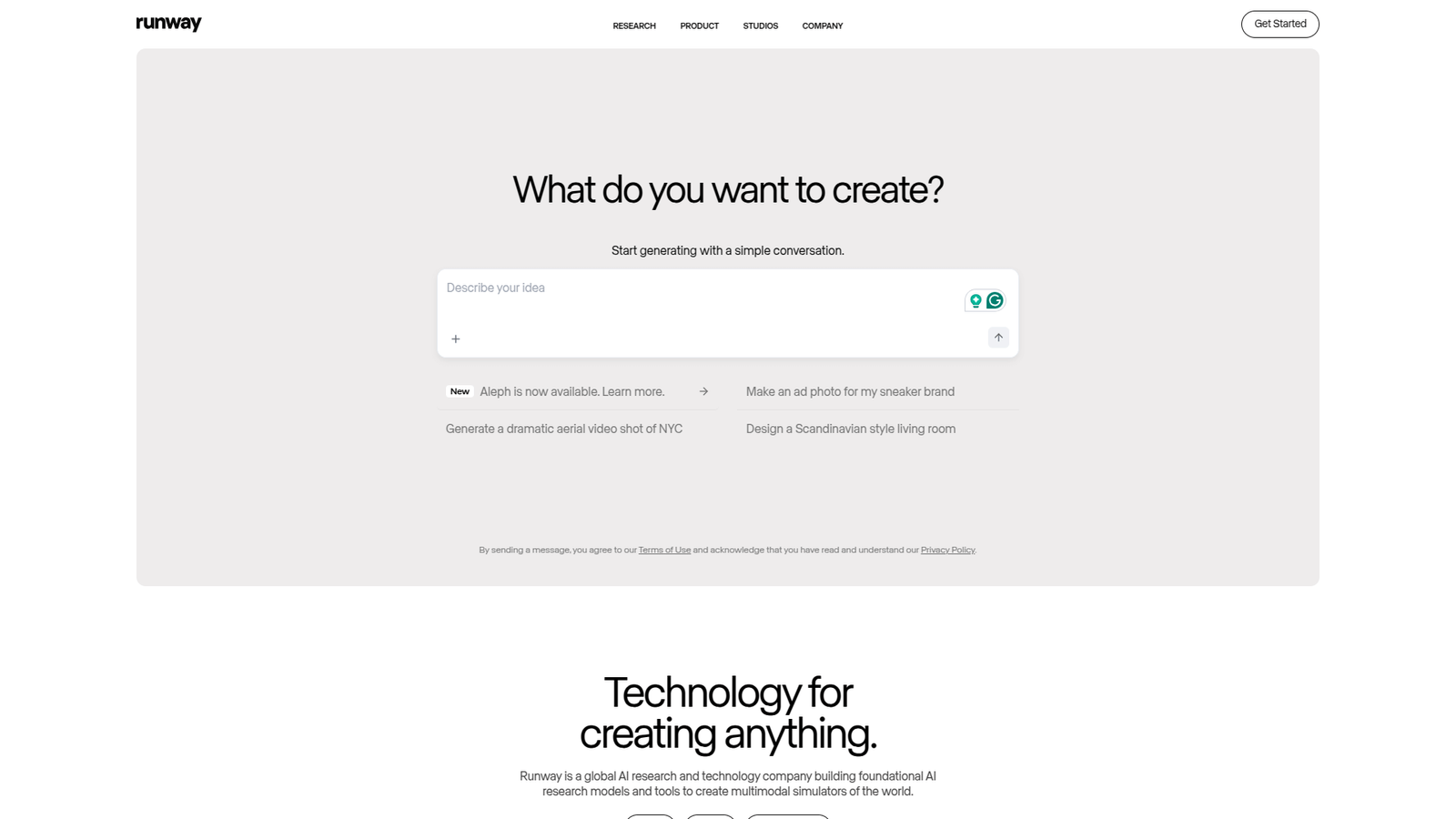
It’s an AI research company that develops cutting-edge tools for content creation. Their flagship platform is a suite of AI-powered tools designed for video and image generation.
Think of it as your creative co-pilot. It’s built to assist creators, filmmakers, artists, and even marketers.
The core function? To simplify complex creative tasks. Especially when it comes to AI video creation.
It takes what used to require hours of manual work and automates it. This means less time fiddling with software.
More time focusing on your vision.
RunwayML is not just for tech wizards. It’s designed with a user-friendly interface.
So, even if you’re new to AI, you can jump in and start creating almost immediately. It’s about democratising advanced AI capabilities.
They’re constantly pushing the boundaries of what’s possible with AI in creative fields. New models, new features, all rolled out consistently.
Their goal is to make professional-grade video production accessible to everyone. From indie filmmakers to big agencies.
It’s a platform where text becomes video, images move, and ideas come to life with a few clicks. It’s a force multiplier for any creative professional.
It allows you to experiment, iterate, and produce high-quality content at a speed previously impossible. That’s the real game-changer.
It’s not just about doing things faster. It’s about doing more. And doing it better.
Key Features of RunwayML for AI Video Creation
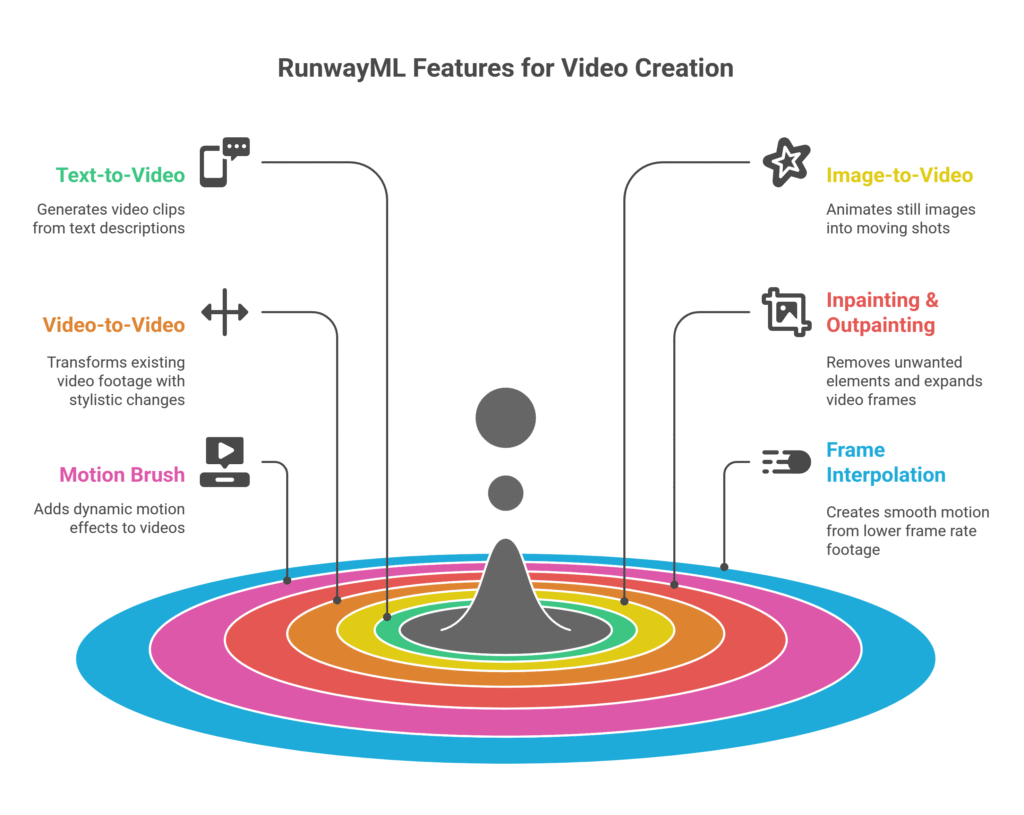
Alright, let’s get into the nuts and bolts. What can RunwayML actually do for your AI video creation?
- Text-to-Video Generation: This is huge. Imagine typing a sentence, like “A dog skateboarding through a neon city at night,” and getting a video clip. That’s exactly what RunwayML’s Gen-1 and Gen-2 models do. It means you can concept and visualise ideas without shooting a single frame. It helps you storyboard faster, creating dynamic scenes from scratch using just words. This accelerates pre-production immensely. You can quickly generate multiple versions of a scene, test different styles, and iterate on your vision. No more waiting on animators or finding stock footage that almost fits. You just type and generate. This is a game-changer for explainer videos, concept art, and rapid prototyping.
- Image-to-Video & Video-to-Video: Not starting from scratch? No problem. RunwayML allows you to take an existing image and animate it. Think about turning still photographs into moving shots. Or, even more powerfully, transforming existing video footage. You can apply stylistic transfers, change lighting, or even alter the content of a video clip. This means you can repurpose old content, give it a fresh look, or experiment with visual effects without expensive software or hours of manual work. It’s like having a magic wand for your existing media. This feature is perfect for artists wanting to bring their static artwork to life or filmmakers looking to add a unique aesthetic to their existing cuts. It streamlines post-production and opens up new creative avenues.
- Inpainting & Outpainting: Ever wish you could magically remove an object from your video? Or expand the frame of a shot beyond its original borders? RunwayML handles it. Inpainting lets you erase unwanted elements from your footage, like a boom mic or a passerby. Outpainting extends the boundaries of your video, intelligently generating new content to fill the expanded frame. This is a massive time-saver for cleanup and creative re-framing. It means fewer reshoots and more flexibility in editing. Imagine easily removing a brand logo from a clip or expanding a static shot to create a pan. These tools give you incredible control over your video’s composition without needing advanced masking or rotoscoping skills. They simplify complex visual effects tasks, making them accessible to everyone.
- Motion Brush & Frame Interpolation: Want specific elements to move or flow differently? Motion Brush allows you to paint motion onto parts of your image or video, creating dynamic effects without complex keyframing. Frame Interpolation, on the other hand, creates smooth, fluid motion from lower frame rate footage. This is perfect for slow-motion effects or simply making your animations look incredibly polished. It fills in the gaps, literally, to create seamless transitions and realistic movement. These features elevate the visual quality of your projects, giving them a professional edge. They’re about refining the subtle details that make a huge difference in the final product.
Benefits of Using RunwayML for Video and Animation
So, what’s the big win here? Why should you care about RunwayML for your AI video creation projects?
It boils down to a few core benefits that hit you right where it counts: your time, your money, and your creative output.
First, time savings are massive. Traditional video production is a marathon. From shooting to editing, it eats up hours, days, weeks.
RunwayML slashes that timeline. Generating a video from text takes minutes, not days.
Automating tasks like rotoscoping or background removal used to be painfully slow. Now, it’s almost instant.
This means you can iterate faster, test more ideas, and deliver projects quicker.
Next, quality improvement. AI isn’t just about speed; it’s about pushing visual boundaries.
The quality of AI-generated content is getting mind-blowing. Text-to-video models produce incredibly detailed and stylised results.
You can achieve high-end visual effects that previously required specialist skills and expensive software.
It levels the playing field, allowing smaller teams or individual creators to produce professional-grade work.
Then there’s overcoming creative blocks. We’ve all been there. Staring at a blank screen, ideas just aren’t flowing.
RunwayML acts as a brainstorming partner. Type in a wild idea, see what it generates.
It can spark new directions, offer unexpected visual solutions, and kickstart your imagination.
It’s about having an endless well of creative possibilities at your fingertips.
Finally, cost efficiency. High-end animation and video production are notoriously expensive.
Hiring teams, renting equipment, licensing software – it adds up fast.
RunwayML significantly reduces these costs. You can produce a remarkable amount of content with a small team or even solo.
It democratises access to powerful production tools.
So, whether you’re a seasoned pro or just starting out, RunwayML gives you an unfair advantage. It lets you produce more, produce better, and do it all without the usual headaches.
Pricing & Plans
Let’s talk money. Because value means nothing if you can’t afford it.
RunwayML offers several tiers, designed to fit different user needs and budgets. They want you to get started, then scale as you grow.
Yes, there’s a free plan. It’s a great starting point.
The free tier gives you limited credits, which you use to generate videos and images. It’s enough to test the waters, get a feel for the interface, and try out some basic AI video creation.
You can’t expect to produce a feature film on the free plan, but it’s perfect for experiments and learning.
When you’re ready to get serious, they have premium versions.
These plans typically include more credits, longer generation times, access to advanced features, and higher resolution outputs.
For instance, a basic paid plan might give you hundreds or thousands of credits per month. This allows for significant production.
Higher tiers offer even more, plus benefits like private generations and faster processing queues.
How does it compare to alternatives?
Well, direct comparisons are tricky because RunwayML is quite unique in its comprehensive suite of AI video tools.
Many alternatives focus on just one aspect, like text-to-image or video editing.
RunwayML bundles a lot into one platform.
When you consider the time saved and the quality of output, the premium plans are often a no-brainer for professionals.
Instead of subscribing to multiple niche tools, you get a powerful all-in-one solution.
The cost often pales in comparison to hiring an extra team member or spending weeks on manual tasks.
It’s an investment that pays for itself in efficiency and expanded creative possibilities.
So, start with free, then upgrade when you hit the limit of your creative ambition. That’s the smart play.
Hands-On Experience / Use Cases
Alright, enough theory. Let’s talk about putting RunwayML to work.
I’ve personally put this tool through its paces. And the results? Often surprising, always impressive.
My first dive into AI video creation with RunwayML was for a client looking for a short, punchy social media ad. They wanted something abstract but visually captivating.
Traditional methods would involve motion graphics artists and days of rendering. I went with RunwayML.
I started with a simple text prompt: “Energetic particles flowing through a futuristic city skyline, vibrant neon colors, fast movement.”
Within minutes, RunwayML generated several clips. Some were exactly what I envisioned. Others were unexpected but equally cool.
I picked the best one, then used the video-to-video feature. I fed it a simple black and white abstract animation I made, and told RunwayML to transfer its motion and style onto the AI-generated city.
The result was a unique, dynamic clip that felt both organic and futuristic. It took about 30 minutes, including rendering time.
Compare that to days of manual animation. The client loved it.
Another scenario: I needed to remove a microphone boom shadow from an interview clip.
Usually, that’s rotoscoping hell. Hours of painstaking mask work.
With RunwayML’s inpainting tool, I simply selected the area. The AI intelligently filled it in.
It wasn’t 100% perfect on the first try, but after a couple of refinements, the shadow was gone.
The usability is surprisingly intuitive. You don’t need a manual.
The interface is clean, and the tools are clearly labelled. It feels like a consumer app, not a professional workstation.
But the power behind it is anything but consumer-level.
The learning curve for basic operations is minimal. For advanced techniques, you’ll spend some time experimenting with prompts and settings.
But that’s part of the fun. It’s like learning a new language that lets you speak directly to a creative powerhouse.
The biggest takeaway from my experience? RunwayML delivers on its promise of accelerating and expanding your creative capacity. It’s not just a toy. It’s a serious tool.
Who Should Use RunwayML?
Alright, who’s this thing for? Not everyone needs an AI powerhouse.
But for a specific set of people, RunwayML is an absolute must-have.
First up: Video creators and YouTubers. If you’re constantly churning out content, you know the grind.
RunwayML can help you generate intro/outro sequences, B-roll footage, or even entire short clips from scratch.
It speeds up your production cycle. More videos, less effort.
Next, animators and motion graphics artists. This is where RunwayML shines.
It doesn’t replace your skills, it augments them.
Automate tedious tasks like rotoscoping, generate base animations, or experiment with complex effects without hours of manual keyframing.
It frees you up to focus on the truly creative parts of your work.
Then there are marketers and social media managers. Need quick, eye-catching video ads?
Want to animate static product shots? RunwayML makes it incredibly easy to produce dynamic visuals for campaigns.
It means more engaging content, faster time to market, and less reliance on expensive external agencies.
Small businesses and startups can also benefit immensely.
Budgets are tight, and resources are limited. RunwayML allows you to produce professional marketing videos, explainer videos, and product demos without breaking the bank.
It’s like having an in-house animation studio for a fraction of the cost.
And finally, digital artists and experimental creators. If you love pushing boundaries and trying new things, RunwayML is your playground.
The generative AI tools open up possibilities that were previously impossible.
It’s a canvas for pure imagination, letting you bring abstract ideas to life in ways you never thought possible.
In short, if your work involves any form of video, animation, or visual content creation, and you’re looking for a serious edge in efficiency and creativity, RunwayML is built for you.
How to Make Money Using RunwayML
So, you’ve got this powerful tool. How do you turn that into cold, hard cash?
RunwayML isn’t just about making cool videos. It’s about building a business or boosting your current one.
Here’s how you can monetise your skills with RunwayML:
- Service 1: Short-Form Video Content Creation: Social media is hungry for video. Think TikTok, Instagram Reels, YouTube Shorts. Businesses, personal brands, and even individuals need constant, fresh content. With RunwayML, you can offer services creating short, engaging video ads, promotional clips, or animated explainers. These can be generated quickly using text-to-video or by animating existing assets. Charge per video, or offer monthly packages. It’s a high-demand service with low overhead for you. Many local businesses, for example, struggle to produce quality video. You can fill that gap.
- Service 2: AI-Powered Animation for Brands: Elevate static brand assets. Take a client’s logo, product images, or even their mission statement as text, and turn them into dynamic, unique animations. You can create eye-catching intros for podcasts, animated banners for websites, or looping backgrounds for virtual events. Businesses are always looking for ways to stand out. Offering “AI-powered animation” positions you as cutting-edge. This is especially valuable for smaller brands who can’t afford traditional animation studios.
- Service 3: Specialised Visual Effects & Cleanup: Many video projects, even basic ones, run into issues. A rogue object in the background. A shaky shot. An unwanted reflection. Using RunwayML’s inpainting, outpainting, and motion tools, you can offer specialised cleanup and VFX services. Post-production houses or independent filmmakers might outsource these specific tasks. You become the go-to person for fixing video problems quickly and affordably with AI. This is a niche but valuable service.
Consider Sarah, a freelance graphic designer. She was making decent money, but clients always needed video.
She invested in RunwayML. She started offering “AI-accelerated brand videos.”
One client, a small e-commerce shop, needed a product demo. Sarah used RunwayML’s image-to-video to animate product shots, adding subtle motion and dynamic backgrounds.
She then used text-to-video for short, punchy testimonials that appeared as animated text bubbles.
The entire project, which would have taken her days traditionally, was done in under four hours.
She charged $500 for the 60-second video. Her hourly rate effectively went through the roof.
She now averages $3,000-$5,000 extra per month just from these AI video services.
It’s not just about the tool. It’s about how you package your newfound efficiency.
RunwayML lets you deliver faster, better, and with unique results. That translates directly to higher profits and more satisfied clients.
Limitations and Considerations
No tool is perfect. And RunwayML, while incredibly powerful, has its quirks.
Understanding these limitations is key to managing expectations and getting the most out of it.
First, accuracy and control. While the AI is smart, it’s not a mind-reader.
Text-to-video can sometimes produce unexpected results. You might ask for “a cat playing a guitar,” and get a cat with a tiny guitar glued to its paw, not actually playing.
It requires precise prompting and a willingness to iterate. You won’t always get exactly what you picture on the first try.
The more specific you are, the better. But even then, there’s an element of randomness.
Next, editing needs. RunwayML isn’t a full-fledged video editor like Premiere Pro or DaVinci Resolve.
It generates clips. You’ll still need a separate video editing software to stitch clips together, add audio, fine-tune cuts, and do traditional post-production.
Think of it as a powerful content generator, not a complete production studio.
Then there’s the learning curve for advanced techniques. While the basic interface is simple, mastering the nuances of AI video creation takes practice.
Understanding how to craft effective prompts, how different models behave, and how to combine features creatively requires experimentation.
It’s not hard, but it’s not entirely “set it and forget it” either.
Rendering times and credits. High-quality, longer videos consume credits and take time to render.
If you’re on a free or lower-tier plan, you might hit limits quickly. This means planning your generations strategically.
Also, while impressive, the AI-generated content can sometimes have a distinctive “AI look” if you’re not careful.
Subtle glitches, odd transitions, or uncanny valley effects can occur, especially with complex prompts or human subjects.
It often requires a human eye to catch and correct these.
Finally, originality. While you create unique content, the underlying models are trained on vast datasets.
This can lead to certain stylistic tendencies or visual patterns appearing across different generations.
It’s a powerful tool, but like any tool, it’s only as good as the person wielding it. Don’t expect magic without effort.
Final Thoughts
So, what’s the bottom line on RunwayML?
It’s not just hype. It’s the real deal for anyone serious about Video and Animation.
This tool fundamentally shifts how you approach content creation. It’s about leveraging AI to do the heavy lifting, freeing you up for creative strategy and execution.
The value is clear: massive time savings, enhanced creative output, and significant cost reductions.
You can produce high-quality video and animation in minutes, not days.
You can experiment with ideas that were previously too expensive or too time-consuming to even try.
It democratises access to professional-grade tools, putting serious power in the hands of individuals and small teams.
Is it perfect? No. You’ll still need to learn the ropes, refine your prompts, and use a separate editor for final assembly.
But these minor considerations are far outweighed by the benefits.
My recommendation? If you work in any aspect of video production, animation, or digital content, you need to explore RunwayML.
Start with the free plan. Get your hands dirty. See what it can do.
You’ll quickly realise how much time and effort it can save you.
It’s not just about keeping up with the competition. It’s about getting ahead.
Stop grinding. Start generating.
Visit the official RunwayML website
Frequently Asked Questions
1. What is RunwayML used for?
RunwayML is primarily used for AI video creation, image generation, and a range of AI-powered creative tools. It helps users generate videos from text, animate images, remove objects from footage, and apply stylistic transfers, all with artificial intelligence. It’s a powerful tool for filmmakers, animators, marketers, and content creators looking to streamline their workflow.
2. Is RunwayML free?
Yes, RunwayML offers a free plan that provides limited credits for generating content. This free tier is excellent for trying out the platform’s core features and understanding its capabilities. For more extensive use, higher-tier paid plans are available, offering more credits, longer generation times, and access to advanced functionalities.
3. How does RunwayML compare to other AI tools?
RunwayML stands out by offering a comprehensive suite of AI video creation tools in one platform, unlike many competitors that specialize in only one aspect (e.g., text-to-image or basic video editing). Its Gen-1 and Gen-2 models are particularly strong for text-to-video and video-to-video transformations, providing unique capabilities that set it apart in the AI video and animation space.
4. Can beginners use RunwayML?
Absolutely. RunwayML is designed with a user-friendly interface that makes it accessible even for beginners with no prior experience in AI or complex video software. While mastering advanced prompting and techniques takes some practice, the basic functions are intuitive and allow new users to start creating impressive AI videos almost immediately.
5. Does the content created by RunwayML meet quality and optimization standards?
The content created by RunwayML is generally high quality, especially as their AI models continue to evolve. For optimization, the AI-generated clips provide an excellent foundation. You would still need to use a traditional video editor for final assembly, colour grading, audio syncing, and export optimization to meet specific platform standards (e.g., social media aspect ratios, video codecs).
6. Can I make money with RunwayML?
Yes, you can definitely make money using RunwayML. By leveraging its speed and advanced capabilities, you can offer services such as short-form social media video creation, AI-powered animations for brands, and specialised visual effects or cleanup services for existing footage. RunwayML allows you to produce high-quality content quickly, which can significantly increase your efficiency and profitability as a freelancer or creative agency.