


Scrivener supercharges your eBook Writing and Formatting, slashing time and boosting quality. Unlock your full potential in content creation today!
Here’s What Happened When I Tried Scrivener for eBook Writing and Formatting
Alright, let’s talk about something real.
The world of content creation is buzzing.
Everyone’s chasing efficiency, right?
Especially when you’re staring down a blank page, thinking about writing an entire eBook.
It’s not just about getting words down.
It’s about structure, flow, and making it look pro.
And then, you hear about tools.
AI is everywhere, making promises.
But what about the tools that help *you* be better, not just replace you?
That’s where Scrivener walks in.
I’ve been on this journey, just like you, trying to figure out the best way to tackle eBook writing and formatting.
It can feel like a mountain.
Ideas scattered, research buried, formatting nightmares.
You want to produce high-quality work, fast.
You want to hit those deadlines without the usual headache.
And you want your eBook to stand out.
So, I tried Scrivener.
And let me tell you, it changed things.
This isn’t some fluffy review.
This is about how a single tool can flip your entire approach to serious content.
Table of Contents
- What is Scrivener?
- Key Features of Scrivener for eBook Writing and Formatting
- Benefits of Using Scrivener for Content Creation
- Pricing & Plans
- Hands-On Experience / Use Cases
- Who Should Use Scrivener?
- How to Make Money Using Scrivener
- Limitations and Considerations
- Final Thoughts
- Frequently Asked Questions
What is Scrivener?
Okay, so you’ve got ideas bouncing around.
Maybe it’s for an eBook, a course, or a massive report.
And you’re currently using Word, or Google Docs, or something similar.
It feels clunky, right?
Scrolling endlessly, trying to find that one research note you made weeks ago.
Scrivener isn’t just another word processor.
Think of it as your command center for long-form writing.
It’s a project management tool, a research repository, and a writing environment, all rolled into one.
It was built for writers.
People who need to manage big projects, complex narratives, or detailed non-fiction.
We’re talking novelists, screenwriters, academics, and, crucially, content creation professionals.
Especially those of us who regularly deal with something as involved as eBook writing and formatting.
Its core function?
To break down large documents into smaller, manageable chunks.
This means you can write a chapter, then reorder it, then add a research note to it, then compile the whole thing into a perfectly formatted eBook without losing your mind.
No more endless copy-pasting.
No more hunting for files.
It keeps everything you need for your project – your manuscript, research, notes, outlines – in one place.
It’s like having a dedicated assistant who organizes all your thoughts and materials.
This lets you focus on the actual writing.
That’s the game-changer right there.
It’s for anyone serious about producing structured, polished long-form content efficiently.
Key Features of Scrivener for eBook Writing and Formatting
When you’re knee-deep in eBook writing and formatting, you need more than just a place to type.
You need tools that make the process smoother, not harder.
Scrivener delivers on that.
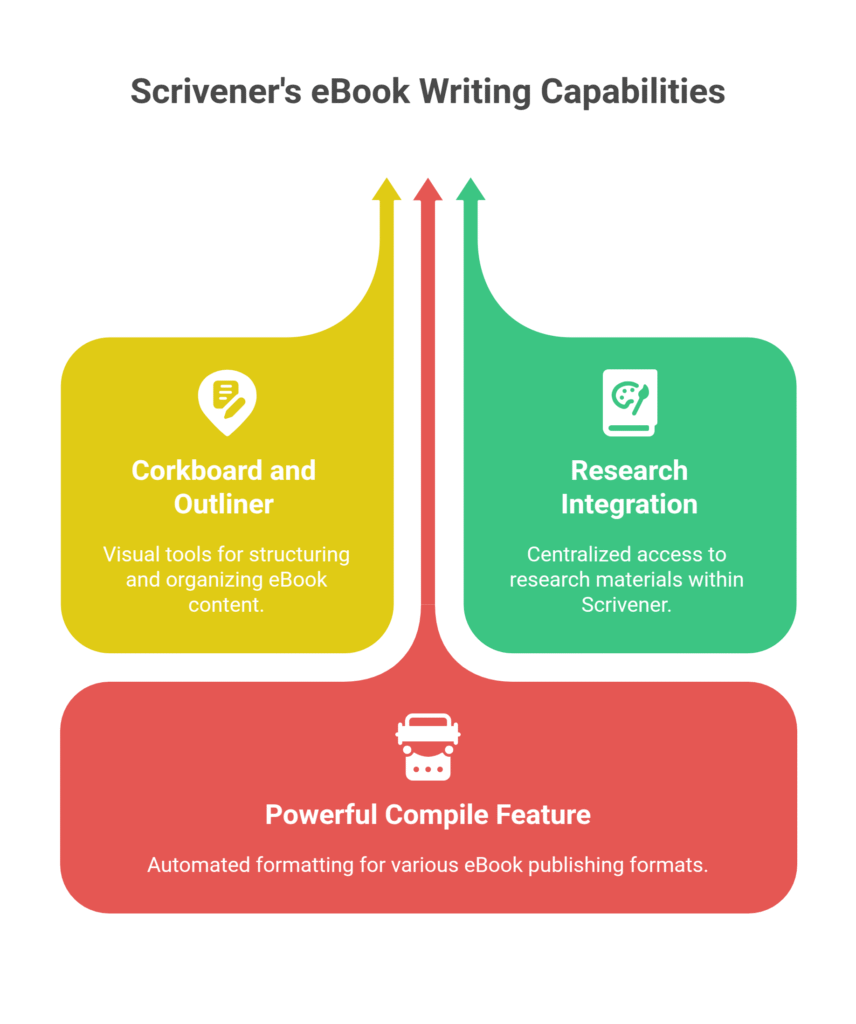
- The Corkboard and Outliner: Your Project Map
This is where Scrivener really shines.
Imagine you’re planning an eBook.
You have chapters, sections, sub-sections.
The Corkboard lets you see each of these as an index card.
You can drag and drop them around, reordering your entire eBook with ease.
Each card can have a synopsis, helping you keep track of your content’s flow.
The Outliner view gives you a list format, showing your structure at a glance.
This means you can structure a 100-page eBook in minutes, then fill in the blanks.
No more getting lost in your own document.
- Research Integration: Everything in One Place
How often do you jump between browser tabs, PDF readers, and your writing document?
With Scrivener, you don’t have to.
You can import PDFs, web pages, images, even video files, directly into your project.
They sit right alongside your manuscript.
Need to reference a statistic?
It’s right there.
Want to check a quote?
No problem.
This saves a massive amount of time and keeps your focus on writing, not on searching.
It’s crucial for factual content creation where accuracy matters.
- Powerful Compile Feature: Export Your eBook Like a Pro
This is the ultimate payoff for all your hard work.
Once you’ve written your eBook, the “Compile” function handles the heavy lifting of formatting.
You can export your project into various formats: EPUB for e-readers, MOBI for Kindle, PDF for print-ready documents, or even plain Word files.
You control headers, footers, table of contents, chapter breaks, and more.
This means you can create a professional-looking eBook ready for publishing without hiring a separate formatter.
It automates what used to be a tedious, error-prone process.
Think about the hours you save here.
Hours you can spend writing your *next* eBook.
Benefits of Using Scrivener for Content Creation
You’re in the game of content creation.
That means deadlines, quality demands, and often, fighting against creative blocks.
Scrivener isn’t just a tool; it’s an unfair advantage.
First off, time savings are massive.
Before Scrivener, compiling a large document meant copying, pasting, reformatting chapter by chapter.
It was a nightmare.
Now, with the Compile feature, a task that used to take hours can be done in minutes.
This frees you up to do more actual writing or, honestly, just live your life.
Then there’s quality improvement.
Because you can restructure and reorder sections so easily, your content flows better.
You can experiment with different sequences without wrecking your entire document.
This means a more logical, more readable, and ultimately, higher-quality eBook.
The ability to keep all research notes tied directly to specific sections means you’re always accurate and well-informed.
No more scrambling for sources.
Overcoming creative blocks becomes easier, too.
If you’re stuck on Chapter 3, you can jump to Chapter 7, write a bit, then come back.
The Corkboard view allows you to see the whole project at a glance, helping you maintain momentum even when a particular section feels difficult.
It’s about having that flexibility.
For eBook writing and formatting specifically, it solves the “messy document” problem.
Your manuscript is broken into logical parts, making it clean and organized from start to finish.
This structured approach reduces errors and improves overall readability.
Think of the mental load this reduces.
Less stress, more output.
That’s the real benefit.
Pricing & Plans

Alright, let’s talk money.
Because at the end of the day, any tool needs to justify its cost.
And Scrivener is a one-time purchase.
Yes, you read that right.
No monthly subscriptions.
No recurring fees that bleed your bank account dry.
You buy it once, you own it.
The price typically hovers around $50 for a standard license.
That’s for either Windows or macOS.
If you need both, you’ll need two separate licenses.
There’s also a iOS version for iPad and iPhone, usually around $20.
Is there a free plan?
Not exactly a free *plan*, but they offer a very generous free trial.
It’s a 30-day *non-consecutive* trial.
This means you get 30 days of actual use.
If you only use it on Tuesdays, those 30 days will last you for months.
This is smart.
It lets you really dig in, write a good chunk of an eBook, and see if it fits your workflow for content creation.
How does this compare to alternatives?
Most direct competitors, especially those geared towards project management or writing, are subscription-based.
Think about what you pay for Microsoft 365 or similar writing suites over a year.
Scrivener’s one-off fee makes it incredibly cost-effective in the long run.
There are free word processors, sure.
But none of them offer the project management, research integration, or sophisticated compile features you get with Scrivener for eBook writing and formatting.
It’s a serious tool for serious writers.
The value for money here is undeniable.
You invest a small amount up front for a tool that will serve you for years.
That’s a smart business decision.
Hands-On Experience / Use Cases
Alright, let’s get real about how Scrivener actually works in practice.
Because features sound nice, but what happens when the rubber meets the road?
My biggest challenge with eBook writing and formatting used to be organization.
I’d have a main document, another for research, a third for character notes (even for non-fiction, some “characters” emerge, like key figures or concepts).
Then a bunch of browser tabs open.
It was chaos.
The first thing I did in Scrivener was create a new project.
It offers templates, but I usually start with a blank non-fiction one.
I immediately broke my eBook idea into major chapters using the Outliner.
Then, for each chapter, I added sub-sections.
Each sub-section became its own document within Scrivener.
This means I could write Chapter 1, Section 3, without worrying about Chapter 1, Section 1, or Chapter 5.
It breaks the monster task into digestible bites.
When I found a useful article or website, I didn’t just bookmark it.
I dragged the URL or imported the PDF directly into the “Research” section of my Scrivener project.
It was always there, linked to the specific part of my eBook if needed.
No more hunting.
When it came to editing, the Corkboard view was a lifesaver.
I could see all my chapter synopses at once, rearrange them instantly if the flow felt off.
One time, I realized a section I wrote for Chapter 4 actually made more sense in Chapter 2.
Drag. Drop. Done.
In a traditional word processor, that’s a painful copy-paste job, risking formatting errors.
The real moment of truth came with compiling the final eBook.
I selected EPUB and PDF, chose a few formatting options like chapter headings and fonts.
Clicked “Compile.”
And boom.
A perfectly formatted eBook ready to upload.
No more manual table of contents.
No more fixing page breaks.
This wasn’t just a time saver; it was a stress reducer.
My output speed for content creation, especially long-form, went up significantly.
The quality improved because I could focus on the words, not the wrestling match with the software.
It’s like moving from building a house with hand tools to using power tools.
Who Should Use Scrivener?
Look, not every tool is for everyone.
But if you’re serious about content creation, especially long-form projects, Scrivener is probably for you.
Let’s break down who gets the most out of it.
First, eBook writers.
This is the obvious one, given our focus.
If you’re planning, writing, and formatting eBooks – whether for self-publishing, lead magnets, or client work – Scrivener will change your life.
The structure and compile features are tailor-made for it.
Then there are marketers creating extensive guides or white papers.
You know those chunky PDFs that explain your product or service in detail?
Or the in-depth industry reports?
Scrivener keeps all your data, case studies, and testimonials organized.
You can pull everything together cleanly.
Bloggers who write pillar content or series also stand to gain.
If you’re building a multi-part series that eventually gets compiled into an eBook, Scrivener’s perfect.
Each post can be a “scene,” and you can easily reorder and combine them.
Small businesses or agencies that produce a lot of educational content for their audience.
Think about your onboarding materials, training manuals, or even internal company wikis.
Scrivener’s organizational power makes these projects manageable and keeps them updated.
Basically, if your work involves:
- Writing anything longer than a blog post.
- Dealing with lots of research or supporting documents.
- Needing to restructure content frequently.
- Producing polished, professional outputs like eBooks.
Then Scrivener is a strong contender.
It’s not for quick social media posts.
It’s for deep work, for building a significant piece of content, especially when it comes to eBook writing and formatting.
It empowers you to tackle projects you might otherwise dread.
How to Make Money Using Scrivener
Okay, so you’ve got this powerful tool, Scrivener.
How do you turn that into cold, hard cash?
It’s not just about writing your own eBooks.
It’s about the efficiency gains and the services you can now offer.
- Offer eBook Writing Services (Accelerated)
This is direct. Clients need eBooks – for lead generation, for courses, for brand building.
They often struggle with the sheer volume of work or the technical aspects of eBook writing and formatting.
With Scrivener, your workflow is streamlined.
You can outline faster, integrate research seamlessly, and compile in minutes.
This means you can take on more projects, deliver quicker, and charge competitive rates for a higher quality product.
You’re not just a writer; you’re an efficient content factory.
This efficiency translates directly into more billable hours and less time wasted.
- Provide Professional eBook Formatting and Publishing Prep
Many writers, especially indie authors or small businesses, write great content but get stuck on the formatting.
EPUB, MOBI, PDF – it’s a headache for them.
With Scrivener’s robust Compile feature, you can offer this as a standalone service.
Take their raw manuscript (even if it’s in Word), import it into Scrivener, structure it, and then compile it into various professional formats.
You can charge a flat fee per eBook or per word for this.
This is a high-value service because it solves a real pain point for clients who want to self-publish or use their eBooks as marketing tools.
- Develop and Sell Information Products (Courses, Guides)
Scrivener isn’t just for eBooks.
It’s for any long-form content.
You can use it to structure and write online courses, detailed guides, or even video scripts for an entire series.
Each module can be a “chapter,” each lesson a “scene.”
Then, compile the text versions into a downloadable PDF course book, or use the structured outline to record your video lessons.
This allows you to create high-quality, comprehensive information products faster.
These digital products can generate passive income once created and marketed effectively.
Here’s a real scenario: I know a content creation specialist who used Scrivener to crank out three 50-page niche-specific eBooks in a month for different clients.
Before Scrivener, that would have taken him over two months, pulling his hair out.
By delivering faster, he satisfied clients and opened up slots for more work.
He charged $1500 per eBook.
That’s $4500 in one month just from eBooks, a significant chunk of which was profit due to reduced time.
The tool itself became a profit center by enabling him to take on higher volume with less effort.
Limitations and Considerations
Nothing is perfect, right?
And Scrivener, while amazing for what it does, has a few things you need to know about.
It’s not a magic bullet that writes your content for you.
First, there’s the learning curve.
Scrivener is powerful.
And with power comes a bit of complexity initially.
If you’re used to just typing into a blank page in Word, Scrivener’s interface might feel overwhelming at first.
All those panels, the Corkboard, the Inspector, the different views.
It takes a little time to get comfortable.
There are tutorials (and good ones), but you won’t master it in an hour.
Be prepared to spend a few dedicated sessions just figuring things out.
It’s an investment of time, but one that pays off.
Then, there’s the fact that it’s not a collaborative tool in the same way as Google Docs.
You can export sections or the whole document for others to edit in Word, but real-time, simultaneous editing with multiple users isn’t its strong suit.
If you work extensively with a team who all need to be in the same document at the same time, you’ll need to work out a different workflow for collaboration, perhaps by exporting chunks for review and then re-importing.
It’s not an AI writing tool.
This might seem obvious, but worth stating.
Scrivener won’t generate content for you.
It won’t write your chapters or suggest improvements based on algorithms.
It’s a tool to empower *your* writing and organization for content creation.
Any AI assistance would need to come from a separate tool, with you pasting the output into Scrivener.
Finally, while the compile feature is incredible for eBook writing and formatting, it can still require some fine-tuning for very specific, complex layouts.
For 90% of eBooks, it’s perfect.
But if you have intricate graphic placements, custom fonts throughout, or very specific design elements, you might still need a graphic designer or a specialized publishing tool for the final polish.
These are minor points compared to the benefits, but it’s important to go in with eyes open.
Final Thoughts
So, what’s the bottom line here?
After spending significant time with Scrivener for eBook writing and formatting, my verdict is clear.
This isn’t just another piece of software you try and forget.
It’s a foundational tool for anyone serious about long-form content creation.
It tackles the messy, chaotic reality of writing large projects and turns it into a structured, manageable process.
The ability to break down your work into small, digestible chunks, keep all your research in one place, and then compile it into professionally formatted outputs?
That’s a game-changer.
It saves you time, reduces frustration, and significantly improves the quality of your final product.
You stop fighting your software and start focusing on your ideas.
That’s where the real magic happens.
It’s an investment, yes, but a one-time investment that will pay dividends for years in increased productivity and reduced stress.
If you’re currently wrestling with Microsoft Word or Google Docs for your eBooks, white papers, or comprehensive guides, you’re leaving money and sanity on the table.
Scrivener is built for this.
It’s built for you to work smarter, not just harder.
My recommendation?
Don’t just take my word for it.
Grab the 30-day non-consecutive free trial.
Start a new project for an eBook you’re planning or already working on.
Give it a real shot.
See how it transforms your workflow.
You’ll likely wonder how you ever managed without it.
It’s that good.
Visit the official Scrivener website
Frequently Asked Questions
1. What is Scrivener used for?
Scrivener is primarily used for organizing and writing long-form content.
Think novels, screenplays, academic papers, and, critically, eBooks and other comprehensive content for marketers and businesses.
It acts as a project management tool for your writing, letting you break down large documents, store research, and compile into various formats.
2. Is Scrivener free?
No, Scrivener is not free.
It’s a one-time purchase, typically around $50 for a lifetime license on a single platform (Windows or macOS).
However, it offers a generous 30-day non-consecutive free trial, allowing you to use it for 30 actual days of work before deciding to buy.
3. How does Scrivener compare to other AI tools?
Scrivener is not an AI tool in the sense of generating content.
It’s a powerful organizational and writing environment.
Most AI tools focus on content generation, paraphrasing, or optimization.
Scrivener complements these by providing the structure and compilation needed for the AI-generated content to become a complete, professional eBook or long-form document.
It’s for *your* workflow, not for replacing your writing.
4. Can beginners use Scrivener?
Yes, beginners can use Scrivener, but there is a learning curve.
It’s more complex than a basic word processor due to its extensive features for project management and organization.
However, with patience and by utilizing its built-in tutorials or online resources, a beginner can quickly become proficient and reap its significant benefits for eBook writing and formatting.
5. Does the content created by Scrivener meet quality and optimization standards?
Scrivener doesn’t create content itself; it’s a tool for you to write and organize.
Therefore, the quality and optimization of the content depend entirely on the writer.
What Scrivener does is *facilitate* higher quality by providing a superior environment for structuring, editing, and compiling, making it easier for you to produce optimized and polished work.
6. Can I make money with Scrivener?
Absolutely.
You can make money by accelerating your own content creation, like writing and selling more eBooks.
You can also offer services such as professional eBook writing, formatting, and publishing preparation for clients.
Its efficiency allows you to take on more projects and deliver high-quality outputs quickly, directly boosting your income potential.




