
Azure Content Moderator empowers visual content filtering like never before. Automate detection of unwanted images & videos, ensuring brand safety & compliance. Streamline your moderation process now!
Azure Content Moderator Is Built for Security and Moderation – Here’s Why
Ever feel like you’re drowning in content? Especially visual content? Images, videos, user-generated stuff – it’s a constant flood.
And let’s be real, managing all that for safety and compliance? It’s a beast.
Manual review? That’s not a business model. That’s a headache waiting to happen.
But here’s the thing: AI isn’t just for chatbots anymore. It’s revolutionising how we tackle the tough stuff.
Especially in security and moderation.
And when it comes to visual content filtering, there’s one tool that stands out.
A tool built to handle the sheer volume and complexity of today’s online world.
I’m talking about Azure Content Moderator.
This isn’t just another tech gadget. This is a strategic lever.
It’s designed for anyone who needs to keep their platforms clean, safe, and compliant, without burning through resources.
If you’re in the business of maintaining brand reputation, protecting users, or simply scaling your content operations, you need to pay attention.
Because Azure Content Moderator isn’t just making things easier. It’s changing the game.
It’s helping businesses achieve levels of efficiency and accuracy that were once impossible.
Let’s unpack what makes it a must-have.
Table of Contents
- What is Azure Content Moderator?
- Key Features of Azure Content Moderator for Visual Content Filtering
- Benefits of Using Azure Content Moderator for Security and Moderation
- Pricing & Plans
- Hands-On Experience / Use Cases
- Who Should Use Azure Content Moderator?
- How to Make Money Using Azure Content Moderator
- Limitations and Considerations
- Final Thoughts
- Frequently Asked Questions
What is Azure Content Moderator?
So, what exactly is Azure Content Moderator? Simple: it’s an AI service.
Part of Microsoft Azure’s Cognitive Services suite.
Its primary job is to help you detect potentially offensive, risky, or otherwise undesirable content.
Think of it as your digital bouncer, scanning everything before it gets through.
But it’s not just about filtering out the bad stuff.
It’s about doing it at scale.
Automatically.
With incredible speed.
It uses machine learning to scan text, images, and videos.
For this article, we’re zoning in on the visual side.
That means images and videos.
Why does this matter? Because platforms today are heavily visual.
Social media feeds, e-commerce product listings, user-generated content sites.
They’re all packed with images and videos.
And with that comes risk.
Brand safety risk.
Legal risk.
Reputational risk.
Azure Content Moderator steps in to mitigate these risks.
It’s designed for anyone managing online content.
From social media platforms to gaming companies.
From e-commerce sites to educational institutions.
If you have users uploading content, you need this tool.
It helps maintain a safe environment.
It helps comply with regulations.
It helps protect your brand’s image.
And it does all this without requiring a massive team of human reviewers.
It’s about automation, intelligence, and peace of mind.
That’s what Azure Content Moderator brings to the table.
Key Features of Azure Content Moderator for Visual Content Filtering
- Image Moderation:
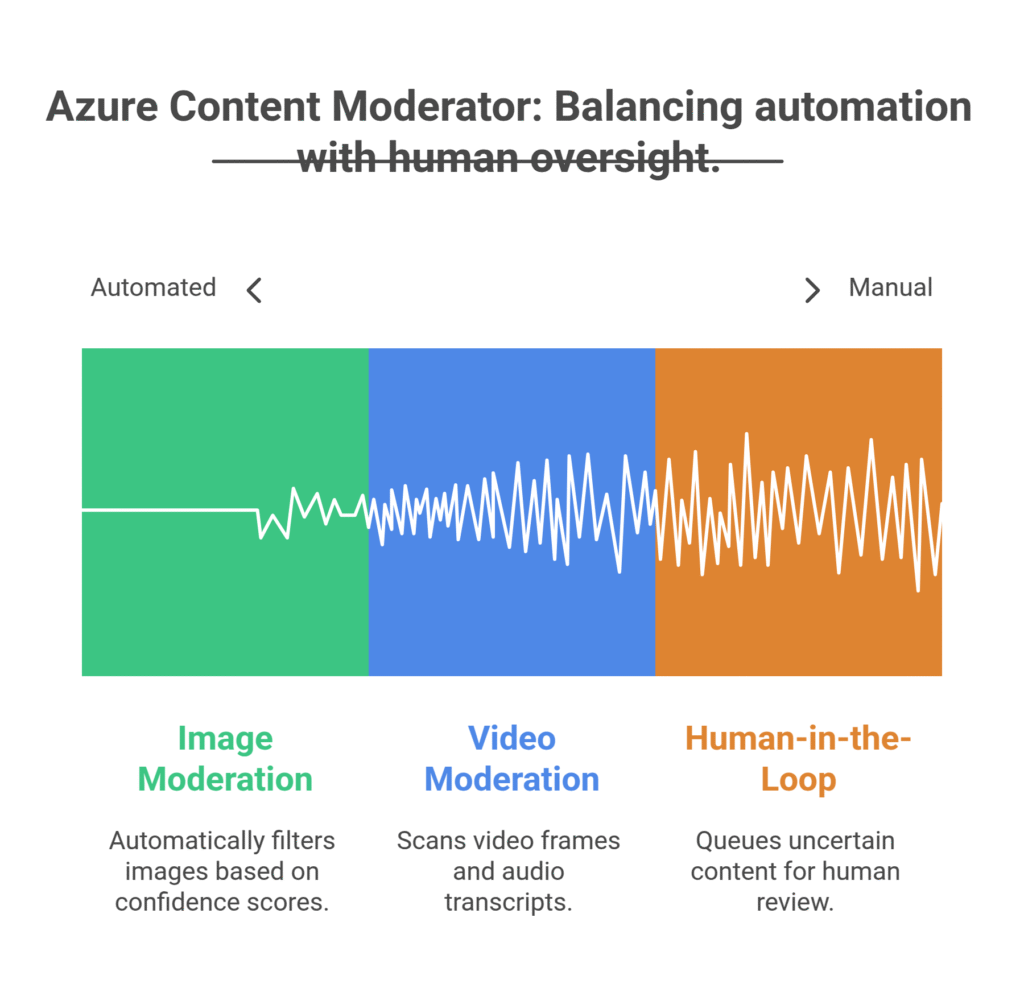
This is where Azure Content Moderator truly shines for visual content filtering. It scans images for a wide range of content types.
From explicit adult content to suggestive themes.
It can detect images of violence, gore, and hateful symbols.
It also flags content that might be considered generally offensive, even if it doesn’t fall into the extreme categories.
The system provides a confidence score for each detection, letting you set thresholds.
You decide what’s acceptable and what’s not.
This means you can automatically block high-confidence problematic images.
And send lower-confidence ones for human review.
It’s not just a pass/fail system. It’s nuanced.
It gives you control.
- Video Moderation:
Handling video is another beast entirely. It’s frames, it’s audio, it’s a time-consuming nightmare to review manually.
Azure Content Moderator tackles this head-on.
It can scan video frames for similar issues as images – adult content, violence, explicit themes.
But it goes further. It can also detect text burned into video frames.
And even moderate audio transcripts.
This means a comprehensive scan of video content.
Not just a superficial check.
Imagine the time saved. Imagine the potential risks avoided.
It’s about having an automated eye on your video library.
Catching things before they go viral for all the wrong reasons.
- Human-in-the-Loop Review Tool:
AI isn’t perfect. Not yet. Sometimes, human judgment is still necessary.
And Azure Content Moderator understands this.
It comes with a built-in review tool.
When the AI isn’t 100% confident about a piece of content, it queues it up for human review.
This isn’t just some clunky interface.
It’s a streamlined dashboard designed for efficiency.
Your human moderators see the flagged content, the AI’s suggested categories, and confidence scores.
They can quickly make a decision.
Approve, reject, or further categorise.
This combination of AI speed and human accuracy is powerful.
It optimises your moderation workflow.
You handle the tricky stuff, the AI handles the bulk.
It ensures compliance while maintaining efficiency.
Benefits of Using Azure Content Moderator for Security and Moderation
Why bother with Azure Content Moderator? Simple: it’s about doing more, better, with less.
First, think about scale. Manually reviewing millions of images or thousands of hours of video? Impossible.
Azure Content Moderator makes it possible. It processes content at incredible speed.
This means you can scale your platform without fear of being overwhelmed by content volume.
Second, consistency. Humans are inconsistent. We get tired, we make mistakes, we have biases.
An AI doesn’t. It applies the same rules, the same logic, every single time.
This leads to more consistent moderation decisions.
Which, in turn, leads to a fairer, more predictable experience for your users.
Third, cost savings. Labour costs for a large moderation team are astronomical.
By automating the majority of the content review, you drastically reduce these costs.
Your human team can focus on edge cases and policy development, not repetitive grunt work.
Fourth, brand reputation and user safety. This is huge.
One piece of inappropriate content can damage your brand instantly.
It can lead to user churn. It can lead to legal issues.
Azure Content Moderator acts as a frontline defence.
It helps create a safer online environment.
It ensures your platform remains a place users trust and want to be on.
Fifth, compliance. Many industries and regions have strict regulations about content.
Especially content involving children or explicit material.
Failing to comply can result in massive fines and legal headaches.
This tool helps you meet these stringent requirements.
It gives you a verifiable system for content review.
Ultimately, Azure Content Moderator isn’t just about filtering content.
It’s about building a sustainable, safe, and scalable online business.
It’s about efficiency, protection, and growth.
Pricing & Plans

Alright, let’s talk brass tacks: what’s it going to cost you?
Azure Content Moderator isn’t a one-size-fits-all subscription.
It operates on a pay-as-you-go model, typical for Azure services.
This means you pay for what you use.
There isn’t a “free plan” in the traditional sense, like a forever-free tier.
However, Azure does offer a free tier for Cognitive Services, which includes Content Moderator.
This free tier typically provides a certain number of transactions or calls per month without charge.
It’s enough to get started, test things out, and understand the capabilities.
For example, you might get a few thousand image analyses for free each month.
Once you exceed those free limits, you move into the standard pricing.
Pricing is usually based on the number of “transactions” or “calls” you make to the API.
So, each image analysed, each video frame processed, each text chunk scanned counts as a transaction.
The cost per transaction is low, often fractions of a cent.
But it adds up with high volume.
For large-scale operations, you’re looking at a cost that scales with your usage.
This model is beneficial because you’re not locked into a high monthly fee if your usage fluctuates.
You only pay for the actual resources consumed.
Compared to alternatives, which might be standalone SaaS tools with fixed monthly fees, Azure’s model can be more economical for varying workloads.
Especially if you already use other Azure services, as it integrates seamlessly.
You’ll need an Azure subscription, of course.
But getting started is straightforward, and the pricing is transparent on the Azure website.
Always check the latest pricing details, as they can evolve.
But the general principle remains: pay for what you process.
For anyone serious about security and moderation at scale, this is a cost-effective solution.
Hands-On Experience / Use Cases
Let’s get real. How does Azure Content Moderator actually work in the wild?
Imagine you run a fast-growing social media platform for pet owners.
People are uploading thousands of photos and videos of their furry friends every day.
Most of it is wholesome. But inevitably, some users try to slip in inappropriate content.
Spam images, sexually explicit photos, even animal cruelty videos.
Without an automated system, your small team of human moderators would be crushed.
They’d miss things. Your platform’s reputation would tank. Users would leave.
Enter Azure Content Moderator.
You integrate its API into your upload workflow.
Every time a user uploads an image or video, it first goes through the Content Moderator.
It quickly scans the content.
If an image is clearly adult content (like a confidence score of 90%+), the system automatically blocks it.
The user gets a message: “Content violates terms.”
No human intervention needed. Instant removal.
What about a photo that’s borderline? Maybe it’s a user in swimwear, but it’s not explicit.
The AI might flag it with a lower confidence score, say 50% for “suggestive content.”
This content is automatically sent to your human-in-the-loop review tool.
Your human moderator sees the image, the AI’s flags, and makes a final decision.
Approve or reject.
They spend their time on the tricky stuff, not the obvious. This drastically cuts down review time.
Another example: an e-commerce site selling user-designed merchandise.
Customers upload designs for t-shirts, mugs, phone cases.
Some designs might contain hate speech, offensive symbols, or copyrighted material.
Running every design through Azure Content Moderator ensures you catch these issues before they’re printed and shipped.
This protects your brand, prevents legal headaches, and keeps your marketplace clean.
The usability is high. The API is well-documented.
Developers can integrate it relatively quickly.
The results? Fewer violations, faster moderation, safer platforms.
It’s not just theory; it’s practical, real-world problem solving.
Who Should Use Azure Content Moderator?

So, who exactly needs this tool? Is it for everyone?
No. But if you fit certain profiles, it’s a game-changer.
First, social media platforms and community forums.
Anywhere users are generating and sharing visual content.
Think about the sheer volume of images and videos uploaded every second.
You can’t manually review it all. Azure Content Moderator is a necessity here.
Second, e-commerce sites with user-generated content or product listings.
Whether it’s customer reviews with photos or sellers uploading product images.
You need to ensure no illegal, explicit, or offensive material makes it onto your storefront.
Third, online gaming platforms.
Many games allow users to create and share avatars, screenshots, or in-game videos.
Moderating this content is crucial for maintaining a safe and enjoyable environment for players.
Fourth, educational institutions or e-learning platforms.
If students or instructors are uploading visual assignments or discussion materials, you need to ensure compliance and appropriateness.
Fifth, marketing and advertising agencies managing user campaigns.
When you run campaigns that invite users to submit photos or videos (e.g., contests, testimonials), you need to filter submissions rigorously.
Sixth, app developers.
Especially for apps that incorporate image or video sharing functionalities.
Embedding content moderation early in the development cycle prevents massive headaches later.
Seventh, any business concerned with brand reputation and compliance.
If a single piece of problematic content on your platform could cause significant damage, you need a robust moderation strategy.
Azure Content Moderator fits perfectly into that strategy.
It’s for businesses that understand the stakes of user-generated content.
And want to mitigate those risks efficiently and effectively.
How to Make Money Using Azure Content Moderator
Okay, this is where it gets interesting. How do you turn a content moderation tool into a revenue stream?
It’s not direct, like selling a product. It’s about leveraging efficiency and offering services.
- Service 1: Content Moderation as a Service (CMaaS) for SMBs.
Many small and medium-sized businesses (SMBs) struggle with content moderation.
They don’t have the volume for a full-time team, but they still have risks.
You can offer them content moderation services.
Set up a system using Azure Content Moderator to process their visual content.
Charge a monthly retainer or per-item fee.
Your costs are low with the AI doing the heavy lifting.
Your margin is high.
You’re solving a real problem for them: keeping their online presence clean.
- Service 2: AI Integration Consulting for Platforms.
Larger platforms know they need AI moderation. But they might not know how to implement it.
This is where you come in as an expert.
Offer consulting services to help businesses integrate Azure Content Moderator into their existing systems.
Charge for your time and expertise in API integration, workflow design, and policy customisation.
This is a high-value service.
You’re not just providing a tool; you’re providing a solution.
- Service 3: Brand Safety and Compliance Audits.
Businesses are terrified of compliance issues and brand damage.
Offer a service to audit their current content for potential risks.
Use Azure Content Moderator to scan their existing image and video libraries.
Provide a detailed report on flagged content, categories, and risk levels.
Then, offer ongoing monitoring or a plan for remediation.
This provides immediate value and opens the door for recurring revenue.
Example: “How Jane Doe made $5,000/month offering content moderation audits.”
Jane, a former social media manager, saw the pain points.
She learned Azure Content Moderator inside out.
She started approaching local businesses with user-generated content sections – review sites, local directories.
She’d run an initial scan of their image galleries for a flat fee.
Then, offer a monthly service to monitor new uploads, catching inappropriate content before it goes live.
Her clients loved the peace of mind. Jane loved the recurring revenue.
It’s about identifying a pain point and offering a tech-enabled solution.
Limitations and Considerations
No tool is perfect. Azure Content Moderator is powerful, but it has its limits.
Understanding these is crucial for setting realistic expectations.
First, accuracy isn’t 100%. AI, especially in moderation, will make mistakes.
It can have false positives (flagging innocent content) and false negatives (missing problematic content).
This is why the human-in-the-loop system is so important.
You need human oversight for the truly ambiguous cases.
Don’t expect it to replace all human moderation.
It augments and streamlines it.
Second, context is challenging for AI. An image of a knife might be fine in a cooking show but problematic in a fight scene.
The AI might flag the knife, regardless of context.
Human judgment is better at discerning intent and context.
This means you might have a higher volume of items sent for human review if your content is highly contextual.
Third, evolving content and trends. What’s considered offensive or risky changes over time.
New symbols, gestures, or slang emerge.
The AI models are continuously updated by Microsoft, but there can be a lag.
Your internal policies and human moderators need to stay agile.
Fourth, integration effort. While the API is well-documented, integrating it requires development resources.
It’s not a plug-and-play solution for non-technical users.
You’ll need developers or technical expertise to get it running smoothly within your systems.
Fifth, cost at scale. While the per-transaction cost is low, if you’re processing billions of items, it will add up.
You need to model your expected usage and budget accordingly.
It’s cost-effective compared to human labour, but it’s not free.
Sixth, customisation limitations. You can fine-tune thresholds and use custom lists (for text, not visuals directly).
But you can’t “train” the visual AI on your specific content nuances in the same way you might with custom machine learning models.
It’s a pre-trained service.
These aren’t deal-breakers. They are considerations.
They mean you need a strategy for implementation and ongoing management.
Azure Content Moderator is a powerful tool, but it’s part of a larger content moderation ecosystem.
Not a complete replacement for human intelligence.
Final Thoughts
So, where does that leave us with Azure Content Moderator?
It’s not just another piece of tech. It’s a strategic asset.
Especially if you’re drowning in visual content that needs filtering.
For anyone serious about security and moderation, it’s a must-consider.
It slashes manual effort, boosts consistency, and protects your brand.
It helps you scale without hiring an army of human reviewers.
Yes, it has limitations. No AI is perfect. You still need human oversight for complex decisions.
But it takes the vast majority of the grunt work off your plate.
It allows your team to focus on the edge cases, the policy refinements, the strategic stuff.
And for entrepreneurs, it opens up new service opportunities.
You can leverage its power to offer moderation services to others.
To provide consulting. To build a business around safety and compliance.
The bottom line?
If you’re dealing with user-generated content, particularly images and videos, you need to explore Azure Content Moderator.
It’s not about if you need moderation. It’s about how efficiently and effectively you can do it.
And this tool gives you a massive advantage.
Stop thinking about moderation as a cost centre.
Start thinking of it as a competitive edge.
A way to build a safer, more trusted platform.
A way to scale your operations without chaos.
Give it a look. You might be surprised at the impact it can have.
Visit the official Azure Content Moderator website
Frequently Asked Questions
1. What is Azure Content Moderator used for?
Azure Content Moderator is an AI service used to detect potentially offensive, risky, or undesirable text, image, and video content. It helps businesses moderate user-generated content to maintain brand safety, ensure compliance, and create a safer online environment.
2. Is Azure Content Moderator free?
Azure Content Moderator offers a free tier as part of Microsoft Azure’s Cognitive Services, providing a limited number of free transactions per month. For higher usage, it operates on a pay-as-you-go model, where you pay for the number of transactions or API calls made.
3. How does Azure Content Moderator compare to other AI tools?
Azure Content Moderator is highly competitive, especially for users already invested in the Microsoft Azure ecosystem. It provides robust image and video analysis, plus a convenient human-in-the-loop review tool. Its pay-as-you-go pricing can be more flexible than fixed-fee alternatives, but specific features and accuracy might vary compared to niche tools.
4. Can beginners use Azure Content Moderator?
While Azure Content Moderator itself is an AI service with an API, integrating it requires some technical knowledge or developer support. It’s not a direct plug-and-play solution for non-technical beginners. However, once integrated, the human-in-the-loop review tool is user-friendly for content moderators.
5. Does the content created by Azure Content Moderator meet quality and optimization standards?
Azure Content Moderator doesn’t “create” content; it filters and flags existing content. Its purpose is to ensure that visual content meets predefined safety, quality, and compliance standards by identifying and flagging problematic material. It helps maintain the overall quality and safety of a platform’s content, rather than generating it.
6. Can I make money with Azure Content Moderator?
Yes, you can make money using Azure Content Moderator. This is primarily by offering content moderation services to other businesses (Content Moderation as a Service), providing AI integration consulting, or conducting brand safety and compliance audits leveraging the tool’s capabilities. It allows you to offer a high-value service with efficient automated processes.