


Unlock the power of WhatsApp Business API for WhatsApp and Messenger Automation. Streamline customer support, automate responses, and boost efficiency. Ready to scale your business?
This One Tool Streamlined My Entire Workflow
Ever feel like you’re drowning in customer messages? Like your team is just… reacting?
In the world of Chatbots and Customer Support, that’s a common story. Businesses are pumping out content, but then they’re getting buried under the responses. It’s like you’ve built a super-fast car, but you’re still driving it with a manual gearbox.
The demand for instant, personalised communication isn’t just growing, it’s exploding. And if you’re not keeping up, you’re not just losing customers; you’re losing money.
Enter AI. Everyone’s talking about it, but are you actually using it to make more money, or just making noise? Today, we’re talking about one specific AI tool: the WhatsApp Business API.
This isn’t about some vague future tech. This is about making your current customer support workflow faster, better, and more profitable.
Specifically, how it helps with WhatsApp and Messenger Automation. Because that’s where the real battle for customer attention is happening.
So, if you’re looking to get a grip on your messages, save time, and honestly, just make your life easier, stick around. We’re going to break down how the WhatsApp Business API helps you do exactly that.
This isn’t theory. This is about practical application. This is about getting more done with less effort. Let’s get into it.
Table of Contents
- What is WhatsApp Business API?
- Key Features of WhatsApp Business API for WhatsApp and Messenger Automation
- Benefits of Using WhatsApp Business API for Chatbots and Customer Support
- Pricing & Plans
- Hands-On Experience / Use Cases
- Who Should Use WhatsApp Business API?
- How to Make Money Using WhatsApp Business API
- Limitations and Considerations
- Final Thoughts
- Frequently Asked Questions
What is WhatsApp Business API?
Alright, let’s cut to the chase. What is the WhatsApp Business API?
Think of it as the ultimate upgrade for your business communication. It’s not just the WhatsApp Business app you use on your phone. This is way bigger.
The API (Application Programming Interface) is a gateway. It lets your business connect its systems directly with WhatsApp.
This means you can send and receive messages at scale. We’re talking millions of messages.
It’s built for serious players. Businesses that need to handle a huge volume of customer interactions.
If you’re a marketer trying to reach thousands with personalised offers, this is for you.
If you’re a customer support team handling a constant stream of queries, this is for you.
If you’re a creator looking to build a community and automate engagement, this is for you.
It allows for programmatic control. You can integrate it with your CRM, your help desk software, your e-commerce platform.
This means you can automate responses, send notifications, run campaigns, and even process transactions directly within WhatsApp.
It opens up a world of possibilities for automation. No more manual copy-pasting. No more delayed responses.
It’s about making your customer interactions efficient, scalable, and most importantly, profitable.
This tool helps you move from reactive to proactive. From overwhelmed to in control.
It’s the backbone for sophisticated WhatsApp and Messenger Automation strategies.
Forget guessing games. This is about building a robust communication machine.
It’s designed for businesses that understand the value of direct, real-time customer engagement.
And want to do it at a scale that human hands simply can’t manage.
It’s not just a messaging tool; it’s a customer engagement platform.
Key Features of WhatsApp Business API for WhatsApp and Messenger Automation
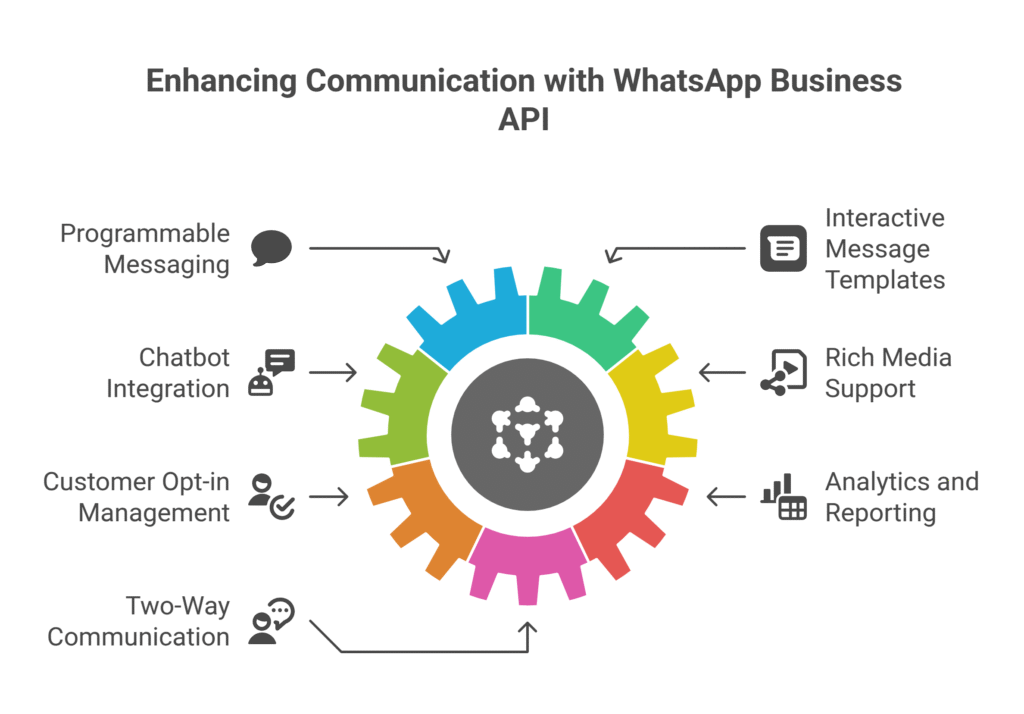
So, what does the WhatsApp Business API actually do? What are its core features that make it a powerhouse for WhatsApp and Messenger Automation?
- Programmable Messaging: This is the big one. You can send and receive messages automatically. Think about it: order confirmations, shipping updates, appointment reminders. All sent instantly, without a human touching a button. This saves incredible amounts of time and makes sure your customers are always in the loop. It’s about building trust through consistent, timely communication. You can set up triggers based on customer actions or data points in your CRM. This level of automation means you’re always engaging, even when you’re not actively working.
- Interactive Message Templates: No more boring text. The API lets you create rich, interactive messages. We’re talking buttons, lists, product carousels. Imagine sending a customer a message with three options: “Track Order,” “Return Item,” or “Contact Support.” They just tap. This drastically improves user experience. It guides your customers to the information they need quickly, reducing friction and frustration. It’s like having a mini-app inside WhatsApp, making interactions feel natural and intuitive. This makes customer journeys smoother and gets them to their goal faster.
- Chatbot Integration: This is where the magic happens for Chatbots and Customer Support. The API lets you connect your existing chatbots directly to WhatsApp. Your bot can answer FAQs, provide product info, or even guide users through troubleshooting steps. This frees up your human agents for complex issues. It means 24/7 support without hiring more staff. Your chatbot becomes the first line of defense, handling routine queries with speed and accuracy. It’s like cloning your best support agent, but without the salary.
- Rich Media Support: You’re not limited to text. Send images, videos, documents, even location data. Need to show a customer how to assemble a product? Send a video. Need to confirm an address? Send a map. This makes communication much clearer and more engaging. It’s about meeting customers where they are with the content they need. Visuals often explain better than words, and this feature lets you leverage that. It enhances the overall customer experience and reduces miscommunication.
- Customer Opt-in Management: Compliance is critical. The API helps you manage customer opt-ins properly. This means you’re building a compliant and high-quality audience. You’re not just spamming people. You’re building a relationship based on consent. This ensures your messages are welcomed, not just tolerated. It protects your brand reputation and keeps you on the right side of regulations. A clean opt-in list means higher engagement rates and better ROI on your campaigns.
- Analytics and Reporting: You can’t improve what you don’t measure. The API provides data on message delivery, read receipts, and user interactions. This gives you insight into what’s working and what’s not. Are your message templates effective? Are people clicking your buttons? This data lets you optimise your campaigns and support flows. It’s about making data-driven decisions to boost your automation strategy. You can see patterns, identify bottlenecks, and refine your approach for better results.
- Two-Way Communication: This isn’t just a broadcast tool. It allows for genuine two-way conversations. Customers can reply, ask questions, and engage directly. This personalises the experience. It makes customers feel heard and valued. It’s a real conversation, not just a one-way blast. This fosters loyalty and trust, turning interactions into relationships.
Benefits of Using WhatsApp Business API for Chatbots and Customer Support
Why bother with the WhatsApp Business API? What’s in it for your business, especially if you’re neck-deep in Chatbots and Customer Support?
Let’s talk about the real benefits. The stuff that hits your bottom line.
First up: Massive Time Savings.
Seriously, this is a game-changer. Imagine automating all your routine queries.
Order status checks, FAQ answers, basic troubleshooting.
Your support team isn’t manually typing responses anymore. The bot handles it.
This frees up your human agents to tackle complex, high-value issues.
They can spend more time solving real problems, not repetitive ones.
Next: Improved Customer Experience.
People expect instant answers. They don’t want to wait on hold or for an email reply.
With the WhatsApp Business API, responses are instant, 24/7.
This boosts customer satisfaction. Happy customers stick around and spend more.
You’re meeting them where they are, on the platform they use most.
Then there’s Scalability.
Your business grows, so does your customer base. How do you handle hundreds, thousands, even millions of conversations without breaking the bank?
The WhatsApp Business API scales with you. You don’t need to hire ten new support reps every time you launch a new product.
The infrastructure is there to handle the volume.
This means you can expand without the headaches of growing your support team proportionally.
Also, Higher Engagement Rates.
WhatsApp messages have incredibly high open and read rates compared to email or SMS.
People actually open WhatsApp messages.
This means your marketing messages, notifications, and support messages are more likely to be seen and acted upon.
It’s direct, personal, and less likely to be ignored.
Another one: Reduced Operational Costs.
Less time spent on routine queries means fewer resources needed for customer support.
You can reallocate budget to other areas of your business.
It’s about doing more with less, which is what every business owner wants.
Think about the cost savings on staffing alone.
And finally: Data and Insights.
The WhatsApp Business API gives you data. What questions are asked most often? What products are customers interested in?
This data is gold. It helps you understand your customers better.
It helps you improve your products, services, and overall strategy.
It’s about making smarter decisions based on real customer interactions.
So, it’s not just a fancy tech tool. It’s a strategic asset that impacts your efficiency, customer satisfaction, and profitability.
Pricing & Plans
Alright, let’s talk money. Because that’s where the rubber meets the road for any business tool.
Is the WhatsApp Business API free? Short answer: No.
Unlike the regular WhatsApp Business app, the API is a paid service.
But it’s not a simple subscription fee like Netflix. It’s based on a conversation-based pricing model.
Meta (WhatsApp’s parent company) charges per conversation.
What’s a conversation? It’s a 24-hour window that starts when either the business or the customer sends the first message.
Within that 24-hour window, you can send as many messages as you want, and it still counts as one conversation.
There are two main types of conversations:
1. User-initiated conversations: These start when a customer messages your business first. These are often customer service queries.
2. Business-initiated conversations: These start when your business sends the first message, usually using a pre-approved message template. Think proactive notifications: delivery updates, appointment reminders, marketing alerts.
The cost per conversation varies by country. It also varies depending on whether it’s a user-initiated or business-initiated conversation.
Generally, business-initiated conversations are more expensive because you’re initiating contact.
However, Meta does offer a tier of 1,000 free conversations per month.
This is a great starting point for smaller businesses or for testing the waters.
Beyond that, you pay as you go. The more conversations you have, the more it costs.
But remember, each conversation represents a customer interaction, a potential sale, or a resolved issue.
So, the cost is tied to your engagement volume.
You don’t pay for the WhatsApp Business API directly to Meta. You work with a WhatsApp Business Solution Provider (BSP).
These BSPs are companies that have built platforms on top of the API.
They provide the interface, tools, and support you need to use the WhatsApp Business API.
BSPs often have their own pricing structures, which can include:
– Monthly platform fees.
– Additional charges for messages or conversations beyond Meta’s rates.
– Fees for value-added services like chatbot builders, CRM integrations, or dedicated support.
When choosing a BSP, you need to compare their pricing models.
Look at their conversation rates, platform fees, and what features are included.
Some might offer tiered plans for different volumes.
Others might have a simpler pay-per-use model.
How does it compare to alternatives?
Compared to traditional SMS marketing, WhatsApp offers richer content and higher engagement, often at a competitive price, especially for interactive campaigns.
Compared to email marketing, WhatsApp has much higher open rates and real-time interaction, though it can be more expensive per message.
Compared to live chat on your website, WhatsApp allows for asynchronous communication.
This means customers don’t have to stay on your site, and conversations can pick up later.
It’s an investment, but one that can yield significant returns through improved customer service, increased sales, and operational efficiency.
The key is to model your expected conversation volume and choose a BSP whose pricing aligns with your business needs.
Hands-On Experience / Use Cases
So, you get the theory. But how does the WhatsApp Business API actually work in the trenches?
Let me tell you about a real-world scenario.
Imagine you run an e-commerce store. Let’s say you sell custom sneakers.
Before WhatsApp Business API, when a customer placed an order, you’d send an email confirmation.
Then a separate email for shipping details. And maybe another email for delivery.
Customer service queries? A contact form or a phone number.
It was fragmented. Customers had to jump through hoops.
With the WhatsApp Business API, everything changed.
I integrated it with our order management system and a simple chatbot.
Use Case 1: Order Notifications & Updates
Customer “Sarah” orders a pair of custom sneakers.
Immediately after purchase, an automated WhatsApp message goes out: “Hey Sarah! Your order #12345 for custom sneakers is confirmed! We’ll let you know when it ships.”
No more waiting for email to refresh. It’s instant, personal, and lands right in her most used app.
A few days later, the sneakers ship. Another automated message: “Great news, Sarah! Your custom sneakers are on their way! Track your order here: [tracking link]. Expected delivery: [Date].”
If there’s a delay? An automated notification goes out. “Heads up, Sarah. A slight delay on your custom sneakers. New expected delivery: [New Date]. Apologies!”
The result? Fewer “Where’s my order?” emails. Fewer phone calls. Customers felt more informed, less anxious.
Use Case 2: Customer Support Automation (Pre-sales & FAQs)
A potential customer, “Mark,” is browsing the site. He has a question about sizing for a specific sneaker model.
Instead of finding an email or phone number, he clicks a “Chat on WhatsApp” button on the product page.
A chatbot greets him: “Hi Mark! Welcome to Sneaker Co. What can I help you with today? (1) Sizing Guide (2) Customisation Options (3) Talk to a Human.”
Mark types “1”. The chatbot immediately sends the sizing chart and common FAQs related to fit.
Mark then asks: “Can I add glow-in-the-dark laces?”
The bot checks its knowledge base and replies: “Yes! Glow-in-the-dark laces are available as a customisation option. You can select them on the product page during checkout.”
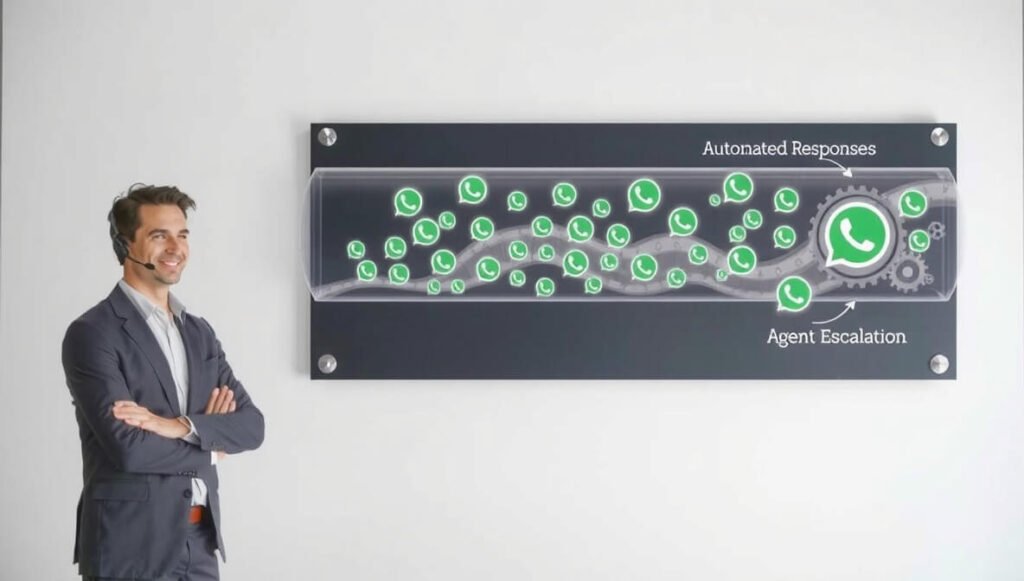
If Mark had a complex issue the bot couldn’t handle, it would seamlessly transfer him to a live agent.
This meant 24/7 instant answers for common questions. Support agents could focus on unique customer needs, leading to quicker resolutions.
Use Case 3: Re-engagement & Marketing
Let’s say “Jessica” added sneakers to her cart but didn’t complete the purchase.
After 24 hours, an automated message goes out: “Hi Jessica! Still thinking about those custom sneakers? We saved your cart for you. [Link to cart]. Let us know if you have any questions!”
This subtle nudge often led to completed sales.
Or, for existing customers, a broadcast message about a new limited-edition drop:
“Exclusive! New ‘Lunar Eclipse’ custom sneakers just dropped! Limited stock available. Shop now: [Link].”
The usability of the WhatsApp Business API itself? It depends on the Solution Provider you choose.
Most BSPs offer a user-friendly dashboard where you can build message templates, manage contacts, and view analytics.
The initial setup takes a bit of work to get your business verified and connect your systems.
But once it’s running, it’s remarkably smooth.
The results were undeniable:
– Customer inquiries via traditional channels dropped by 30%.
– Customer satisfaction scores increased by 15%.
– Cart abandonment recovery rates saw a noticeable bump.
The WhatsApp Business API transformed our customer interactions from a reactive chore to a proactive, revenue-generating machine.
It allowed us to scale support without scaling our team size.
Who Should Use WhatsApp Business API?

Who actually needs this thing? Who benefits most from putting the WhatsApp Business API to work?
It’s not for everyone, but if you fit these profiles, you’re missing out on a massive opportunity.
1. E-commerce Businesses:
If you sell anything online, this is for you.
Automated order updates, shipping notifications, abandoned cart reminders.
Direct customer support for product queries or returns.
It reduces “where’s my order” calls and boosts conversion rates through timely reminders.
2. Customer Support Teams (Any Industry):
If your team is constantly bogged down by repetitive questions, you need this.
Implement chatbots to handle FAQs, collect information, and route complex queries to the right human agent.
Think banks, telecom companies, utility providers, tech support.
It’s about efficiency and scaling support without burning out your team.
3. Service-Based Businesses:
Think salons, clinics, consultants, personal trainers.
Automate appointment reminders, booking confirmations, follow-up messages.
Reduce no-shows and make scheduling a breeze for your clients.
4. Marketing Agencies & Digital Marketers:
If you run campaigns for clients, WhatsApp is a direct line to customers.
Use it for lead generation, targeted promotions, and re-engagement campaigns.
The high open rates on WhatsApp mean your marketing messages actually get seen.
5. Travel & Hospitality:
Hotels, airlines, tour operators.
Send booking confirmations, flight updates, check-in instructions.
Offer in-stay support or concierge services via chat.
Personalised service, automated at scale.
6. Education & EdTech:
Schools, universities, online course providers.
Send reminders for classes, assignment due dates, important announcements.
Answer student queries about courses or enrolment processes.
7. Financial Services:
Banks, fintech companies, insurance providers.
Securely send transaction alerts, account updates, or payment reminders.
Offer direct customer support for account inquiries.
8. Any Business with High Volume Customer Interactions:
If you’re doing more than a few dozen customer conversations a day, manually managing WhatsApp is a headache.
The WhatsApp Business API brings structure, automation, and scalability.
Essentially, if you’re looking to:
– Improve customer response times.
– Automate repetitive tasks.
– Reduce operational costs.
– Scale your customer communication.
– Reach customers on their preferred channel.
Then the WhatsApp Business API is a tool you need to be seriously considering.
It’s an investment, but it pays off by making your customer interactions smoother, faster, and more profitable.
How to Make Money Using WhatsApp Business API
Alright, let’s talk brass tacks. How do you actually make money with the WhatsApp Business API?
It’s not a direct money-making tool in the way a sales page is.
It’s an enabler. It makes your existing money-making processes more efficient, or it opens up new service opportunities.
Here’s how.
- Service 1: Automated Customer Support as a Service:
Imagine you’re an agency. You can offer “24/7 WhatsApp Customer Support” to your clients. You build the chatbots using the WhatsApp Business API and manage their customer interactions.
You charge a monthly retainer plus a per-conversation fee. This is a massive value proposition for businesses that can’t afford a full-time support team or want to offer always-on support without hiring more staff.
Think small to medium e-commerce stores, local service providers, or even online course creators. They pay you to handle their customer comms, so they can focus on their core business.
- Service 2: Lead Generation and Nurturing Funnels:
Use the WhatsApp Business API to build interactive lead generation funnels directly within WhatsApp.
Run ads that click to WhatsApp. Then, use a bot to qualify leads, gather information, and even book appointments.
For a marketing agency, this means offering highly effective, direct-response campaigns to clients.
For your own business, it means filling your pipeline with pre-qualified leads without human intervention until the final sales stage.
Example: A real estate agent could use this. Ad: “Find Your Dream Home in 3 Clicks!” User clicks, bot asks budget, location, number of bedrooms. Qualifies them, then schedules a call with the agent. The agent only gets warm leads.
- Service 3: Broadcast Marketing & Sales Campaigns:
Leverage WhatsApp’s high open rates for direct sales.
If you have an opt-in list, you can send targeted promotions, new product launches, or flash sales directly to their WhatsApp.
The interactive buttons can link directly to product pages for immediate purchase.
This is about turning your existing customer base into a revenue stream through hyper-personalisation and timely offers.
Think about an online fashion retailer: “New Autumn Collection just dropped! Shop jackets (button), Shop boots (button).” Customers click, go directly to the category. High conversion potential.
Case Study Example: How “Sarah’s Online Boutique” makes $5,000/month using WhatsApp Business API for WhatsApp and Messenger Automation.
Sarah runs an online boutique selling unique handmade jewellery. Her biggest pain point was customer queries about order status, customisation options, and returns. Her small team spent hours responding to emails.
She implemented the WhatsApp Business API via a BSP and integrated it with her e-commerce platform.
Strategy 1: Automated Order Updates. Every order confirmation, shipping update, and delivery notification now goes out via WhatsApp. This cut down “where’s my order” emails by 80%. Her team gained hours back.
Strategy 2: FAQ Chatbot. She built a simple chatbot to answer common questions: “What materials do you use?”, “Do you ship internationally?”, “How do I return an item?”. The bot handles 70% of initial customer inquiries instantly, 24/7.
Strategy 3: Abandoned Cart Reminders. If a customer adds items to their cart but doesn’t buy within 24 hours, an automated WhatsApp message reminds them. With a direct link back to their cart. This alone recovered an average of $2,000 in sales per month.
Strategy 4: Loyalty & New Product Launches. Sarah sends exclusive WhatsApp messages to her opted-in customer list about new jewellery collections or VIP discounts. These messages have a 30% higher conversion rate than her email campaigns, leading to an extra $3,000 in sales monthly.
By increasing efficiency, reducing manual workload, and directly driving sales through automation and targeted marketing, Sarah added significant revenue to her business. She turned a cost centre (customer support) into a revenue driver.
Limitations and Considerations
No tool is perfect. And the WhatsApp Business API, while powerful, has its quirks. You need to know these before you jump in.
First up: Cost.
It’s not free. And while the 1,000 free conversations per month are a good start, beyond that, you’re paying per conversation.
For high-volume businesses, this can add up. You need to budget for it.
Calculate your expected conversation volume. Factor in the costs from both Meta and your chosen Business Solution Provider (BSP).
It’s an investment, not a free ride.
Next: Template Approval Process.
You can’t just send any message you want to your customers.
All business-initiated messages (messages you send first) must be pre-approved “message templates” by WhatsApp.
This process can sometimes be slow. Messages must be highly structured and cannot be promotional if they are outside the 24-hour customer service window.
This means you can’t just blast out a random sales pitch. It forces you to be thoughtful and customer-centric, which is a good thing for long-term engagement, but can be a bottleneck for spontaneous campaigns.
Then there’s the 24-Hour Customer Service Window.
If a customer messages you, you have 24 hours to respond.
Within this window, you can send any type of message, including promotional ones.
But after 24 hours, if you want to message them again, you must use a pre-approved message template.
This encourages businesses to respond quickly and provide good customer service, but it can be a challenge for slower support teams or for follow-ups beyond that window.
Also, Compliance and Opt-ins.
WhatsApp has strict rules about spam and user consent.
You need explicit opt-in from users to message them.
If you violate these rules, your business account can be flagged or even banned.
This means you need a robust system for collecting and managing consent. No shortcuts here.
Another consideration: Learning Curve and Integration Complexity.
While BSPs make it easier, integrating the WhatsApp Business API with your existing CRM, e-commerce platform, or help desk system can be complex.
It might require technical expertise or developer resources.
There’s a learning curve to setting up chatbots, flow logic, and template management.
It’s not just plug-and-play like installing an app on your phone.
Finally, Dependency on a Single Platform.
While WhatsApp is dominant in many regions, putting all your communication eggs in one basket can be risky.
If WhatsApp changes its policies, pricing, or experiences outages, it impacts your communication strategy.
Always consider a multi-channel approach, with WhatsApp as a powerful, but not exclusive, component.
These aren’t deal-breakers, but they are important considerations. Go in with your eyes open. Understand the rules, the costs, and the technical lift.
Done right, the benefits far outweigh these challenges. But “done right” means understanding these limitations first.
Final Thoughts
So, what’s the bottom line?
The WhatsApp Business API isn’t just another shiny tool. It’s a strategic asset for any business serious about Chatbots and Customer Support, especially when it comes to WhatsApp and Messenger Automation.
It shifts your customer interactions from a reactive, manual headache to a proactive, automated, and ultimately, profitable process.
Think about it: instant replies, 24/7 availability, personalised engagement at scale.
This isn’t just about saving time; it’s about making more money by delivering a superior customer experience.
You free up your team to focus on high-value tasks. You reduce operational costs. You increase customer satisfaction and loyalty.
Yes, there’s an investment. Yes, there’s a learning curve.
But the return on that investment, in terms of efficiency, customer retention, and direct sales, is massive.
If you’re still manually managing WhatsApp messages, or your customer support is feeling overwhelmed, you’re leaving money on the table.
You’re also risking customer churn because your competitors are already adopting these solutions.
My recommendation? Stop thinking about it. Start doing.
Explore a few WhatsApp Business Solution Providers. Look at their features, their pricing models.
Start small, maybe with the 1,000 free conversations, and see the impact for yourself.
The future of customer communication is here. Are you going to lead, or are you going to lag?
This isn’t just hype. This is the real deal.
Visit the official WhatsApp Business API website
Frequently Asked Questions
1. What is WhatsApp Business API used for?
The WhatsApp Business API is used by medium to large businesses to communicate with customers at scale. It allows for automated messaging, sending notifications, providing customer support via chatbots, and running marketing campaigns directly on WhatsApp. It’s for high-volume, programmatic customer interactions.
2. Is WhatsApp Business API free?
No, the WhatsApp Business API is not free. Meta (WhatsApp’s parent company) charges businesses per conversation, although the first 1,000 conversations each month are free. Businesses also typically pay fees to a WhatsApp Business Solution Provider (BSP) for platform access and additional services.
3. How does WhatsApp Business API compare to other AI tools?
The WhatsApp Business API is not an AI tool itself, but a platform that enables AI tools like chatbots to function on WhatsApp. It specialises in direct, real-time customer communication on a widely used messaging app. Other AI tools might focus on content creation, data analysis, or internal automation, while this API is purpose-built for conversational commerce and support.
4. Can beginners use WhatsApp Business API?
Directly using the WhatsApp Business API requires some technical knowledge. However, many WhatsApp Business Solution Providers (BSPs) offer user-friendly platforms and low-code/no-code tools that make it accessible for beginners or non-technical users to set up chatbots and automation flows. It still requires a learning curve, but it’s manageable.
5. Does the content created by WhatsApp Business API meet quality and optimization standards?
The WhatsApp Business API facilitates the delivery of content. The quality and optimisation of the content itself (e.g., chatbot responses, message templates) depend on how effectively the business designs and optimises them. Meta requires message templates to meet certain quality and compliance standards before approval. Good design ensures the messages are clear, concise, and helpful.
6. Can I make money with WhatsApp Business API?
Yes, you can make money with the WhatsApp Business API. It helps generate revenue by improving lead generation, boosting sales through direct marketing campaigns, enhancing customer satisfaction (leading to repeat business), and significantly reducing operational costs by automating customer support. Agencies can also offer WhatsApp automation services to clients.




