
OpenAI Codex transforms your learning to code journey. Generate code, debug, and learn faster than ever before. Revolutionise your programming skills today!
Here’s How OpenAI Codex Solved My Biggest Learning To Code Issue
Feeling stuck when learning to code?
We all know the drill.
Hours spent debugging, searching for syntax, or just staring at a blank screen, wondering where to even begin.
It’s frustrating. It slows you down. And sometimes, it makes you want to quit.
But what if there was a better way?
A way to accelerate your progress, understand complex concepts faster, and truly enjoy the process of building things with code?
The world of Learning and Education is changing fast. AI isn’t just a buzzword anymore; it’s a game-changer. And when it comes to mastering coding, one tool stands out.
It’s called OpenAI Codex.
This isn’t some theoretical future. It’s here now, helping people just like you overcome those coding roadblocks and achieve their learning goals. Ready to see how? Let’s get into it.
Table of Contents
- What is OpenAI Codex?
- Key Features of OpenAI Codex for Learning To Code
- Benefits of Using OpenAI Codex for Learning and Education
- Pricing & Plans
- Hands-On Experience / Use Cases
- Who Should Use OpenAI Codex?
- How to Make Money Using OpenAI Codex
- Limitations and Considerations
- Final Thoughts
- Frequently Asked Questions
What is OpenAI Codex?
Okay, let’s cut to the chase. What exactly is OpenAI Codex?
Think of it as an incredibly smart coding assistant. It’s a large language model developed by OpenAI, specifically trained on a massive dataset of publicly available code and natural language. This means it understands both what you want to achieve in plain English and how to translate that into working code.
It’s the AI engine that powers tools like GitHub Copilot. Its core function is to generate code from natural language prompts, complete code, translate between programming languages, and even explain code. It’s designed to make programming more accessible and efficient.
Who’s it for? Anyone who codes. From seasoned developers looking to speed up their workflow to, crucially, beginners grappling with their first lines of code. It acts like an experienced mentor, always ready to offer suggestions or explanations.
Imagine you’re learning Python and get stuck on how to write a function that sorts a list of numbers. Instead of spending hours scouring Stack Overflow, you can simply ask Codex, “write a Python function to sort a list of integers in ascending order.” And boom, it gives you the code.
It’s a game-changer for speeding up the learning process. You get immediate feedback and working examples, which is invaluable when you’re trying to grasp new concepts. It reduces frustration and keeps you moving forward.
This isn’t just about getting answers; it’s about understanding them. Codex can break down complex snippets, explaining what each part does. This turns a potentially frustrating block into a learning opportunity.
It’s a powerful ally for anyone on the journey of Learning To Code. It doesn’t replace the need to learn, but it certainly accelerates it. It handles the tedious parts so you can focus on the bigger picture.
It acts as your personal coding tutor, available 24/7. No more waiting for a friend to reply or a forum post to get approved. Instant answers mean instant progress.
This tool is built for practicality. It’s not just theoretical; it delivers real, executable code that you can immediately test and learn from. That hands-on approach is critical for true understanding.
Key Features of OpenAI Codex for Learning To Code
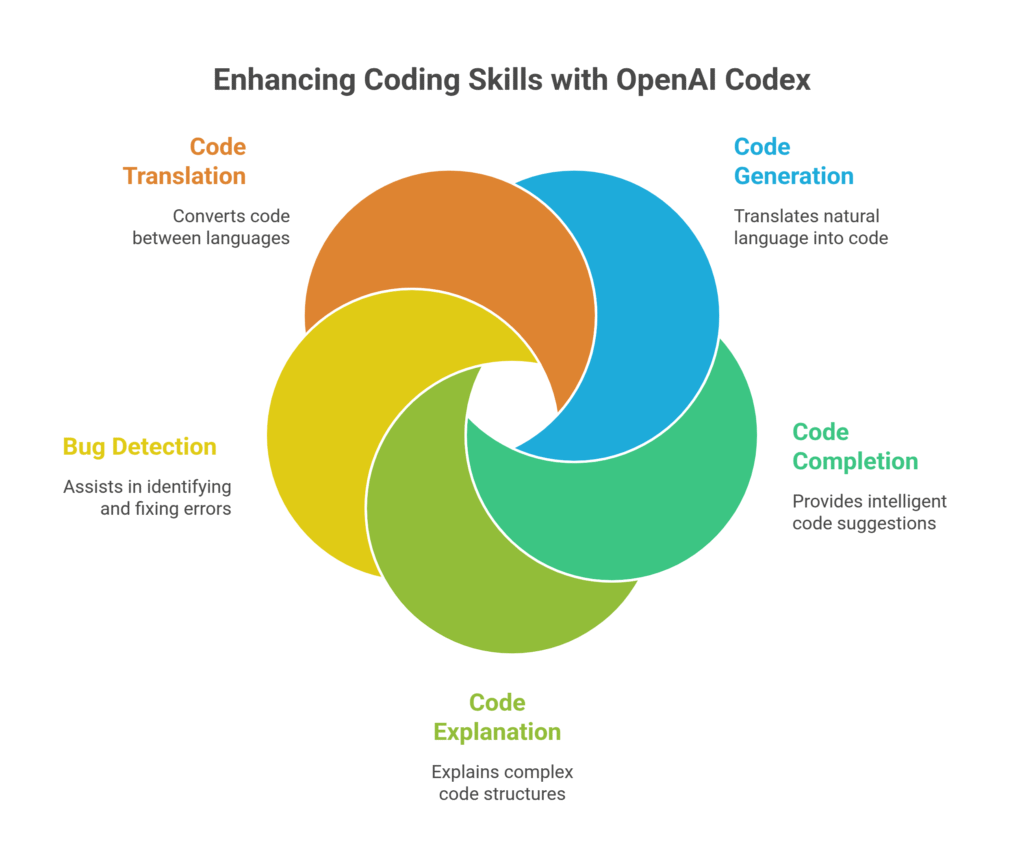
Let’s break down what makes OpenAI Codex such a powerful ally for anyone trying to master code.
- Code Generation from Natural Language:
This is where Codex really shines. You literally describe what you want to build in plain English, and Codex attempts to write the code for you. For someone learning, this is huge. Instead of struggling with syntax from scratch, you can focus on the logic. “Create a simple web server in Node.js that serves ‘Hello World’ on port 3000.” Or “write a SQL query to select all users older than 30 from a ‘users’ table.” It’s like having a translator for your ideas directly into code. This helps you build intuition about how ideas translate into programming constructs, accelerating your understanding.
- Code Completion and Suggestion:
As you type, Codex offers intelligent suggestions to complete your code. This isn’t just basic auto-complete; it understands the context of your entire project and provides relevant snippets. For a beginner, this is invaluable for learning syntax and best practices on the fly. It reduces typos and helps you discover common patterns without constant Googling. It’s like a smart co-pilot guiding your hands, making coding feel less like memorization and more like problem-solving.
- Code Explanation and Documentation:
Got a piece of code you don’t understand? Paste it into Codex and ask it to explain what it does. This feature is a lifesaver for deciphering complex algorithms or unfamiliar libraries. It can break down functions, variables, and logic, providing clarity where there might have been confusion. For learning, this means you can grasp concepts much faster without getting bogged down by cryptic lines of code. It also helps you learn to read and understand existing codebases, a crucial skill for any developer.
- Bug Detection and Debugging Assistance:
Debugging is often the most frustrating part of learning to code. Codex can help. While it’s not a magic bullet, you can provide it with error messages or snippets of non-working code and ask for potential fixes or explanations. It can identify common errors, suggest corrections, and even point you towards the likely source of a bug. This significantly reduces the time spent on troubleshooting, allowing you to focus on learning new concepts rather than fixing obscure errors.
- Code Translation and Refactoring:
Need to see how a function written in Python would look in JavaScript? Codex can often translate code between different programming languages. This is fantastic for understanding language differences and for porting logic. It can also suggest ways to refactor your code, making it more efficient, readable, or adhering to best practices. For students, this provides a glimpse into professional development techniques and helps them write cleaner, more maintainable code from the start.
Benefits of Using OpenAI Codex for Learning and Education
So, why should anyone in Learning and Education care about OpenAI Codex?
It’s all about efficiency and understanding.
First off, it drastically cuts down on learning time. Instead of wrestling with syntax or obscure error messages for hours, you get solutions and explanations almost instantly. This means you spend more time understanding concepts and less time stuck in frustrating loops.
Quality of learning goes up, big time. You’re exposed to correct syntax and effective patterns right from the start. Codex helps you build good habits, avoiding the pitfalls of trial-and-error without proper guidance. It’s like having an expert looking over your shoulder.
Creative blocks? Gone. When you’re learning, it’s easy to get stuck on how to implement a specific idea. Codex acts as a brainstorming partner, generating different approaches or filling in the gaps in your knowledge. This keeps your momentum going and prevents discouragement.
It makes complex topics more approachable. Breaking down a convoluted algorithm or a tricky data structure becomes easier when you can ask Codex for explanations or simplified examples. It turns abstract concepts into concrete, executable code snippets you can learn from.
Think about the confidence boost. Getting working code quickly, even with AI assistance, builds self-efficacy. You see your ideas come to life faster, which motivates you to keep going and tackle more challenging projects. Success breeds success.
It also supports different learning styles. Visual learners can see the code generated. Auditory learners can read explanations aloud. Kinesthetic learners can immediately experiment with the provided code. It caters to a wider range of needs than traditional textbooks or lectures alone.
Consider the practical application. Learning by doing is critical in coding. Codex helps you do more, faster. You can build small projects or components, test them, and iterate, all without getting bogged down by foundational syntax. This accelerates the “doing” part of learning.
It democratizes coding. Someone without a formal computer science background can start building functional programs much sooner. This opens up opportunities for more people to enter the tech field, regardless of their starting point.
Finally, it prepares you for the real world. AI-powered coding assistants are becoming standard in professional development environments. Learning to use Codex effectively now means you’re already building skills that will be essential in your future career. It’s not a crutch; it’s a tool for the modern developer.
Pricing & Plans

Alright, let’s talk brass tacks: what’s the deal with pricing for OpenAI Codex?
It’s important to understand that OpenAI Codex itself isn’t a standalone product you subscribe to directly in the same way you might for a SaaS app.
Instead, Codex is an underlying AI model that developers use via OpenAI’s API. This means its pricing is usage-based.
You pay per token. Tokens are chunks of text – essentially, words or parts of words. You pay for the input tokens (what you send to the model) and the output tokens (what the model generates back to you).
There isn’t a free plan specifically for Codex, but OpenAI does offer free credits to new users when they sign up for an API key. These credits are usually enough to experiment with Codex and other OpenAI models for a short period. It’s a great way to kick the tires and see what it can do without committing any cash.
For ongoing use, you’ll need to monitor your token usage. The cost per token can vary slightly depending on the specific model version you’re using (e.g., `code-davinci-002` vs. `text-davinci-003`, which is also capable of code). Generally, it’s very affordable for individual learning purposes. We’re talking fractions of a cent per thousand tokens.
What does the premium version include? Well, since it’s an API, “premium” typically means simply having more budget available for higher token usage. There aren’t tiered features like “premium features” or “enterprise features” in the traditional sense, directly tied to Codex. You get full access to the model’s capabilities once you have an API key.
Compared to alternatives, such as GitHub Copilot, which is powered by Codex, pricing differs. GitHub Copilot has a monthly subscription fee (e.g., $10/month or $100/year for individuals). This fixed fee might be more predictable for some users who prefer not to manage token usage. Copilot bundles the Codex power with a slick IDE integration.
For a beginner learning to code, using the raw OpenAI API with Codex might be a bit more technical to set up initially, but it offers more flexibility and potentially lower cost if your usage is light. You can integrate it into your own scripts or simple interfaces.
If you’re using it for specific Learning To Code projects, the API is super flexible. You can build custom learning tools or interactive coding environments that leverage Codex.
For institutions in Learning and Education, large-scale deployments would involve careful budget planning based on expected student usage and API calls. OpenAI offers enterprise-level support and potentially custom pricing for very high volumes.
So, in short: no free tier in the traditional sense, but free credits to start. Pay-as-you-go based on token usage. Very cost-effective for individual learning. Consider GitHub Copilot for a ready-to-use, integrated experience with a fixed monthly cost.
Hands-On Experience / Use Cases
Let me tell you how using OpenAI Codex actually played out in my own journey.
I was trying to get a handle on regular expressions in Python. If you’ve ever dealt with regex, you know it can feel like trying to read ancient hieroglyphs. I needed to extract specific data patterns from log files, and I was completely lost.
My usual process involved endless trial and error, cross-referencing documentation, and feeling increasingly frustrated. It was slowing my Learning To Code progress to a crawl.
So, I decided to give Codex a real workout.
I opened up my environment and typed: “Write a Python regular expression to extract all IP addresses from a multiline string.”
Within seconds, Codex returned a clean, correct regex pattern, along with the Python code to implement it. But here’s the kicker: I also asked, “Explain this regular expression step by step.”
The explanation was clear, concise, and broke down each component of the regex. It told me what `\d{1,3}` meant, what the `\.` was for, and how the `(?:…)` grouping worked. This wasn’t just a solution; it was a lesson. I wasn’t just copying and pasting; I was understanding.
Another time, I was working on a small web app and needed to implement user authentication. This is a common but often complex task for beginners. I knew the concepts but kept stumbling on the implementation details for hashing passwords securely.
I prompted Codex: “How do I securely hash a password in Python using bcrypt?”
It provided a code snippet using `bcrypt` and explained the salting process and why it’s important. Then I asked, “What’s the difference between SHA256 and bcrypt for password hashing?” And it gave me a clear, simple comparison that solidified my understanding of cryptographic principles.
Usability? It’s surprisingly straightforward. If you’re comfortable with a command line or a simple Python script, you can interact with the OpenAI API. For a smoother experience, tools like GitHub Copilot integrate Codex directly into your code editor, making it feel like magic. You type a comment, press enter, and the code appears.
The results? Time saved was monumental. What would have taken me hours of struggling with regex or security best practices was condensed into minutes of prompt-and-learn.
The quality of the generated code was consistently high, adhering to common conventions. And when it wasn’t perfect, it was usually a very solid starting point that required only minor tweaks. This is great for learning because it teaches you to review and adapt, rather than just blindly accept.
This wasn’t about avoiding the learning process. It was about supercharging it. Instead of getting stuck on the ‘how to write it’ and giving up, I focused on the ‘what it does’ and ‘why it works’. It shifted my learning from brute-force memorization to conceptual understanding.
For anyone in Learning and Education, especially those grappling with coding, this hands-on experience proves its value. It takes the pain out of the process, leaving more room for genuine comprehension and creativity.
Who Should Use OpenAI Codex?

Who stands to gain the most from OpenAI Codex?
Let’s break it down.
First up, **beginner programmers**. If you’re just starting your Learning To Code journey, this tool is a godsend. It reduces the initial friction of syntax errors and provides instant working examples. It’s like having a patient tutor who never gets tired of answering “how do I…?” questions. You’ll learn faster and get discouraged less often.
Next, **students and academics**. Whether you’re in computer science, data science, or any field requiring coding, Codex can accelerate your assignments and projects. Need to quickly prototype an algorithm for a research paper? Or generate boilerplate code for a class project? Codex helps you focus on the logic and concepts, not the mundane typing.
Then there are **educators and instructors**. Teaching coding can be tough. Codex can help you create custom examples, generate practice problems, or even debug student code more efficiently. You can use it to demonstrate concepts visually, showing how a natural language idea translates directly into runnable code.
**Independent learners and self-starters** will love it. If you’re teaching yourself through online courses, tutorials, or books, Codex fills in the gaps. It provides immediate answers when you’re stuck, allowing you to maintain your learning pace without waiting for forum replies or tutor availability.
Also, consider **anyone switching careers into tech**. You need to ramp up fast. Codex can help you quickly grasp new programming languages or frameworks. It speeds up the initial awkward phase of learning new syntaxes and libraries, making the transition smoother.
Even **experienced developers** can benefit. While this article focuses on learning, professionals use Codex (via Copilot) for repetitive tasks, generating boilerplate code, or exploring new APIs quickly. It frees up mental bandwidth for higher-level problem-solving. This means less time on mundane tasks and more on actual innovation.
Small businesses or startups might also find value, even if not directly for “learning.” The efficiency gains from faster code generation can help deliver projects quicker, effectively reducing development costs. It allows them to experiment with ideas that might have been too time-consuming to prototype manually.
Anyone who values **rapid prototyping and experimentation** should consider it. Want to test an idea quickly? Generate the core logic with Codex, and then iterate. This immediate feedback loop is crucial for validating concepts.
Essentially, if you write code, want to learn to write code, or teach others to write code, OpenAI Codex is a powerful addition to your toolkit. It’s built for efficiency, understanding, and accelerating progress in the world of programming.
How to Make Money Using OpenAI Codex
Alright, let’s talk about the money. How can you actually leverage OpenAI Codex to put cash in your pocket, especially in the context of Learning and Education and Learning To Code?
It’s about efficiency and providing value.
- Service 1: Code Tutoring and Mentoring (Accelerated)
You can offer personalized coding tutoring services, but with a major twist: leverage Codex to make your sessions incredibly efficient. Instead of struggling to explain every single line, use Codex to generate examples, debug student code on the fly, and instantly provide alternative solutions. This means you can cover more ground in less time, provide clearer explanations, and help students grasp concepts faster. You can charge a premium for this accelerated learning experience. Imagine a student is stuck on a particular algorithm; you can use Codex to show multiple implementations and explain the trade-offs, making you a more effective and valuable tutor.
- Service 2: Course Material and Curriculum Development
Building high-quality coding courses or educational materials from scratch is time-consuming. Use OpenAI Codex to rapidly generate code examples, challenge problems, and even potential solutions for your lessons. You can create interactive coding exercises that explain concepts progressively. Need code snippets for different programming languages to illustrate a principle? Codex can help translate. This significantly speeds up the development cycle, allowing you to launch more courses or modules faster, reaching more paying students or institutions. You can also use it to quickly create varied quiz questions that test different aspects of coding knowledge.
- Service 3: Technical Content Creation (Blogs, Tutorials, Books)
If you’re creating educational content like blog posts, YouTube tutorials, or even e-books focused on “Learning To Code,” Codex is a huge advantage. It can help you generate accurate, well-structured code examples for your articles. Instead of spending hours writing and testing every snippet, you can prototype them quickly with Codex. This allows you to produce more content, consistently, which in turn drives more traffic, attracts more subscribers, and eventually leads to monetization through ads, affiliates, or direct sales of your educational products. You can also generate variations of code for different levels of learners.
Consider a case study: How Jane Doe makes $5,000/month using OpenAI Codex for Learning To Code.
Jane was a self-taught programmer struggling to scale her online tutoring business. She could only take on a few students at a time because preparing custom examples and debugging live was so time-intensive.
She started integrating OpenAI Codex into her workflow. When a student asked about implementing a specific data structure, Jane would use Codex to generate three different Python implementations (e.g., using a list, a dictionary, and a custom class) in minutes. She could then walk the student through the pros and cons of each, providing a much richer learning experience.
She also began offering “Code Review & Refactoring” sessions. Students would send her their messy code, and Jane, with Codex’s help, could quickly identify potential bugs, suggest cleaner syntax, and explain best practices, all within a 30-minute session. Without Codex, this would have taken her much longer, reducing her hourly rate effectively.
By increasing her efficiency and the quality of her offerings, Jane could take on more students and charge more for her specialized services. She reduced her prep time by 50% and increased her capacity by 30%. This translated directly into a significant boost in her monthly income, simply by making her existing skills more leverageable with AI.
It’s about working smarter, not harder. OpenAI Codex isn’t doing the work for you entirely, but it’s accelerating your ability to deliver high-value coding and educational services.
Limitations and Considerations
Alright, let’s be real. No tool is perfect, and OpenAI Codex is no exception. It’s powerful, but it comes with its own set of considerations.
First, **accuracy is not 100% guaranteed**. While OpenAI Codex is impressive, it’s not infallible. It can sometimes generate code that has subtle bugs, or isn’t the most efficient, or simply doesn’t quite fit your specific requirements. You need to verify the code it produces. This is especially important when you’re Learning To Code; blindly trusting the AI won’t help you learn. You still need to understand *why* the code works (or doesn’t).
Then there’s the **editing and refining need**. Even when the code is mostly correct, it often requires tweaking. It might not adhere to your specific coding style, variable naming conventions, or project structure. It’s a starting point, not a final product. You’ll spend time adapting it, which is still faster than writing from scratch, but it’s not zero effort.
**Understanding context can be a challenge**. OpenAI Codex works best with clear, explicit prompts. If your request is ambiguous or relies on a very specific, obscure context within a large codebase, it might struggle to provide exactly what you need. It doesn’t “understand” your entire project history or unique setup. You might need to break down complex requests into smaller, more manageable pieces.
There’s also a **learning curve for effective prompting**. Getting the best results from OpenAI Codex isn’t just about typing a question. It’s about learning how to phrase your requests effectively, providing enough context, and iterating on your prompts to guide the AI to the desired output. This skill, often called “prompt engineering,” takes practice.
**Over-reliance is a risk for learners**. If you just copy-paste without understanding, you’re not learning. The goal is to accelerate understanding, not bypass it. Learners must actively engage with the generated code, trace its logic, and understand the underlying concepts. It’s a tool to aid learning, not replace it.
**Security implications** are another point. If you’re generating code for sensitive applications, be cautious. Code generated by AI might unintentionally introduce vulnerabilities if not carefully reviewed. Always follow best practices for security and manually audit any critical code.
Finally, **data privacy**. When you send code or prompts to the OpenAI API, that data is processed by OpenAI’s servers. While OpenAI has strong data privacy policies, it’s always something to consider, especially if you’re dealing with proprietary or highly sensitive code. For educational purposes, this is usually less of an issue, but worth noting for professional use.
So, while OpenAI Codex is a powerful accelerator for Learning and Education, approach it with a critical eye. It’s an intelligent assistant, not a replacement for human understanding and critical thinking. Use it to enhance your learning, not to shortcut it.
Final Thoughts
Here’s the deal. If you’re serious about Learning To Code, or if you’re involved in Learning and Education, OpenAI Codex isn’t just a fancy AI tool.
It’s a strategic advantage.
It bridges the gap between natural language and complex code, making the entire programming journey less intimidating and far more efficient. We’ve seen how it can generate code, explain snippets, and even help debug, effectively acting as an omnipresent coding mentor.
The value proposition is clear: accelerate your learning, build confidence, and overcome those frustrating roadblocks that typically halt progress. It’s about spending more time on understanding core concepts and less time battling syntax or obscure errors.
Is it a magic bullet? No. You still need to think, understand, and verify. But it’s an incredibly powerful lever. It reduces the time investment required to grasp new ideas and build functional projects.
My recommendation? Dive in. Experiment with it. Whether through direct API calls or via integrated tools like GitHub Copilot, get your hands dirty. See how it transforms your workflow.
This isn’t just about getting code faster; it’s about learning better. It’s about empowering you to achieve your coding goals with greater ease and enjoyment.
Don’t get left behind. The future of coding is here, and tools like OpenAI Codex are leading the charge.
Visit the official OpenAI Codex website
Frequently Asked Questions
1. What is OpenAI Codex used for?
OpenAI Codex is an AI model primarily used for translating natural language into code. It can generate code snippets, complete functions, explain existing code, and assist with debugging across various programming languages. It’s especially useful for accelerating the learning process in coding.
2. Is OpenAI Codex free?
OpenAI Codex itself is not a free standalone product. It’s accessible via OpenAI’s API, which operates on a usage-based pricing model (pay-per-token). However, OpenAI often provides new users with free credits upon signing up, allowing for initial experimentation without cost. Tools like GitHub Copilot, which are powered by Codex, have their own subscription fees.
3. How does OpenAI Codex compare to other AI tools?
OpenAI Codex excels in its deep understanding of code and natural language, making it highly effective for code generation and explanation. Many other AI tools are either more general-purpose language models (like basic ChatGPT for text) or are specialized for non-coding tasks. Codex’s strength lies in its specific training on a vast dataset of code, giving it a unique edge for programming tasks.
4. Can beginners use OpenAI Codex?
Absolutely. OpenAI Codex is incredibly beneficial for beginners. It helps overcome common hurdles like syntax errors and understanding complex concepts by generating clear examples and explanations. It acts as an accessible, always-available tutor, allowing beginners to learn faster and reduce frustration.
5. Does the content created by OpenAI Codex meet quality and optimization standards?
Code generated by OpenAI Codex is generally high quality and adheres to common programming conventions. However, it’s not always perfect and may require review and optimization for specific project standards or edge cases. For learning, it provides a very solid foundation. For production use, human review is always recommended to ensure optimal performance, security, and adherence to specific coding guidelines.
6. Can I make money with OpenAI Codex?
Yes, you can. By leveraging OpenAI Codex’s efficiency, you can offer accelerated coding tutoring, rapidly develop and sell high-quality coding course materials, or create technical content like blogs and tutorials more efficiently. Its ability to speed up development and explanation directly translates into opportunities to scale services and monetize your expertise in coding education.