
LangGraph supercharges your Agent Development workflow, helping you build powerful AI Agents faster. Gain efficiency, save time, and build more robust AI solutions. Ready to level up?
Why LangGraph Is a Smart Choice for Agent Development
The world of AI Agents is exploding. Everyone’s talking about it, building in it.
But here’s the kicker: building these agents? It’s rarely straightforward.
You hit roadblocks. You deal with complex states, unpredictable loops, and endless debugging.
It’s enough to make you pull your hair out. It can feel like you’re constantly fighting your own code.
I know the feeling. I’ve been there, staring at a screen, wondering if there was a better way.
Well, guess what? There is. It’s called LangGraph.
This tool isn’t just another library. It’s a complete shift in how you approach Agent Development.
It helps you manage the chaos. It brings order to complex agentic workflows.
If you’re serious about building reliable, performant AI Agents, then you need to pay attention.
LangGraph is designed for exactly this purpose. It’s for those who want to build smarter, not harder.
It helps you get results. Fast. It’s about building powerful agents without the usual headaches.
Let’s dive into why LangGraph is quickly becoming the go-to choice for anyone serious about Agent Development.
It’s time to rethink your process. It’s time to build better agents.
This article will show you how LangGraph makes that possible.
You’ll see exactly what it offers. You’ll understand its impact.
And you’ll learn why it’s a smart choice for your projects.
Table of Contents
- What is LangGraph?
- Key Features of LangGraph for Agent Development
- Benefits of Using LangGraph for AI Agents
- Pricing & Plans
- Hands-On Experience / Use Cases
- Who Should Use LangGraph?
- How to Make Money Using LangGraph
- Limitations and Considerations
- Final Thoughts
- Frequently Asked Questions
What is LangGraph?
LangGraph is a library built on top of LangChain. Think of it as the ultimate toolkit for building robust, stateful AI Agents.
It’s designed to handle complex, multi-step operations where an agent needs to make decisions, perform actions, and then react to new information.
This isn’t just for simple chatbots. This is for agents that can think, plan, and adapt.
It helps you define agent behaviours as graphs. Each node in the graph can be a tool call, a model invocation, or even a custom function.
The edges define the transitions between these states. This gives you incredibly fine-grained control over the agent’s flow.
Before LangGraph, building such complex agents was a nightmare of if-else statements and custom state management.
It was prone to errors. It was hard to scale.
LangGraph simplifies all of that. It provides a clear, visual way to design and debug your agent’s logic.
Its target audience? Developers and researchers working on advanced Agent Development.
Anyone who needs to build autonomous agents that can tackle real-world problems.
If you’re building agents for data analysis, customer service, task automation, or content creation, LangGraph is for you.
It helps you move beyond basic prompt engineering. It helps you build truly intelligent systems.
It’s a game-changer for anyone struggling with agent orchestration.
The core idea is to represent your agent’s decisions and actions as a graph. This visual representation makes it easier to understand.
It also makes it easier to test. And crucially, easier to maintain.
You can define entry points, exit points, and conditional logic. This enables agents to adapt their behaviour on the fly.
It’s not just about running a sequence of actions. It’s about building agents that can reason.
Agents that can recover from errors. Agents that can learn from their interactions.
This is the future of AI Agents. And LangGraph is making it accessible.
Key Features of LangGraph for Agent Development
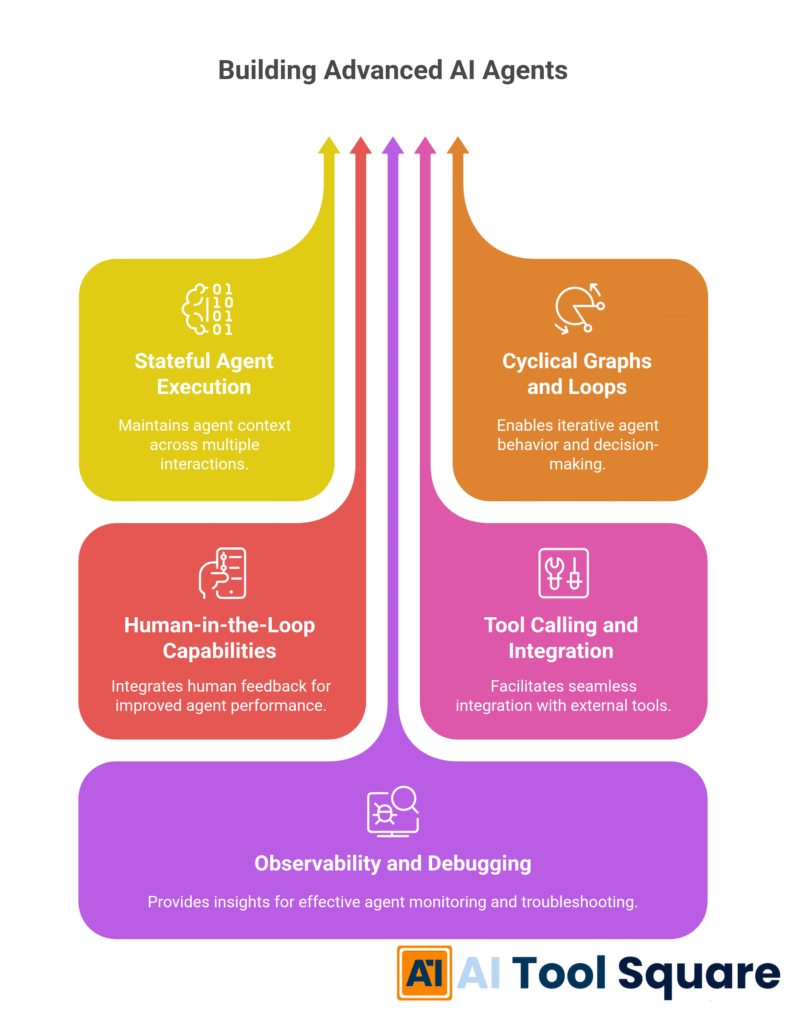
Stateful Agent Execution: LangGraph excels at managing state. This is crucial for Agent Development where an agent needs to remember previous interactions or decisions. It allows agents to maintain a consistent view of the world. This means fewer errors and more coherent agent behaviour. Instead of stateless calls, agents can carry context through multiple steps.
This helps avoid repetitive questions or actions. It leads to a much smoother user experience. It’s like giving your agent a memory, letting it build on past interactions.
Cyclical Graphs and Loops: Real-world problems are rarely linear. Agents often need to iterate, backtrack, or try different approaches. LangGraph handles this with ease. You can define cycles in your graph. This means agents can go back to a previous state. They can retry actions or refine their approach.
This is particularly powerful for agents that need to self-correct. For example, an agent trying to find an answer might consult a tool, not find what it needs, and then decide to rephrase its query and try another tool. LangGraph makes this logic simple to implement.
Human-in-the-Loop Capabilities: Sometimes, an agent needs human intervention. LangGraph supports this directly. You can design your graph to pause execution and ask for human input at specific points. This is brilliant for complex tasks where full autonomy isn’t always desirable or possible.
Imagine an agent drafting a legal document. It can reach a point, present its work to a human reviewer, wait for feedback, and then continue. This blend of AI and human intelligence is incredibly powerful. It builds trust and ensures quality control. It makes AI Agents more reliable for critical applications.
Tool Calling and Integration: Agents aren’t just about language models. They’re about using tools effectively. LangGraph simplifies the integration of external tools. Whether it’s a search engine, a database, an API, or a custom Python function, you can plug it into your graph as a node.
This means your agents aren’t confined to what they know intrinsically. They can fetch real-time data. They can perform complex calculations. They can interact with other software systems. This capability is essential for building practical, real-world AI Agents that provide tangible value.
Observability and Debugging: When an agent goes wrong, you need to know why. LangGraph provides excellent observability. Because your agent’s logic is defined as a graph, you can easily visualise its execution path. You can see which nodes were visited. You can inspect the state at each step.
This makes debugging a far less painful process. You can pinpoint exactly where an agent deviated from its expected behaviour. This visibility is invaluable during Agent Development. It helps you quickly identify issues and refine your agent’s logic. It saves hours of frustrating trial-and-error.
Benefits of Using LangGraph for AI Agents
Using LangGraph for AI Agents offers some serious advantages.
First up, it’s a massive time saver. Before LangGraph, building complex, multi-step agents meant writing a ton of boilerplate code.
You were managing state, handling transitions, and wrestling with control flow.
It was manual, tedious, and prone to bugs.
Now, you define your agent’s logic as a graph. LangGraph handles the orchestration.
This speeds up Agent Development significantly. You focus on the agent’s intelligence, not the plumbing.
Quality improvement is another huge win. With a clear graph structure, your agent’s behaviour becomes predictable.
You can easily trace its execution. This helps you catch logical errors earlier.
It leads to more reliable and robust agents. Agents that perform consistently.
It also helps overcome creative blocks. When you can visualise the agent’s flow, new ideas emerge.
You can experiment with different paths and decision points easily.
It’s like drawing a flowchart for an intelligent system. It clarifies your thinking.
The ability to incorporate human feedback directly into the loop is a game-changer.
For critical applications, this means you don’t have to trust the AI blindly.
You can ensure accuracy and compliance. This builds confidence in your AI solutions.
For instance, if you’re building a content generation agent, you can have it draft an outline. Then, a human reviews and approves it before the agent proceeds to write the full article.
This blend makes for higher-quality output. It also reduces risks.
Scalability is another key benefit. As your agents become more complex, LangGraph helps you manage that complexity.
The modular nature of the graph means you can add new capabilities without rewriting everything.
You can plug in new tools. You can add new decision points.
This makes your agents future-proof. They can grow and adapt alongside your needs.
Finally, the debugging experience is vastly improved. Seeing the agent’s path makes troubleshooting simple.
No more guessing where things went wrong. You have a clear, visual record of every step.
This means less downtime. It means faster iteration cycles.
It directly translates to more efficient and effective Agent Development.
Pricing & Plans

Alright, let’s talk money. Or, in this case, the lack thereof for the core library.
LangGraph itself is an open-source library. This is huge.
It means you can use it, integrate it, and even contribute to it without paying a dime.
It’s part of the broader LangChain ecosystem, which is also open source.
So, there isn’t a “free plan” versus a “premium version” for LangGraph specifically.
You get full access to its capabilities right out of the box.
However, building powerful AI Agents with LangGraph will involve other costs.
You’ll be interacting with large language models (LLMs). These models typically come with API usage fees.
Think OpenAI, Anthropic, Google Gemini, or others. Their pricing varies based on usage, model complexity, and token counts.
You might also use other paid APIs for specific tools. For example, a premium search API or a data enrichment service.
The benefit of LangGraph being open source is that it gives you maximum flexibility.
You pick and choose the LLMs and tools that fit your budget and performance requirements.
You’re not locked into a specific vendor’s ecosystem or pricing model for the orchestration layer.
This makes Agent Development accessible to a wider range of developers and businesses.
Small startups can build sophisticated agents without a huge upfront software licensing cost.
Enterprises can integrate it into their existing infrastructure without vendor lock-in concerns.
Compared to some closed-source AI platforms that charge per agent, per interaction, or tiered subscriptions, LangGraph offers a different value proposition.
Your primary costs will be compute and external API calls.
This model often proves more cost-effective for high-volume or custom agent deployments.
You control your spending by optimising your LLM calls and tool usage.
Plus, being open source means a vibrant community. You get free support. You get continuous updates.
You benefit from the collective knowledge of developers worldwide.
It’s a strong point in its favour, especially for those who want control and transparency.
Hands-On Experience / Use Cases
I’ve had my hands dirty with LangGraph, and let me tell you, it changes things.
Let’s walk through a common problem: building a research agent.
Imagine you need an agent that can answer complex questions by searching the web.
A simple LLM might hallucinate. A basic tool-calling agent might struggle with follow-up questions.
With LangGraph, I set up a graph with a few key nodes.
Node 1: “Planner” – An LLM that takes the user’s query and decides if it needs research or if it can answer directly.
Node 2: “Search Tool” – A function that calls a search engine (like Google Search API).
Node 3: “Synthesiser” – An LLM that takes the search results and generates a coherent answer.
Node 4: “Refiner” – An LLM that reviews the synthesized answer, checks for completeness, and decides if more research is needed or if the answer is ready.
The beauty is in the transitions.
From “Planner”, if it needs research, it goes to “Search Tool”.
From “Search Tool”, results go to “Synthesiser”.
From “Synthesiser”, the draft answer goes to “Refiner”.
Here’s the clever bit: from “Refiner”, if the answer isn’t good enough, it can loop back to “Planner” with a refined query.
This creates a self-correcting loop. The agent effectively thinks, “Did I do a good enough job? No? Okay, let’s try again, but smarter this time.”
The usability is surprisingly good once you grasp the graph concept.
Defining nodes and edges in Python is intuitive. Each node is just a callable function or an LLM chain.
The debugging experience is fantastic. When my agent got stuck, I could print out the state at each node.
I could see exactly what the “Planner” decided, what the “Search Tool” returned, and how the “Synthesiser” processed it.
This visibility is a lifesaver for complex Agent Development workflows.
The results? My research agent became significantly more accurate and resilient.
It handled ambiguous queries better. It recovered from irrelevant search results by re-strategising.
Another use case I explored was a multi-agent system.
One agent was a “Project Manager”, another a “Coder”, and another a “Reviewer”.
LangGraph allowed me to orchestrate their interactions. The Project Manager would assign tasks.
The Coder would attempt the task. The Reviewer would check the code.
If the code wasn’t up to scratch, the Reviewer would send it back to the Coder.
This created a mini-team of AI, all working together through a defined workflow.
It showcased LangGraph’s power for advanced AI Agents scenarios.
It moves beyond simple Q&A. It moves into autonomous task execution.
This tool helps you build sophisticated, intelligent systems that can adapt and improve.
Who Should Use LangGraph?

LangGraph isn’t for everyone. If you’re just building a basic chatbot, it might be overkill.
But for anyone serious about Agent Development, it’s a must-have.
AI Developers and Researchers: If your job involves pushing the boundaries of what AI Agents can do, LangGraph is your playground. It provides the primitives for building truly complex, intelligent systems.
Data Scientists and Machine Learning Engineers: Those looking to operationalise LLMs beyond simple prompt chains will find immense value. It helps you build robust, production-ready agents that integrate with your data pipelines and existing models.
Startups building AI Products: If your product relies on autonomous agents performing multi-step tasks, LangGraph can accelerate your development. It gives you a structured, scalable way to build your core AI functionality. This means faster time to market and a more reliable product.
Agencies offering AI Solutions: For agencies developing custom AI solutions for clients, LangGraph provides a powerful framework. You can build bespoke agents for diverse needs, from automated customer support to complex data processing. Its modularity means you can reuse components across projects.
Enterprises needing complex automation: Large organisations often have intricate business processes. LangGraph can help build agents that navigate these processes. Think of agents that handle order fulfilment, financial analysis, or IT support with multiple escalation paths.
Content Strategists and Marketers building advanced tools: While not direct users of the code, if you’re a content strategist working with developers to build AI tools for content creation, research, or SEO, understanding LangGraph’s capabilities will help you define more ambitious projects.
You can envision agents that don’t just write an article, but research it, draft it, optimise it for SEO, and then suggest distribution channels. This level of automation requires a framework like LangGraph.
Essentially, if your AI Agents need to:
- Maintain state over time.
- Execute multi-step tasks.
- Make conditional decisions.
- Utilise multiple tools.
- Involve human oversight at certain points.
- Recover from errors or unexpected outcomes.
Then LangGraph is probably a smart choice for you. It simplifies the hard stuff. It lets you focus on creating intelligent behaviour.
How to Make Money Using LangGraph
Okay, so LangGraph is powerful for Agent Development. But how does that translate into actual cash?
It’s not a direct money-making tool. It’s an enabler. It helps you build things that make money.
Here are some solid monetization strategies using LangGraph:
Service 1: Custom AI Agent Development: This is the most direct path. Businesses are hungry for custom AI Agents that solve their specific problems. You can offer your expertise in building these.
Think agents for automated customer support, lead qualification, market research, or data analysis. LangGraph helps you build these complex, bespoke solutions efficiently. You charge clients for development, deployment, and ongoing maintenance.
For example, a marketing agency might need an agent to continuously monitor competitor strategies, summarise industry news, and generate content ideas. With LangGraph, you can build an agent that performs all these steps autonomously.
Service 2: AI Automation Consulting: Many businesses understand the potential of AI but don’t know where to start. You can consult them on how to integrate AI agents into their existing workflows.
LangGraph allows you to design and prototype sophisticated automation quickly. You show them how an agent can streamline processes, reduce manual labour, and improve efficiency. This directly translates to cost savings for them, and revenue for you.
You’re not just building the agent; you’re selling the vision of improved operations. Your ability to deliver robust agents with LangGraph strengthens your consulting pitch.
Service 3: Developing and Selling Niche AI Products: Identify a common pain point in a specific industry. Build a productized AI agent using LangGraph to address it.
For instance, an agent that helps small e-commerce businesses write product descriptions based on simple inputs and SEO best practices. Or an agent for legal firms that summarises case files and identifies relevant precedents.
You can then sell these agents as a SaaS (Software as a Service) offering. This creates recurring revenue. LangGraph’s ability to handle complex logic and integrate various tools makes building such comprehensive products feasible.
Case Study Example: I know a developer who used LangGraph to create an “AI content repurposing agent.” His agent takes a long-form blog post, then automatically generates LinkedIn posts, Twitter threads, and email newsletters from it. He charges businesses a monthly subscription to use his agent. He reports making around £5,000/month by offering this niche service, saving his clients hours of manual work and providing them with consistent, high-quality content across platforms. LangGraph was critical for orchestrating the multi-step process of understanding the original content, adapting it for different platforms, and ensuring brand consistency.
Efficiency Gains in Existing Businesses: If you already run a business, integrating LangGraph-powered agents can drastically cut operational costs. For example, an agent that handles first-line customer support, triages tickets, or automates data entry.
These efficiency gains free up human resources. They allow your team to focus on higher-value tasks. This indirectly boosts your profit margins.
LangGraph is a tool that allows you to build highly valuable AI assets. The more complex and valuable the problem an agent solves, the more you can charge for it.
Limitations and Considerations
No tool is perfect. LangGraph is powerful, but it comes with its own set of considerations.
First, the learning curve. If you’re new to the LangChain ecosystem, there’s a ramp-up period.
Understanding agents, tools, LLMs, and then adding graph theory on top can feel a bit much initially.
It requires a solid grasp of Python and basic AI concepts. This isn’t a drag-and-drop solution.
Accuracy and reliability are always concerns with AI Agents.
While LangGraph helps orchestrate, the quality of your agent’s output still heavily depends on the underlying LLMs and tools you choose.
Garbage in, garbage out still applies. You’ll need careful prompt engineering and robust tool definitions.
Debugging, while improved by the graph visualisation, can still be complex for highly intricate agents.
Tracing execution paths through many nodes and conditional loops requires methodical testing.
You’ll need good logging practices to truly understand what’s happening at each step.
Resource consumption can be an issue. Running complex agents, especially those with multiple LLM calls and tool integrations, can be expensive.
Each LLM interaction incurs a cost. Each tool call might too.
Optimising your graph to minimise unnecessary steps or redundant calls is important for cost efficiency.
The dependency on external services is another factor. Your LangGraph agent is only as reliable as the APIs it calls.
If your search engine API goes down, your research agent stops working.
You need to consider error handling and fallback mechanisms within your graph design.
Also, keeping up with rapid changes in the AI space. LangGraph, like LangChain, is constantly evolving.
New features are added. APIs change.
You need to stay updated to leverage the latest improvements and ensure compatibility.
This means a commitment to continuous learning for effective Agent Development.
Finally, avoiding over-engineering. For simple tasks, a straightforward LangChain expression might suffice.
Don’t reach for LangGraph just because it’s available. Assess if the complexity of your agent truly warrants a graph-based approach.
For highly stateful, cyclical, or human-in-the-loop scenarios, it’s brilliant. For simple sequences, it might add unnecessary overhead.
Final Thoughts
So, what’s the verdict on LangGraph? It’s a powerful tool.
For anyone serious about Agent Development, it’s a game-changer.
It addresses the core challenges of building sophisticated, stateful AI Agents.
It offers a structured, visual, and robust way to orchestrate complex agentic workflows.
This means less time fighting with code. More time building genuinely intelligent systems.
It’s not just about chaining prompts. It’s about creating agents that can reason, react, and adapt.
The ability to manage state, define loops, and integrate human feedback makes it indispensable.
It makes your agents more reliable. It makes them more capable.
And crucially, it makes them easier to debug and maintain.
My recommendation? If your AI Agents go beyond simple, one-shot interactions, give LangGraph a serious look.
It will transform your development process. It will unlock new possibilities for your projects.
Start small, get comfortable with the graph concept, and then scale up.
The investment in learning it will pay dividends in the quality and robustness of your agents.
It’s a foundational piece for the future of AI. You don’t want to be left behind.
Visit the official LangGraph website
Frequently Asked Questions
1. What is LangGraph used for?
LangGraph is used for building stateful, multi-actor AI Agents. It helps orchestrate complex workflows where agents need to make decisions, use tools, maintain memory, and engage in cyclical processes or human-in-the-loop interactions.
2. Is LangGraph free?
Yes, the core LangGraph library is open-source and free to use. However, you will incur costs for the underlying large language models (LLMs) and any external APIs or tools your agents utilise.
3. How does LangGraph compare to other AI tools?
LangGraph stands out by providing a robust framework for complex agent orchestration. While many AI tools focus on specific tasks (like content generation or image creation), LangGraph provides the underlying structure for building intelligent systems that can integrate multiple tools and models, manage state, and execute multi-step Agent Development workflows, often surpassing simpler prompt-chaining approaches.
4. Can beginners use LangGraph?
Beginners with a solid grasp of Python can learn LangGraph, but it does have a steeper learning curve than simpler AI libraries. It requires understanding of graph theory basics, state management, and how to integrate LLMs and tools effectively for AI Agents.
5. Does the content created by LangGraph meet quality and optimization standards?
LangGraph itself doesn’t create content directly. It orchestrates LLMs and tools that do. The quality and optimisation of content produced by a LangGraph agent depend entirely on the quality of the LLMs, the prompts you engineer, and the specific tools integrated for tasks like SEO analysis. LangGraph helps you build an agent that can *ensure* quality and optimisation by guiding it through specific checks and refinement loops.
6. Can I make money with LangGraph?
Yes, you can make money with LangGraph by offering custom AI Agents development services, providing AI automation consulting, or building and selling niche AI products that solve specific business problems.
7. How to make money with LangGraph?
Monetisation with LangGraph involves leveraging its capabilities to build high-value solutions. You can create custom agents for clients, consult businesses on AI integration, or develop specialised SaaS products like an automated market research agent or a content repurposing tool, selling subscriptions or one-off development fees for these advanced Agent Development services.