
ManyChat revolutionizes WhatsApp and Messenger Automation for Chatbots & Customer Support. Automate & boost your business. Learn more!
ManyChat Is Built for Chatbots and Customer Support – Here’s Why
The AI wave isn’t just coming; it’s here. And it’s not just for coders in labs.
AI is hitting the front lines of business, especially in how we talk to customers. Think about it. Every day, your business is probably missing opportunities because customer queries aren’t handled fast enough, or because repetitive questions eat up valuable time.
This is where intelligent automation steps in. And if you’re in the game of Chatbots and Customer Support, you know the struggle. You need tools that work, tools that save time, and tools that actually boost results without making you pull your hair out.
Enter ManyChat. This isn’t just another piece of software. It’s a powerhouse designed to streamline how you interact with customers, particularly on the platforms they live on – WhatsApp and Messenger.
If you’ve been searching for a way to scale your customer support, generate leads on autopilot, and free up your team from mind-numbing tasks, then you need to pay attention.
Let’s break down why ManyChat is becoming the go-to for businesses serious about automated communication.
Table of Contents:
- What is ManyChat?
- Key Features of ManyChat for WhatsApp and Messenger Automation
- Benefits of Using ManyChat for Chatbots and Customer Support
- Pricing & Plans
- Hands-On Experience / Use Cases
- Who Should Use ManyChat?
- How to Make Money Using ManyChat
- Limitations and Considerations
- Final Thoughts
- Frequently Asked Questions
What is ManyChat?
ManyChat is a comprehensive platform that lets you build automated messaging workflows for platforms like Facebook Messenger, Instagram Direct Messages, and, crucially, WhatsApp.
Think of it as your virtual assistant for conversations. It’s built for businesses of all sizes, from solo entrepreneurs to large enterprises, who want to engage with their audience through automated chat sequences.
The core idea is simple: create interactive conversations that guide users, answer their questions, capture leads, and even close sales – all without direct human intervention for every single interaction.
It’s about taking the most common customer touchpoints and automating them intelligently.
For anyone working in Chatbots and Customer Support, ManyChat offers a visual drag-and-drop interface. This means you don’t need to be a coding wizard to build sophisticated automated systems.
The platform is designed to be intuitive, allowing you to map out conversation flows that feel natural and helpful to your customers.
It’s ideal for marketers looking to boost lead generation, sales teams wanting to qualify prospects faster, and customer support departments aiming to reduce response times and handle high volumes of inquiries.
ManyChat focuses on making automation accessible and powerful.
Key Features of ManyChat for WhatsApp and Messenger Automation
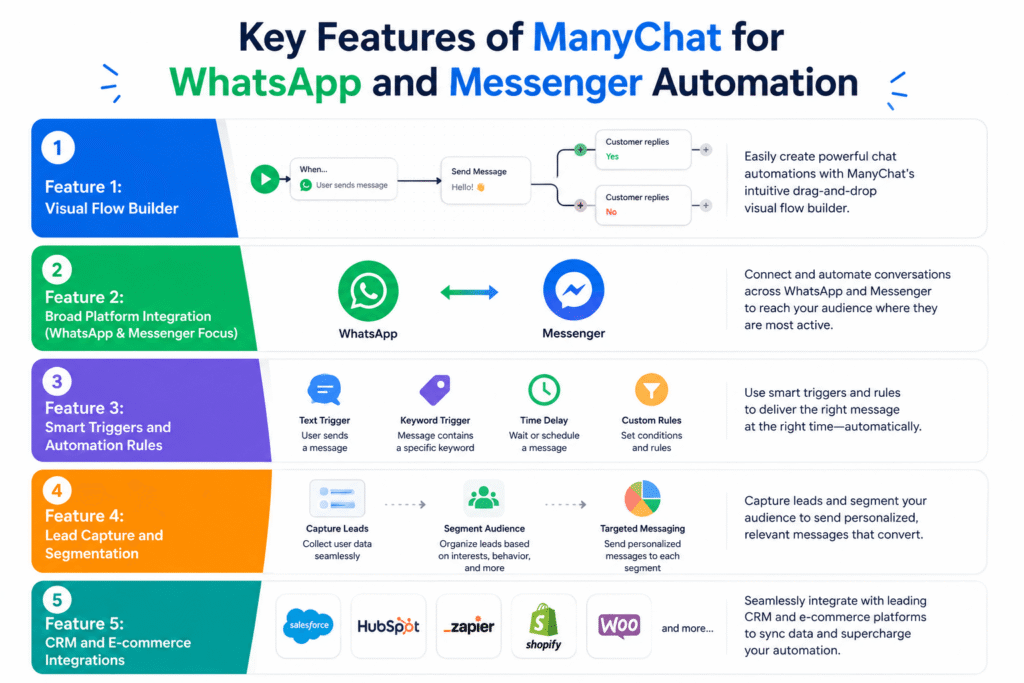
ManyChat’s strength lies in its targeted features for automating conversations on key messaging channels. When it comes to WhatsApp and Messenger Automation, these capabilities are game-changers.
- Feature 1: Visual Flow Builder
This is the heart of ManyChat. The drag-and-drop interface allows you to visually map out entire conversation flows. You can create sequences of messages, add buttons for user responses, set up conditions, and integrate other actions.
For WhatsApp and Messenger, this means you can design automated onboarding processes, FAQ bots, lead qualification sequences, and even simple customer support flows. It makes complex automation feel remarkably straightforward, letting you see the entire conversation path at a glance. - Feature 2: Broad Platform Integration (WhatsApp & Messenger Focus)
ManyChat offers robust integration for both Facebook Messenger and Instagram Direct Messages. Crucially, it also provides a pathway for WhatsApp automation, allowing businesses to connect with customers on the world’s most popular messaging app.
This dual capability means you can create a unified automation strategy across multiple channels where your customers are most active. Instead of managing separate tools for each platform, ManyChat consolidates your messaging automation efforts, saving significant time and complexity. - Feature 3: Smart Triggers and Automation Rules
Beyond simple sequences, ManyChat allows you to set up sophisticated triggers that initiate conversations or actions. This can include keywords, user interactions (like clicking a button), or even time-based events.
For WhatsApp and Messenger automation, this is vital. Imagine a user typing “support” into your Messenger bot, automatically triggering a flow that gathers information before handing over to a human agent. Or consider a WhatsApp broadcast message sent to a segment of your audience based on their previous interactions. These intelligent triggers ensure timely and relevant engagement, boosting customer satisfaction and operational efficiency. - Feature 4: Lead Capture and Segmentation
ManyChat excels at capturing user information within conversations. You can ask questions, collect email addresses, phone numbers, and other vital data directly within the chat interface.
This captured data is then used to segment your audience. For example, you can tag users who expressed interest in a specific product on Messenger or customers who haven’t responded to a WhatsApp follow-up. This segmentation is gold for personalized marketing and targeted customer support. It ensures the right message reaches the right person at the right time, improving engagement and conversion rates. - Feature 5: CRM and E-commerce Integrations
ManyChat plays well with others. It integrates with popular CRMs and e-commerce platforms. This means data captured in your chatbot can flow directly into your sales pipeline or order management system.
When you automate WhatsApp and Messenger interactions, connecting this data is crucial for a seamless customer journey. If a customer makes a purchase via your Messenger bot, the order details can be instantly recorded in your e-commerce platform. If a lead is captured, their contact information populates your CRM. This level of integration minimises manual data entry and ensures a consistent customer experience.
Benefits of Using ManyChat for Chatbots and Customer Support
When businesses in Chatbots and Customer Support leverage ManyChat for their WhatsApp and Messenger Automation needs, the advantages become clear and tangible.
First off, there’s the massive time saving. Repetitive questions like “What are your opening hours?” or “How do I track my order?” can be answered instantly by a bot. This frees up your human support agents to handle more complex, nuanced issues that actually require human empathy and problem-solving skills.
Quality of service sees a boost too. Customers expect instant responses. ManyChat ensures they get them, 24/7. This immediate engagement dramatically improves customer satisfaction and reduces the likelihood of customers getting frustrated and looking elsewhere.
Creative blocks? ManyChat can help. While not a content *creation* tool in the same vein as AI writing assistants, it helps structure conversational content. You can map out logical conversation paths that are both engaging and effective for information delivery or lead nurturing.
Scalability is another huge win. As your business grows, so does the volume of customer inquiries. Manually scaling your support team can be costly and time-consuming. ManyChat allows you to handle a significantly larger volume of interactions without a proportional increase in staffing costs.
Personalisation becomes achievable at scale. By segmenting your audience based on their interactions and data collected through the chatbot, you can deliver highly relevant messages and offers. This isn’t just about sending a generic blast; it’s about having a one-on-one conversation, albeit automated, that feels tailored to each individual user’s needs and interests.
Lead generation and qualification are streamlined. ManyChat bots can engage potential customers from the first interaction, ask qualifying questions, and gather necessary information. This ensures that your sales team only receives leads that are genuinely interested and have met specific criteria, making their efforts far more efficient and productive.
Cost reduction is a significant outcome. By automating routine tasks and improving the efficiency of your support and sales teams, businesses can see a direct impact on their operational expenses. Reduced staffing needs for basic inquiries, higher conversion rates from qualified leads, and improved customer retention all contribute to a healthier bottom line.
Data insights are also invaluable. ManyChat provides analytics on bot performance, user engagement, and conversation flows. This data helps you understand what’s working, where users drop off, and how to continuously improve your automated communication strategies for better outcomes.
Pricing & Plans

ManyChat offers a tiered pricing structure designed to accommodate businesses of varying sizes and needs. This flexibility is a key reason why it’s accessible to a wide range of users.
Free Plan: ManyChat provides a robust free plan that is excellent for getting started. This plan typically allows you to connect one channel (like Facebook Messenger or Instagram) and build basic automation flows. It’s perfect for individuals or very small businesses looking to test the waters of chatbot automation without any financial commitment. You can explore the visual builder and set up simple automated messages.
Pro Plan: This is where the real power for WhatsApp and Messenger automation comes into play. The Pro plan unlocks multiple channels, including WhatsApp (which often has specific pricing considerations due to Meta’s policies). It offers advanced features like more advanced triggers, custom fields, detailed analytics, A/B testing, and integrations with other business tools. This plan is ideal for businesses serious about scaling their customer support and marketing efforts through automation. Pricing is usually based on the number of contacts you have.
Teams/Business Plans: For larger organisations with higher contact volumes or specific integration needs, ManyChat often offers custom enterprise solutions. These plans can include dedicated support, advanced features, and tailored solutions to meet complex business requirements.
When comparing with alternatives, ManyChat often stands out for its user-friendly interface, particularly for non-technical users. While other platforms might offer similar core functionalities, ManyChat’s intuitive drag-and-drop builder and strong focus on ease of use make it a compelling choice, especially for those new to chatbot automation. The free tier is also more generous than many competitors, allowing for substantial experimentation before upgrading.
Hands-On Experience / Use Cases
Imagine a small e-commerce business selling handmade jewellery. They receive hundreds of inquiries daily via Instagram DMs and WhatsApp. Many of these are about shipping times, customisation options, and order status.
Using ManyChat, this business can set up a bot that greets new Instagram DMs with an automated message. This message could include quick replies for common questions like “Shipping Info” or “Custom Orders.”
If a user selects “Shipping Info,” the bot can instantly provide a link to their shipping policy page or a pre-written message detailing delivery times and costs. This resolves the query in seconds.
For custom orders, the bot could guide the user through a series of questions: what type of jewellery, preferred materials, colour preferences, and any specific designs. The collected information is then stored as custom fields associated with the user’s profile within ManyChat.
Once the user provides all details, the bot can present a summary and a button to “Speak to a Designer.” This button triggers a notification to the business owner or a specific team member, along with all the captured custom order details. This means the human designer receives a pre-qualified lead with all necessary information, drastically speeding up the consultation process.
On WhatsApp, the business can use ManyChat to send targeted broadcast messages to customers who have opted in. For example, announcing a new collection or a limited-time sale. The bot can also handle order status inquiries by asking for an order number and then fetching the status from an integrated e-commerce platform.
Another use case involves a local service provider, like a salon. They can use ManyChat on Facebook Messenger to allow clients to book appointments. The bot can show available time slots, ask for service preferences, and collect client details. Once booked, the bot confirms the appointment and even sends a reminder message a day before, reducing no-shows.
Content creators can use ManyChat to deliver gated content. A user might express interest in a free guide via a Messenger ad. The bot can then ask for their email address to deliver the guide, effectively capturing a lead and adding them to an email list.
The core principle across these scenarios is automating the initial, repetitive, or data-gathering stages of customer interaction. This allows businesses to offer instant, consistent support and sales engagement across WhatsApp and Messenger Automation, enhancing customer experience and freeing up valuable human resources for more impactful tasks.
Who Should Use ManyChat?

ManyChat is incredibly versatile, making it a valuable tool for a wide array of professionals and businesses looking to enhance their customer communication.
Marketers: If you’re in marketing, ManyChat is a no-brainer. It’s brilliant for lead generation, nurturing leads through automated sequences, running targeted campaigns on Messenger and Instagram, and driving traffic to websites or landing pages.
Small Business Owners: For those juggling multiple roles, ManyChat automates crucial customer interactions, saving precious time. It can handle customer service inquiries, take orders, book appointments, and promote products, all on autopilot.
E-commerce Businesses: Online stores benefit immensely from ManyChat. It can automate order confirmations, shipping updates, abandoned cart reminders, product recommendations, and handle common customer service queries, boosting sales and customer satisfaction.
Agencies (Marketing, Social Media, Web Design): Agencies can use ManyChat to offer chatbot development and management services to their clients. It’s a powerful tool to add to your service stack and provide tangible value and automation solutions.
Content Creators and Influencers: For those building an audience, ManyChat can help engage followers, deliver exclusive content, run Q&A sessions, and drive traffic to their platforms or merchandise.
Service-Based Businesses (Coaches, Consultants, Freelancers): If you offer services, ManyChat can automate lead qualification, answer FAQs about your services, schedule discovery calls, and even manage initial client onboarding.
Customer Support Teams: Even dedicated support teams can use ManyChat to handle the high volume of repetitive queries, acting as a first line of defence before escalating to human agents, thereby improving response times and efficiency.
Essentially, any business or individual that relies on direct communication with an audience through digital channels and wants to automate repetitive tasks, improve engagement, and drive results, will find ManyChat immensely useful for their WhatsApp and Messenger Automation strategies.
How to Make Money Using ManyChat
ManyChat isn’t just a tool for saving money; it’s a powerful platform for generating revenue. You can leverage its capabilities to offer valuable services to clients or to directly boost your own business income.
- Service 1: Chatbot Development and Management for Clients
This is a primary revenue stream. Many businesses, especially small to medium-sized ones, lack the time or expertise to build and manage sophisticated chatbots. You can offer your services to design, build, and maintain custom ManyChat bots for them.
This includes creating automated lead generation funnels, customer support bots, appointment booking systems, or e-commerce automation sequences tailored to their specific industry and needs. Charging a setup fee plus a recurring monthly management fee is a common and effective model. - Service 2: WhatsApp and Messenger Marketing Campaigns
ManyChat allows for highly targeted messaging campaigns. You can offer to manage these campaigns for clients, creating engaging content, segmenting their audience within ManyChat, and running automated sequences that drive sales or engagement.
This could involve promoting new products, running flash sales, delivering exclusive content, or re-engaging dormant customers. The direct communication channel of WhatsApp and Messenger, powered by ManyChat’s automation, offers high open and response rates, making it an attractive service for businesses. - Service 3: Lead Generation and Qualification Services
Businesses are always looking for more qualified leads. You can position yourself as a specialist in using ManyChat to build automated lead generation systems.
This involves designing bots that attract potential customers through ads or organic posts, engage them with interactive conversations, ask qualifying questions, and then pass hot leads directly to the client’s sales team. You can charge based on the number of leads generated or a performance-based commission. - Service 4: Automating Customer Support Processes
Many companies struggle with the volume of customer support tickets. You can offer to implement ManyChat solutions that automate responses to frequently asked questions, guide users through troubleshooting steps, and gather necessary information before escalating to human agents.
This not only saves your clients money on support staff but also improves customer satisfaction through faster response times. You can offer this as a standalone service or as part of a broader chatbot management package.
Case Study Example: A freelance social media manager started offering ManyChat automation services to her existing clients. She focused on e-commerce businesses, building them automated abandoned cart recovery sequences on Messenger and WhatsApp broadcast lists for flash sales. Within three months, she added an average of $800 per month per client for this service, significantly increasing her agency’s revenue without needing to acquire entirely new clients for this specific offering. She found that clients who were already seeing value in her social media management were eager to adopt more advanced automation tools she could provide through ManyChat.
Limitations and Considerations
While ManyChat is a powerful tool, it’s not a magic bullet, and understanding its limitations is crucial for setting realistic expectations.
Accuracy: While ManyChat can automate conversations, it’s only as smart as the flows you build. Complex or ambiguous user inputs might still stump the bot, leading to unhelpful responses or an inability to proceed. Regular review and refinement of your conversation flows are necessary to maintain accuracy and user satisfaction.
Editing Needs: The content generated or automated by ManyChat, while guided by your input, requires careful drafting and editing. It’s essential to ensure the tone, clarity, and accuracy of all automated messages align with your brand voice and provide genuine value. It’s not a content *generation* tool in the AI writing sense, but rather a system for delivering your pre-written conversational content.
Learning Curve: Although ManyChat boasts a user-friendly interface, mastering its full potential, especially for advanced automation rules, triggers, and integrations, can take time and practice. Users new to chatbot development might find the initial setup and logic mapping a bit challenging.
Platform Dependencies: ManyChat’s functionality is tied to the APIs and policies of the platforms it integrates with, primarily Meta (Facebook, Instagram, WhatsApp). Changes in these platforms’ terms of service or API capabilities can potentially impact ManyChat’s features. For instance, WhatsApp automation often requires adherence to strict messaging policies and approval processes.
Over-Automation Risk: There’s a risk of over-automating and creating a frustrating experience for users if the bot isn’t well-designed or if it’s used in situations where human interaction is truly necessary. It’s vital to identify the right balance between automation and human touch.
Cost for Advanced Features: While a free plan exists, unlocking the full potential for robust WhatsApp and Messenger Automation, including multiple channels and advanced features, requires a paid subscription. The cost can increase based on the number of contacts managed, which might be a consideration for businesses with very large audiences.
Dependency on User Input: ManyChat relies on users interacting with buttons, keywords, or prompts. If users are not actively engaged or understand how to interact with the bot, the automation may fail to initiate or proceed correctly. Clear instructions and intuitive design are paramount.
Considering these points helps in implementing ManyChat effectively, ensuring it serves as a powerful asset rather than a source of frustration.
Final Thoughts
In the fast-paced world of Chatbots and Customer Support, staying ahead means embracing tools that offer efficiency and scale. ManyChat stands out as a premier solution for automating conversations on essential platforms like WhatsApp and Messenger.
Its intuitive visual builder, robust feature set, and focus on user experience make it accessible for businesses of all sizes. Whether you’re looking to streamline customer service, supercharge lead generation, or simply free up valuable team time, ManyChat delivers.
The ability to create dynamic, interactive chat flows that feel natural and helpful is its superpower. It transforms how you connect with your audience, providing instant responses and personalized engagement 24/7.
While it requires thoughtful planning and ongoing refinement, the benefits in terms of time savings, improved customer satisfaction, and increased revenue are undeniable.
If you’re not yet leveraging automated messaging for your business, or if your current solution feels clunky and inefficient, it’s time to seriously consider ManyChat.
Visit the official ManyChat website to explore its features and see how it can transform your WhatsApp and Messenger Automation workflow.
Frequently Asked Questions
1. What is ManyChat used for?
ManyChat is primarily used to build automated chatbots for platforms like Facebook Messenger, Instagram Direct Messages, and WhatsApp. It helps businesses automate customer interactions, generate leads, provide customer support, run marketing campaigns, and engage with their audience on a large scale.
2. Is ManyChat free?
ManyChat offers a free plan that allows you to connect one channel and build basic automation flows. This is great for testing and small-scale needs. However, to unlock advanced features, multiple channels (including WhatsApp), and higher contact limits, a paid Pro plan is required.
3. How does ManyChat compare to other AI tools?
ManyChat is specifically designed for conversational marketing and automation on messaging platforms. While other AI tools might focus on content generation or data analysis, ManyChat excels at creating interactive chat experiences. Its visual builder is a key differentiator for ease of use compared to more code-intensive platforms.
4. Can beginners use ManyChat?
Yes, ManyChat is designed with a user-friendly, drag-and-drop visual builder, making it accessible for beginners. While mastering advanced features takes time, creating basic automated flows is relatively straightforward, even for those without technical coding experience.
5. Does the content created by ManyChat meet quality and optimization standards?
ManyChat itself doesn’t *create* content; you provide the conversational content. The quality and optimization depend entirely on the messaging and flow structure you design. When built thoughtfully, with clear calls to action and valuable information, ManyChat can deliver highly effective and optimized conversations that meet business goals.
6. Can I make money with ManyChat?
Absolutely. ManyChat can be used to directly increase revenue by automating sales processes, recovering abandoned carts, or running targeted promotions. Additionally, you can offer ManyChat chatbot development and management services to clients, creating a new revenue stream.
7. How to make money with ManyChat?
You can make money by offering services like building custom chatbots for businesses, managing their automated marketing campaigns on Messenger and WhatsApp, providing lead generation and qualification services through chatbots, or by using ManyChat to directly drive sales and conversions for your own products or services.