
Google Analytics 4 helps with Customer Behavior Analysis, offering deep insights into user journeys. Gain a competitive edge by understanding your customers better. Start optimizing your E-commerce and Retail strategies today!
Google Analytics 4 Is Built for E-commerce and Retail – Here’s Why
Ever feel like you’re just guessing what your customers want?
Like you’re throwing spaghetti at the wall to see what sticks?
The world of E-commerce and Retail is ruthless.
Every click, every view, every purchase matters.
And if you’re not tracking it, you’re leaving money on the table.
That’s where AI tools come in, making sense of the chaos.
Google Analytics 4 (GA4) isn’t just another analytics platform.
It’s a game-changer for anyone serious about understanding their customers.
Especially when it comes to Customer Behavior Analysis.
This isn’t about vanity metrics.
It’s about making data-driven decisions that impact your bottom line.
Let’s cut the noise and get straight to what matters.
Table of Contents
- What is Google Analytics 4?
- Key Features of Google Analytics 4 for Customer Behavior Analysis
- Benefits of Using Google Analytics 4 for E-commerce and Retail
- Pricing & Plans
- Hands-On Experience / Use Cases
- Who Should Use Google Analytics 4?
- How to Make Money Using Google Analytics 4
- Limitations and Considerations
- Final Thoughts
- Frequently Asked Questions
What is Google Analytics 4?
Google Analytics 4 is Google’s latest analytics platform.
It’s a big step up from Universal Analytics.
Think of it as a complete rebuild, designed for the modern web.
GA4 focuses on event-based data collection.
What does that mean?
Everything is an event.
A page view? An event.
A click? An event.
A purchase? You guessed it, an event.
This unified approach lets you track users across websites and apps seamlessly.
No more siloed data.
This is crucial for Customer Behavior Analysis, especially in E-commerce and Retail.
It gives you a holistic view of the customer journey.
From their first touchpoint to conversion and beyond.
GA4 also leverages machine learning.
It helps predict user behavior and identifies important trends.
This predictive power is gold for marketers, analysts, and business owners.
It means you can stop reacting and start proactively shaping your strategy.
The interface is different, no doubt.
It takes some getting used to.
But the power under the hood is undeniable.
It’s built for understanding the true value of your customers.
And that’s what we’re all here for, right?
Making smarter decisions, faster.
That’s the promise of Google Analytics 4.
Key Features of Google Analytics 4 for Customer Behavior Analysis
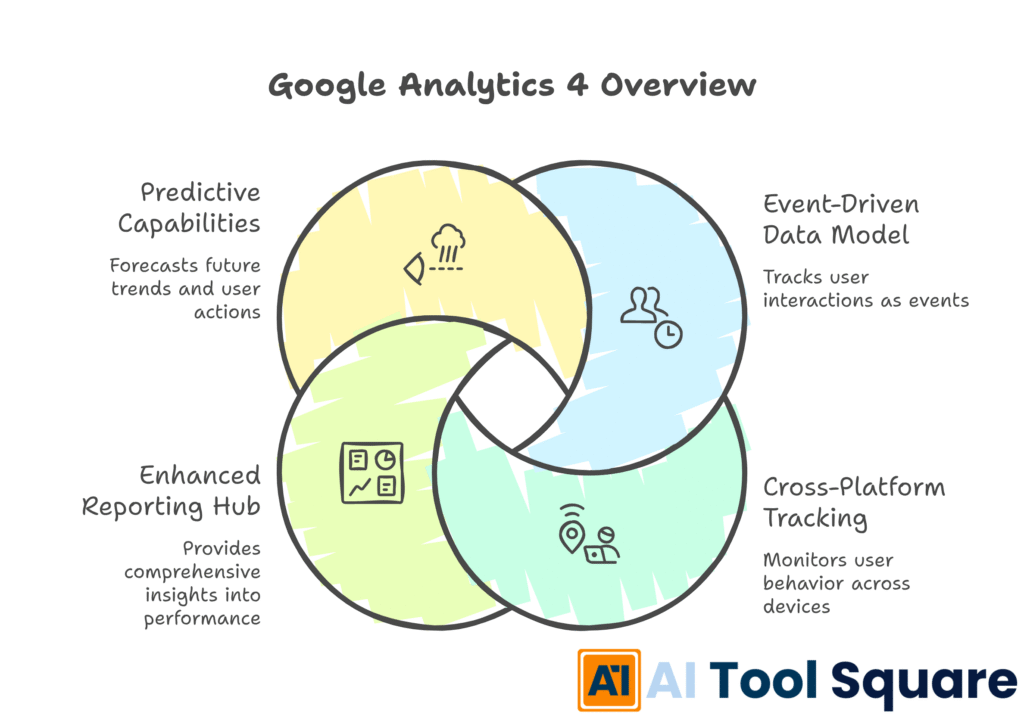
GA4 packs a punch with features designed for deep Customer Behavior Analysis.
These aren’t just shiny new buttons; they’re tools that give you actionable insights.
- Event-Driven Data Model:
This is the big one.
Instead of sessions and page views being primary, everything is an event.
This means you get incredibly granular data.
You can track custom events without complex coding.
Did a customer add an item to their cart? Event.
Did they scroll halfway down a product page? Event.
This precision helps you pinpoint exactly where users engage, or drop off.
It’s about understanding every micro-interaction.
Which is vital for optimizing product pages and checkout flows.
- Cross-Platform Tracking:
Today, customers jump between devices and platforms.
Your website, your app, maybe even an in-store kiosk.
GA4 tracks users across these touchpoints.
It stitches together their journey using User-ID or Google Signals.
This gives you a unified view.
You see how a user discovers your product on mobile, then buys on desktop.
This cross-platform insight is a game-changer for E-commerce and Retail.
It allows you to build more effective omnichannel strategies.
- Enhanced Reporting and Analysis Hub:
GA4’s reporting is highly flexible.
The “Analysis Hub” lets you create custom reports.
You can use funnels, path exploration, segment overlap, and more.
Want to see the exact path customers take before buying? Use path exploration.
Need to identify high-value customer segments? Segment overlap has you covered.
These tools allow you to ask specific questions of your data.
And get precise answers.
No more digging through endless pre-defined reports.
You get the insights you need, fast.
- Predictive Capabilities:
This is where GA4 truly shines.
It uses machine learning to predict customer behavior.
It can estimate churn probability, revenue prediction, and purchase probability.
Imagine knowing which users are likely to leave, or which are most likely to buy.
This lets you target your marketing efforts more effectively.
You can re-engage at-risk customers.
Or double down on those likely to convert.
It’s like having a crystal ball for your business.
Benefits of Using Google Analytics 4 for E-commerce and Retail
Okay, so GA4 has cool features. But what’s in it for your E-commerce and Retail business?
Let’s talk real benefits.
First, time savings.
With automated event tracking and a unified data model, you spend less time fiddling with setup.
And more time actually analyzing data.
That means quicker insights.
And faster decision-making.
Next, improved understanding of customer behavior.
The event-driven model lets you see the journey, not just snapshots.
You can identify friction points in the conversion funnel.
For example, where are customers dropping off during checkout?
Is it the shipping cost page? The payment gateway?
GA4 shows you.
This leads to higher conversion rates.
By spotting and fixing these issues, you convert more browsers into buyers.
Another huge win: better personalization.
With granular data on customer preferences and actions, you can tailor experiences.
Show relevant products. Offer targeted promotions.
This isn’t just about making sales; it’s about building loyalty.
And speaking of loyalty, GA4 helps with customer retention.
Its predictive metrics can flag customers at risk of churn.
You can then launch re-engagement campaigns before they leave.
It’s cheaper to keep an existing customer than acquire a new one.
The predictive analytics also lead to smarter marketing spend.
Knowing who’s likely to convert means you can focus your ad budget on the right audiences.
No more wasted impressions.
Just efficient, targeted campaigns.
This all boils down to increased revenue and profitability.
By optimizing every part of the customer journey, you drive more sales.
And by making data-backed decisions, you ensure every penny spent delivers value.
Google Analytics 4 isn’t just a reporting tool.
It’s a strategic asset for growth.
Pricing & Plans

Alright, let’s talk money.
Is Google Analytics 4 going to break the bank?
The good news is, for most E-commerce and Retail businesses, Google Analytics 4 is free.
Yes, you heard that right.
The standard version, which offers a robust set of features, costs nothing.
This includes all the core functionalities we’ve talked about.
Event tracking, cross-platform analysis, the Analysis Hub, and even some predictive metrics.
For small to medium-sized businesses, this free tier is more than enough.
It provides incredible value for zero investment.
Now, there is an enterprise version: Google Analytics 360.
This is for the really big players.
Think Fortune 500 companies with massive data volumes.
GA360 offers features like higher data limits, unsampled reports, dedicated support, and deeper integration with other Google products like BigQuery.
But for 99% of businesses, you won’t need it.
The cost of GA360 can run into the tens of thousands per month.
So, compare it with alternatives?
Many analytics tools offer similar features.
Adobe Analytics, Mixpanel, Heap, Matomo – they all have their strengths.
But they often come with a significant price tag.
Especially for the advanced features that GA4 gives you for free.
This makes Google Analytics 4 an incredibly attractive option.
It levels the playing field.
Small businesses get access to enterprise-grade analytics.
Without the enterprise budget.
So, if you’re worried about the cost of getting serious about Customer Behavior Analysis, don’t be.
GA4 makes it accessible.
Hands-On Experience / Use Cases
Let’s get real. How does Google Analytics 4 actually work in practice?
I recently worked with an online clothing store.
They were seeing good traffic but conversions were… meh.
Their old analytics gave them basic numbers.
Page views, bounce rate.
Not enough to fix the problem.
We switched them to GA4.
First, we set up custom events for key interactions.
Things like “product_view,” “add_to_cart,” “remove_from_cart,” “begin_checkout,” and “purchase.”
Then, we dived into the “Funnel Exploration” report in the Analysis Hub.
We mapped out the typical customer journey.
From viewing a product to completing a purchase.
What we found was eye-opening.
A huge drop-off happened right after “add_to_cart.”
Customers were adding items but not starting the checkout process.
Using GA4’s “User Explorer” report, we looked at individual user journeys.
We saw users adding items.
Then they’d navigate back to product categories.
Or even leave the site entirely.
It wasn’t a checkout issue.
It was a price perception or comparison issue.
Users were browsing, adding to cart to save items, but not committing.
We also used the “Path Exploration” report.
It showed us common paths users took after adding to cart.
Many were going to competitor sites, as shown by exit links.
The solution?
We implemented a dynamic “items in cart” reminder.
And added a clear “free shipping over X amount” banner across the site.
We also started showing “customers who bought this also bought…” recommendations on the cart page.
The results?
Within a month, the “add_to_cart” to “begin_checkout” conversion rate increased by 15%.
This wasn’t possible with their old analytics.
This example shows the power of Google Analytics 4 for Customer Behavior Analysis.
It’s not just about data.
It’s about understanding the “why” behind the numbers.
And then acting on it.
The usability of GA4, once you get past the initial learning curve, is fantastic.
The interface allows you to slice and dice data in so many ways.
It gives you the control you need to dig deep.
And find those hidden insights.
Who Should Use Google Analytics 4?

Who exactly benefits from Google Analytics 4?
Pretty much anyone serious about online success.
If you run an E-commerce and Retail store, this is non-negotiable.
You need to know how customers interact with your products.
Where they click, what they ignore, and why they buy (or don’t).
GA4 gives you that clarity.
Digital Marketers and SEO Specialists:
You’re constantly trying to drive traffic and convert it.
GA4’s attribution models help you understand which channels are truly driving conversions.
Not just last-click, but the full journey.
This optimizes your ad spend and content strategy.
Small Business Owners:
Every penny counts.
You can’t afford to guess.
GA4, being free and powerful, gives you insights normally reserved for big corporations.
Understand your local customers, optimize your online presence.
Agencies and Consultants:
Your clients expect results.
GA4 lets you deliver.
You can provide data-backed recommendations.
Show clear ROI on your efforts.
It makes you look good, and your clients happy.
Product Managers:
Are users engaging with new features?
Are there bottlenecks in your app’s user flow?
GA4’s event tracking is built for this.
It helps you make data-driven decisions about product development.
Content Creators and Bloggers:
What content resonates?
How long do people stay on your articles?
GA4’s engagement metrics show you.
This helps you refine your content strategy.
Essentially, if you have an online presence and want to understand how people interact with it.
And you want to improve those interactions for business growth.
Then Google Analytics 4 is for you.
It’s an essential tool for effective Customer Behavior Analysis.
How to Make Money Using Google Analytics 4
Alright, let’s get down to brass tacks: how do you actually turn Google Analytics 4 into cash?
It’s not a direct money-making tool, but it’s a massive enabler.
It helps you identify opportunities, optimize processes, and deliver services.
- Service 1: GA4 Implementation and Migration Services:
Many businesses are still on Universal Analytics.
They need to migrate to GA4 before July 2023 (when UA stops processing data).
This is a massive service opportunity.
Offer to set up GA4 properties, configure event tracking, and migrate historical data.
It’s a technical task, and businesses will pay good money for a smooth transition.
You could charge per project or even a retainer for ongoing setup and support.
- Service 2: Customer Behavior Analysis and Optimization Consulting:
This is where the real value of GA4 shines.
Businesses have data but lack the expertise to make sense of it.
You can offer consulting services focused on Customer Behavior Analysis.
Use GA4 to identify conversion bottlenecks, analyze user journeys, and propose optimizations.
For an E-commerce and Retail store, this might mean increasing their checkout conversion rate by X%.
Or reducing cart abandonment.
These tangible results justify your fees.
Charge for audits, monthly reporting, or project-based optimization campaigns.
- Service 3: Data-Driven Marketing Strategy Development:
GA4 gives deep insights into campaign performance and user segments.
Leverage this to build smarter marketing strategies for clients.
For example, identify high-value customer segments using GA4’s predictive metrics.
Then, create targeted ad campaigns for these segments.
Show clients how to allocate their ad budget more effectively.
Leading to higher ROI for them, and recurring revenue for you.
You could offer this as part of a broader digital marketing retainer.
Case Study Example:
I know a consultant, Sarah, who specializes in GA4.
She helped an online shoe retailer.
They were spending heavily on Google Ads but weren’t sure which campaigns were truly profitable.
Sarah used GA4’s attribution reporting to show them.
She identified that while some campaigns drove clicks, others (like email marketing and organic search) had a stronger influence earlier in the customer journey.
By reallocating ad spend based on GA4 insights, the retailer saw a 20% increase in ROAS (Return On Ad Spend) within three months.
Sarah charges them a monthly retainer for ongoing analysis and strategy.
That’s real money, directly linked to GA4 expertise.
Limitations and Considerations
No tool is perfect.
Google Analytics 4, while powerful, has its quirks.
You need to be aware of them.
First, the learning curve.
It’s different from Universal Analytics.
The event-based model, the interface, the reports – it all takes time to grasp.
Don’t expect to be an expert overnight.
There will be frustration.
But the investment in learning pays off.
Next, data retention limits.
For the free version, detailed user-level data is only kept for 14 months.
This might be a problem if you need to do long-term historical Customer Behavior Analysis.
If you need more, you’d need GA360 or to export data to BigQuery.
Setup complexity for advanced tracking.
While basic event tracking is simpler, customizing complex events and parameters still requires some technical know-how.
Google Tag Manager helps, but it’s not always plug-and-play.
Especially for intricate E-commerce and Retail tracking.
Report sampling.
If you have a very large amount of data, GA4 might sample your data in certain reports.
This means it analyzes a subset of your data to provide faster results.
For most businesses, this isn’t an issue.
But for high-traffic sites, it could lead to less precise insights.
Attribution model limitations.
While GA4 offers various attribution models, understanding which one is “right” for your business is crucial.
And implementing it correctly can be complex.
Don’t just pick one at random.
Finally, integration with other tools.
While GA4 integrates well with Google Ads and BigQuery, connecting it to other CRM systems or marketing platforms might require custom development.
It’s not always a seamless, out-of-the-box solution.
These aren’t deal-breakers.
But they are points to consider.
Go into GA4 with realistic expectations.
And be prepared to invest some time in learning and setup.
The rewards far outweigh these challenges.
Final Thoughts
Look, the bottom line is this: Google Analytics 4 isn’t just an upgrade.
It’s a fundamental shift in how we understand our customers.
Especially in the cutthroat world of E-commerce and Retail.
If you’re still clinging to old analytics methods, you’re falling behind.
GA4 gives you the power to see the entire customer journey.
Not just fragments.
From their first interaction on any device to their final purchase.
Its event-driven model and machine learning capabilities are game-changers.
They help you predict behavior, personalize experiences, and optimize your marketing spend.
All leading to one thing: more revenue.
Yes, there’s a learning curve.
Yes, it’s different.
But every minute you invest in mastering GA4 will pay dividends.
It’s about making confident decisions.
Not relying on gut feelings.
My recommendation?
If you haven’t already, start your migration to Google Analytics 4 now.
Explore its reports.
Play with the Analysis Hub.
Start small, learn as you go.
The future of Customer Behavior Analysis is here.
And it’s called Google Analytics 4.
Don’t get left behind.
Visit the official Google Analytics 4 website
Frequently Asked Questions
1. What is Google Analytics 4 used for?
Google Analytics 4 (GA4) is used for tracking and reporting on website and app user behavior. It helps businesses understand how users interact with their online properties, analyze customer journeys, measure marketing campaign effectiveness, and identify opportunities for optimization. Its primary strength lies in its event-based data model, allowing for deeper Customer Behavior Analysis.
2. Is Google Analytics 4 free?
Yes, the standard version of Google Analytics 4 is free to use for most businesses. It offers a comprehensive set of features for data collection, reporting, and analysis. There is an enterprise version, Google Analytics 360, which comes with a significant cost and offers higher data limits and advanced support for very large organizations.
3. How does Google Analytics 4 compare to other AI tools?
While Google Analytics 4 itself isn’t an AI content generation tool, it leverages AI and machine learning for predictive analytics and automated insights. Compared to other analytics tools like Adobe Analytics or Mixpanel, GA4 offers robust cross-platform tracking and predictive capabilities, often at no cost for the standard version. Its strength lies in understanding user behavior across platforms, crucial for E-commerce and Retail.
4. Can beginners use Google Analytics 4?
Yes, beginners can use Google Analytics 4, but there is a learning curve, especially if you’re coming from Universal Analytics. The interface and data model are different. However, Google provides extensive documentation and resources, and the platform is designed to be accessible. Starting with basic reports and gradually exploring advanced features makes it manageable for new users.
5. Does the content created by Google Analytics 4 meet quality and optimization standards?
Google Analytics 4 doesn’t “create” content. Instead, it provides the data and insights necessary to inform and optimize content strategies. By understanding which content resonates with users (engagement time, conversions from content), you can create higher-quality, more optimized content that meets user needs and business goals. The data from GA4 directly supports SEO and content marketing efforts.
6. Can I make money with Google Analytics 4?
Absolutely. You can make money with Google Analytics 4 by offering services such as GA4 implementation and migration, advanced Customer Behavior Analysis consulting, data-driven marketing strategy development, and conversion rate optimization for businesses. By helping clients understand their data and improve their online performance, you provide tangible value that they will pay for. It’s an efficiency gain that translates directly to profit.