Pictory Review: Turn Blog Posts into Videos
Pictory is an AI video generator that builds a finished video from a script, a blog post URL, a PowerPoint, images or audio. It suits marketers, trainers and content teams who already have written material and want to repurpose it as video without learning an editor. This Pictory review covers what it does, what the plans include and where the limits sit.
What Pictory is and who it is for
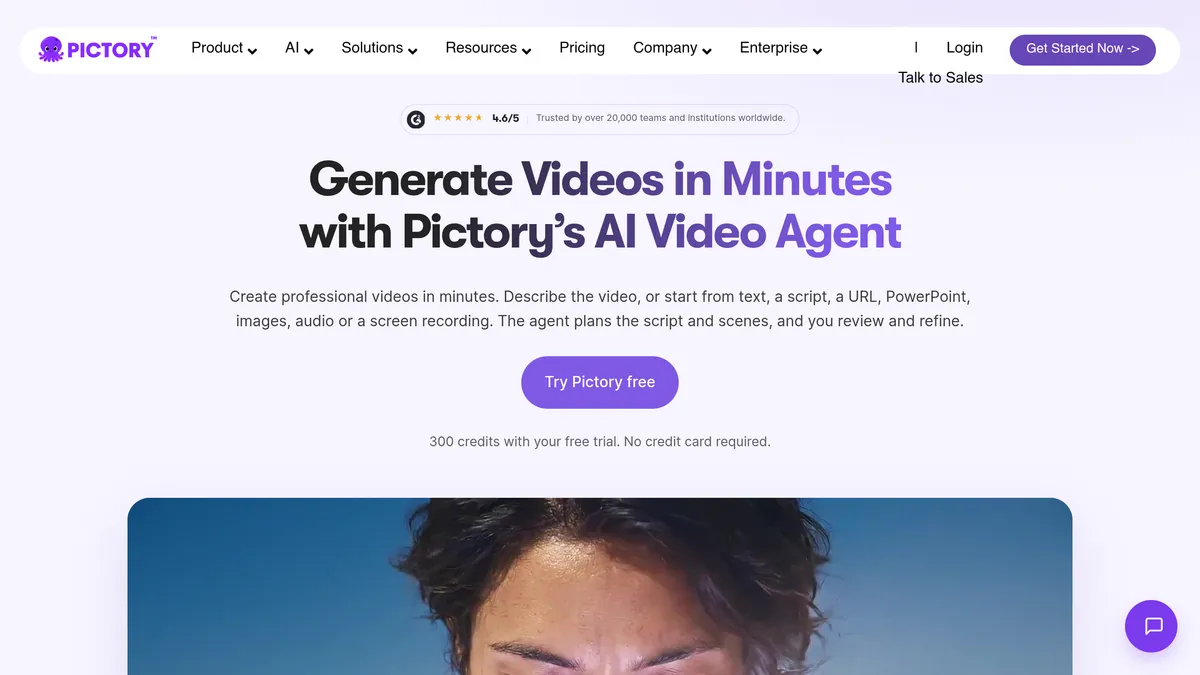
Pictory describes itself as an AI video generator and AI video agent. You describe a video or start from existing content, and it builds scenes with captions, AI voices, avatars and your branding. You then review the result and download it.
The company lists its audience as marketers, learning and development teams, educators and trainers, social media managers, agencies, coaches and YouTube or course creators. It also says it is trusted by over 20,000 teams and institutions and lists a 4.6/5 average rating on G2. Both are the company’s own claims.
Key features
Blog post and URL to video
You paste the link to any public article. Pictory asks for a video type (explainer, marketing or tutorial), a platform such as YouTube, TikTok or LinkedIn, and a length, then writes a script. You can edit the script yourself or use the “Ask AI” option to shorten it, rephrase it or change its tone. Only after you approve the script does it build scenes with visuals, a voiceover and captions.
Visuals come from stock clips and images, your own article images, or clips generated in its AI Studio. Pictory says the output can be 16:9, 9:16 or 1:1. If an article is behind a login, you paste the text into the text-to-video option instead.
Other starting points
Besides URLs, Pictory lists text, an idea, a script, audio, PowerPoint, images, and Doc and PDF files as inputs. That makes it useful for turning webinars, slide decks and written guides into short clips.
Voices and avatars
- AI voices: Pictory’s page mentions 170+ AI voices in 29+ languages, and a cloned voice option. The voices are supplied by ElevenLabs.
- Avatars: stock presenters deliver your script. Professional and Teams plans add cloned avatars (see the pricing section).
Editing by text
You can edit the transcript to edit the video, for example removing filler words. Pictory also lists automatic highlights and clip generation for longer recordings.
Brand kits and AI Studio
Brand kits apply your colours, fonts and logo to every video, and Pictory says one can be built from your website. AI Studio generates and edits images and video clips, can keep characters consistent across scenes and can extend clips.
Pictory pricing
As of November 2026, Pictory’s pricing page lists these plans (USD). The Starter, Professional and Teams prices are labelled as a Black Friday offer with no stated end date, and the page shows the previous prices of $29, $59 and $199.
| Plan | Monthly billing | Annual billing (per month) | Video time |
|---|---|---|---|
| Starter | $14.50 | $12.50 | up to 30 minutes a month |
| Professional | $29.50 | $17.50 | up to 90 minutes a month |
| Teams | $99.50 | $59.50 | up to 300 minutes a month |
| Enterprise | Custom | Custom | Custom |
What else the pricing page says:
- Free trial: 14 days, 3 videos, videos up to 5 minutes, 720p export, Pictory branding on the output and 500 MB of storage. The home page says the trial includes 300 credits and needs no credit card.
- Starter: 1 user, unlimited videos up to 30 minutes each, 1080p, 5 GB storage, 1 brand kit, stock avatars and no Pictory branding.
- Professional: adds cloned avatars, voice clones, custom brand fonts, 5 brand kits, 20 GB storage and a larger stock library (18 million+ clips from Getty Images and Storyblocks, against 5 million+ on Starter).
- Teams: adds 3+ users, shared brand assets, collaboration, onboarding and priority support, with 10 brand kits and 100 GB storage.
- Enterprise: adds single sign-on, a dedicated account manager, SCORM export, quizzes and custom templates.
Credits matter as much as minutes. Starter includes 2,000 credits a month (24,000 on annual billing, granted upfront), Professional 6,000 and Teams 18,000. According to Pictory’s help centre, some features draw on credits at their own rates. Stock avatars are billed at roughly 15 credits per 30 seconds and custom avatars at 35, and AI-generated clips are billed per second, with rates that differ by model. Check the current rates before relying on avatars or generated clips heavily.
The pricing page says paid subscriptions are not refundable, though you can cancel at any time and will not be charged on renewal. Pictory’s own pages have shown different starting prices at different points (the blog-to-video page quotes $25 a month billed annually), so confirm the live price before you buy.
Strengths and limitations
Strengths
- It starts from content you already have, so a finished draft arrives quickly.
- The script is shown for review before scenes are built.
- Captions, voiceover, stock footage and branding are in one place.
- A text-based editor lowers the learning curve compared with a timeline editor.
Limitations
- Paid video length depends on credits and plan allowances, so heavy use of avatars and generated clips can run through them.
- The free trial is small: 3 videos, 5 minutes each, 720p and branded.
- API access is listed as not included on Starter, Professional and Teams.
- Pictory does not publish the article length or export limits for URL-to-video on its product page, so test with your own content.
Independent user reviews and Reddit threads are worth a read for output quality, since the company’s own pages only describe what the tool offers.
Who should use Pictory
It fits people who publish written content regularly and want short social, explainer or training videos from it: a content marketer with a blog archive, a trainer with slide decks, a small team that wants branded captions on every clip.
It is a weaker fit if you want cinematic generated footage from prompts, full manual control over a timeline, or a presenter-led product video. For avatar-led videos, see our HeyGen review or our Synthesia overview. For prompt-based generation and effects, see our Runway review. For a broader list, read 5 Best AI Video Makers or 7 Best AI Video Editors.
FAQ
Is Pictory free?
Pictory offers a 14-day free trial, with 3 videos, 5-minute videos, 720p export and Pictory branding. The pricing page does not list a permanent free plan.
Does Pictory work with blog posts?
Yes. Paste the URL of a public article and Pictory generates a script, then scenes, a voiceover and captions. For pages behind a login, paste the text instead.
Is Pictory worth it for beginners?
The workflow (script, scenes, edit, download) needs no editing background, and the trial lets you check output quality on your own content before paying.
Verdict
Pictory is a practical way to turn existing articles, scripts and slides into branded short videos, and the text-first workflow keeps it approachable. Check the credit allowance against how you plan to use avatars and generated clips, start with the free trial on a real blog post, and confirm current prices on Pictory’s pricing page.