Julius AI Review: What It Does, Is It Free and Who It Suits
Julius AI is a chat-based tool for analysing data: you bring a spreadsheet or other data, ask questions in plain English, and it answers. If you want to look at a CSV without writing code or formulas, it is built for that job. This review covers what the product’s own site says it does, where the gaps are, and what to check before you pay.
The short version on price: there is a free plan with a daily credit allowance, and paid plans start at US$20 a month. The plans are covered in detail below.
What Julius AI is
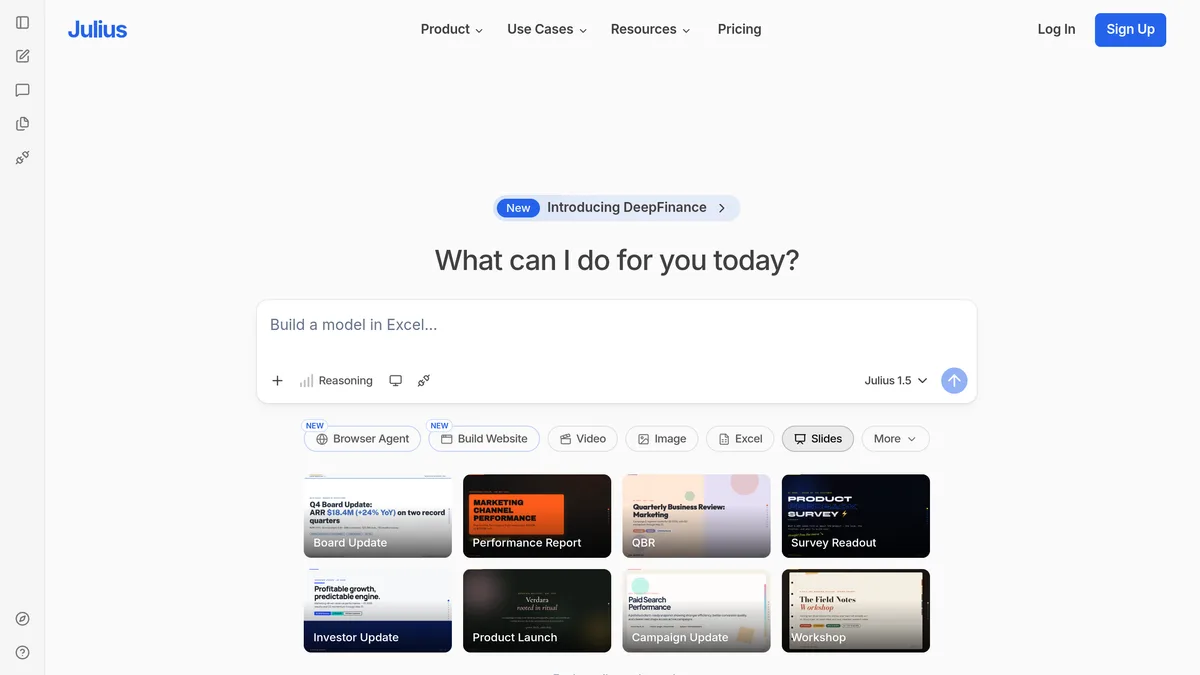
The homepage greets you with “What can I do for you today?” and a prompt box. The site describes Julius as a tool to analyse data (“Chat with your data”) and to create files such as spreadsheets, presentations, websites, images, videos and reports. So it has grown beyond a pure analysis tool into a wider AI workspace.
The homepage lists these areas:
- Chat with your data: ask questions about your data in conversation.
- AI for Excel: “Analyze spreadsheets in plain English.”
- Generate reports: turn data into reports.
- Build slides: presentation templates include Board Update, QBR, Investor Update, Performance Report and Product Launch.
- Build websites and apps, plus image and video creation.
- Browser Agent and an AI chatbot for general questions.
- Data connectors: according to the FAQ on the pricing page, Julius supports Snowflake, BigQuery, MySQL, PostgreSQL and SQL Server natively, and teams can connect Google Drive, OneDrive and SharePoint.
- Julius 1.5: the model shown in the prompt box, along with a “Reasoning” switch.
- DeepFinance: announced on the homepage as new. Nothing more is published there, so this review does not assess it.
The examples on the site (board updates, quarterly business reviews, marketing performance reports) point towards business users and analysts, although the page does not name a target audience.
Is Julius AI free?
Yes, there is a free plan. Julius’s pricing page says every plan, including Free, can create presentations, websites and videos, and that the Free plan “comes with a daily credit allowance”. The page does not list the size of that allowance, and it does not mention a student discount, although “Julius AI free for students” is a common search.
Everything in Julius runs on credits. The paid plans, with monthly billing, as listed in November 2026:
| Plan | Price (monthly billing) | Credits | Notable extras |
|---|---|---|---|
| Free | US$0 | Daily allowance | Presentations, websites and videos included |
| Plus | US$20 a month | 2,000 a month + 100 daily refresh | Frontier models, file analysis and charts, 7-day file storage, custom Julius domain for websites |
| Pro | US$45 a month | 5,000 a month + 100 daily refresh | 32 GB of RAM, unlimited parallel agents, priority email support |
| Business | US$450 a month | 60,000 a month | Teammates (up to 50 members), data connectors such as Postgres, BigQuery and Snowflake, no table limit |
Annual billing saves 20%, according to the toggle on the page. The Pro and Business cards also have a credits selector; the prices above are for the default amounts shown. Above Business there is an Enterprise tier for organisations that need extra security such as SSO, audit logging and finer role-based access, arranged through Julius’s team.
Third-party sites quote older plan names and message counts, so treat any article that does not match this table as out of date.
What Julius is good for
Based on what the site presents:
- Quick questions about a spreadsheet. If you would otherwise write pivot tables or formulas for a one-off question, asking in plain English is faster to try.
- Turning results into something shareable. Report and slide templates mean the answer does not have to stay in the chat.
- People who do not code. The pitch is analysis without writing code.
Limits and things to check
- Accuracy is yours to verify. Any AI that answers questions about data can misread a column or choose the wrong calculation. Spot-check totals against the source file before you send numbers to anyone.
- Sensitive data. Julius says in its FAQ that it is SOC 2 Type II compliant. That is a useful baseline, but if your data is confidential, still read the privacy policy and your company’s rules before uploading.
- Connectors cost more. Warehouse connections such as Postgres, BigQuery and Snowflake are listed on the Business plan at US$450 a month, so a live database is a team-budget decision, not a personal one.
- A broad product. With video, images, websites and a browser agent alongside analysis, check that the data features you need are the ones you get on your plan.
Julius AI vs ChatGPT, Claude and Excel
Autocomplete shows people comparing Julius with ChatGPT, Claude, Power BI, Excel, Gemini and Copilot. We have not found official comparison data, so we will not rank them. The practical difference is the starting point: Julius is organised around your data and outputs, while general chatbots are organised around conversation. If you already work in spreadsheets, our guide to AI tools for Excel shows options that sit inside the spreadsheet itself, and our roundup of AI data analysis tools covers alternatives.
Who should use it
Try it if you regularly have a spreadsheet and a question, and you do not want to build formulas or write code.
Look elsewhere if you need a database connection on a small budget, enterprise controls without an Enterprise contract, or analysis that lives inside Excel or Sheets.
Verdict
Julius AI is a reasonable first stop for non-coders who want to ask questions of their data and get charts or reports out. Start on the free plan with a real file; Plus at US$20 a month is enough for individual analysis, and the jump to Business is only worth it when a team needs shared access and live data connections.