Best AI Subtitle Generators for Shorts (2026)
For short vertical videos, the best AI subtitle generator is usually Submagic if you want styled, animated captions with little editing, and CapCut if you want a free editor that also adds captions. Happy Scribe is a different kind of tool: it is built around transcripts and subtitle files, with human-made subtitles as an option, so it suits longer or more formal videos better than Shorts and Reels.
This guide compares the three on what their own websites say, as of November 2026. Prices and limits change, so check the linked pages before you pay.
Quick comparison
| Submagic | CapCut | Happy Scribe | |
|---|---|---|---|
| Built for | Styled captions and edits for short videos | General video editing with auto captions | Transcripts and subtitle files |
| Free option | “Try for free” on the site | Free plan; the caption page says AI captions are free | Not confirmed in our research |
| Paid plans | From $12/month billed yearly ($19 billed monthly) | Pro $19.99/month or $179.99/year | See Happy Scribe’s pricing page |
| Caption length limit | 2 min (Starter), 5 min (Pro), 30 min (Business) | Not stated on the caption page | Not applicable to this comparison |
| Best for | Creators posting shorts weekly | People who also want to edit the video | Accuracy-focused subtitle work |
What to look for in a subtitle generator for Shorts
Short-form captions are not only about accuracy. Viewers often watch with the sound off, so the style, size and timing of the words matter as much as the transcript. These points tend to decide the choice:
- Caption styles: animated, word-by-word captions versus plain subtitles.
- Editing the text: being able to fix names and jargon before export.
- Video length and quality limits: especially on cheaper plans.
- Export: a finished video with captions burned in, a subtitle file such as SRT, or both.
- Price per month of regular posting: the free tiers are fine for trying, but weekly posting usually needs a paid plan.
Submagic
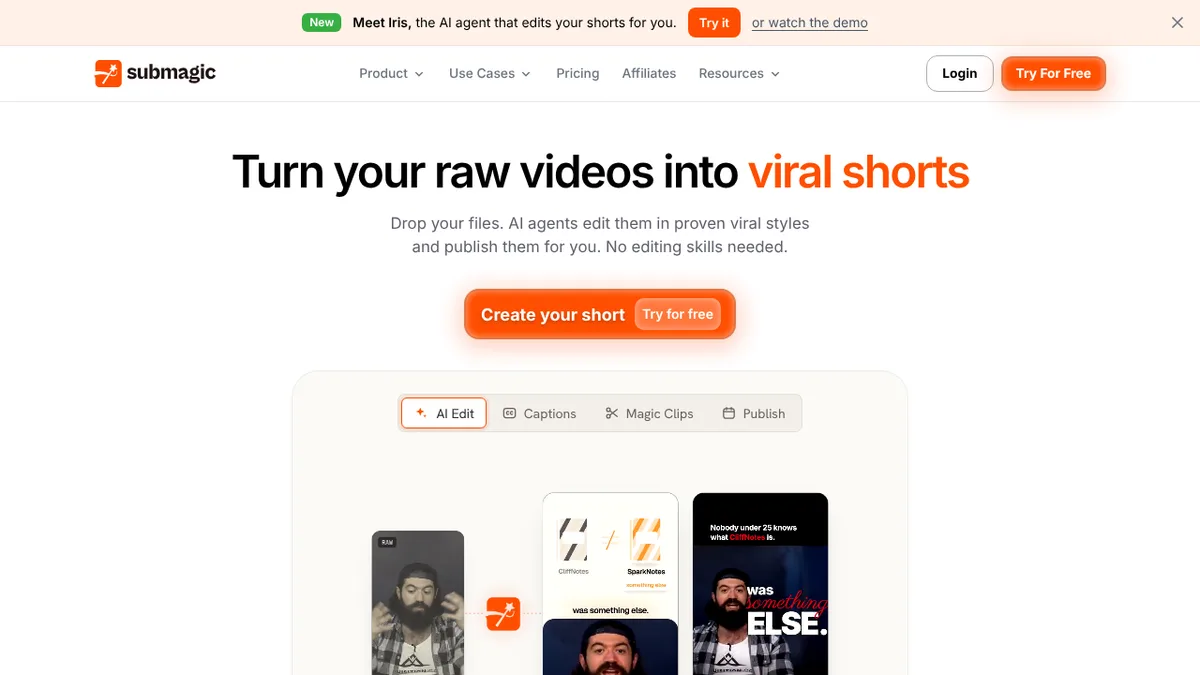
Submagic positions itself as an AI tool for captions and edits on short videos. Its site lists AI captions, Magic Clips (cutting long videos into shorts), b-roll, auto-zoom, sound effects, a video translator and an AI agent called Iris that edits shorts for you.
Plans (monthly price, with the cheaper yearly rate in brackets), as listed on its pricing page:
| Plan | Price | Captioned videos / month | Max length | Export |
|---|---|---|---|---|
| Starter | $19 ($12 billed yearly) | 15 | 2 min | 1080p, 30 fps |
| Pro | $39 ($23 billed yearly) | 40 | 5 min | 2K, 30 fps |
| Business | $69 ($41 billed yearly) | 100 | 30 min | 4K, 60 fps |
Pro adds extra caption templates, removal of bad takes and silences, audio clean-up, a brand kit and publishing to social accounts. Business adds custom templates, API access and a custom words dictionary, which helps with product names and jargon. The site says plans have no watermark and that you can cancel anytime.
Limits to know: the monthly caption allowance is counted in videos, and each plan has a maximum video length, so a 10-minute YouTube video needs Business.
Best for: creators who post shorts every week and want ready-made caption styles.
CapCut
CapCut is a video editor first. Its web auto-caption tool transcribes the speech in your clip, and you then change the font, colour, size, position and animation, or start from a caption template. The page lists support for more than 20 languages, lets you pick the spoken language before generating, and lets you import your own SRT file to add or replace captions.
On the caption page, CapCut says the AI caption feature is free to generate, edit and export, and that no credit card is needed. The page does not describe usage limits, so check the app for limits on your account.
On its pricing page, CapCut lists a Free plan, Pro at $19.99 a month ($179.99 a year), Ultra at $79 a month and a per-seat Teams plan. The paid tiers are built mostly around AI credits, premium templates and AI video generation, not captions as such, and the page notes that the final price shown after sign-in can differ.
The caption page mentions importing SRT files but does not say whether you can export one, so check that if you need a subtitle file for another platform.
Best for: anyone who wants to cut and caption in the same editor without paying first.
Happy Scribe
Happy Scribe is a transcription and subtitling service. Its help centre describes human-made transcription and subtitle services alongside its automatic tools, which sets it apart from the other two: it is aimed at accurate transcripts and subtitle files more than at animated captions for social video.
We could not read Happy Scribe’s pricing or feature pages for this comparison, because the site blocks automated access. For that reason this article gives no prices or language counts for it. Open its pricing page before deciding, and compare the per-minute cost with a monthly subscription if you caption a lot of short clips.
Best for: longer videos, interviews and anything where a reviewed transcript or subtitle file matters more than caption styling.
How to choose
- You post shorts several times a week and want styled captions fast: Submagic’s plan limits are counted in captioned videos, which fits regular posting.
- You want to try captions at no cost, or already edit in CapCut: start with CapCut’s free auto captions.
- You need subtitle files, transcripts or a human-checked result: look at Happy Scribe.
Whichever tool you use, read the generated text before publishing. AI transcription can get names, brand terms and accents wrong, and a custom dictionary (Submagic Business) or a quick manual edit is the fix.
Related guides
If you need transcription rather than styled captions, see our posts on Otter.ai, Rev and Sonix, or our wider list of AI subtitle tools.
FAQ
What is the best free AI subtitle generator?
CapCut’s page says its AI captions are free to generate, edit and export. Submagic offers a free trial route (“Try for free”), but its pricing page lists paid plans only.
Can I download subtitles as an SRT file?
CapCut’s caption page mentions importing SRT files, not exporting them. For subtitle files, check each tool’s export options before you commit, or consider a transcription-focused service such as Happy Scribe.
Which tool is best for TikTok and Reels?
Submagic and CapCut both target short vertical video. Submagic is built around caption styles for shorts; CapCut gives you a full editor as well.